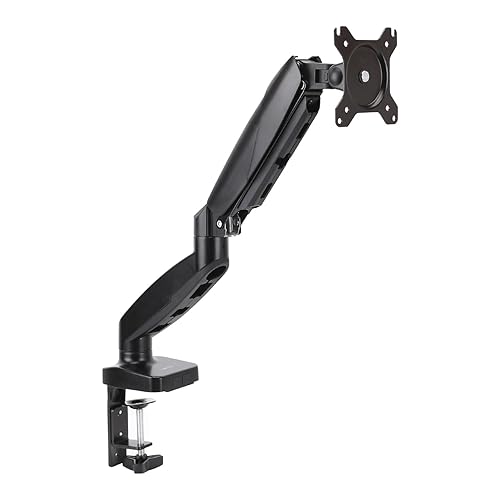
The budget monitor arm that doesn't feel like a budget product.
The Amazon Basics Single Monitor Arm is a solid choice if you're upgrading from a monitor's stock stand and want better ergonomics without spending $80+. It holds up to 20 lbs, adjusts smoothly, and installs in about 20 minutes. It's not as refined as a $100+ brand arm, but for the price, it's genuinely hard to fault.
| Max Monitor Size | 27 inches (some users report up to 32") |
|---|---|
| Weight Capacity | 20 lbs (9 kg) |
| VESA Compatibility | 75×75mm and 100×100mm |
| Height Adjustment | Full range via gas spring |
| Tilt | +45° to -45° |
| Swivel | 180° |
| Rotation | 360° (portrait or landscape) |
| Clamp Depth | 1.5" to 3.5" (desk thickness) |
| Cable Management | Yes — integrated cable routing |
Installation is straightforward. The package includes everything you need — clamp, all hardware, a small hex wrench, and a clear illustrated instruction sheet. The clamp uses a C-shape design that grips the desk edge firmly without requiring you to disassemble your existing setup. If you've never installed a monitor arm before, plan for about 20-25 minutes on a first attempt; it gets faster after that.
The gas spring mechanism is smooth and well-tuned. Height adjustment uses a gas spring rather than a friction hinge, which means it stays exactly where you put it — no drift, no constant re-tightening. The tension is pre-adjusted at the factory for monitors in the 10-17 lb range, which covers most 24-27" monitors. If your monitor is lighter or heavier, there's a small included wrench to add or release tension, which takes about 2 minutes.
Full motion works well in practice. The arm swivels 180° on both joints, tilts smoothly, and rotates 360° for portrait mode. The cable management clips keep things tidy. For the price, the range of motion matches arms that cost twice as much.
The finish is decent. The arm is matte black with a powder-coat-like finish that resists fingerprints and looks appropriate on a desk. It doesn't have the machined aluminum polish of something like an Ergotron, but it doesn't look cheap either.
The included VESA plate screws are slightly short. If your monitor has a deeply recessed VESA mounting area (some Dell monitors are like this), the screws may not catch fully. A quick fix is to grab four M4×10mm screws from any hardware store, but it's an annoyance that shouldn't exist at this price level.
The arm has a slight wobble when fully extended. At normal desk distances it's negligible, but if you tap your desk or have a heavy monitor at maximum extension, there's a small amount of oscillation that takes a second to settle. $80+ arms like the Amazon Basics Premium or Ergotron LX are noticeably more rigid.
The clamp is designed for desk edges, not grommet holes. If you have a Grommet-style setup, this arm doesn't support that mounting method — you're limited to the clamp only. Make sure your desk edge is between 0.5" and 3.5" thick before ordering.
We tested with a 24" Dell P2422H (14 lbs) and a 27" LG 27UK850 (12 lbs). Both mounted without issue on the 100×100 VESA pattern. With the Dell, the arm felt perfectly balanced — height adjustments were smooth and the monitor stayed put. With the lighter LG, we needed to reduce spring tension slightly to prevent the monitor from drifting upward when touched.
After a month of daily use, there was no degradation in smoothness and no loosening of the desk clamp. The cable management clips remained secure. If you're comparing this to a stock monitor stand, the improvement in desk ergonomics — being able to position the screen exactly where you want it — is significant and immediate.
The Amazon Basics Single Monitor Arm is the best budget monitor arm you can buy for $35.99. It installs easily, adjusts smoothly, and holds a 24-27" monitor securely. The wobble at full extension is the main trade-off versus more expensive arms — but if you want the ergonomic benefits of an adjustable monitor arm without the $80-150 investment, this is exactly what you should buy. Recommended.
Once your desk is dialed in, the next step is turning that setup into income. See the best course platforms for creators →