
Buying Guide — Webcams
Best Webcam for Group Calls
The short answer first: a group call is not a solo call with more people in it. One camera now has to frame everyone at once, hear everyone from farther away, and divide its resolution between several faces — and the four webcams we've reviewed were not built equally for any of those jobs. One pairs the widest selectable view here with the only microphones rated past the end of a desk. One crops a 4K sensor beautifully and then cannot hear the far side of the table. And one is a solo camera that no seating arrangement turns into a group camera.
Affiliate disclosure: Home Office Stack is a participant in the Amazon Services LLC Associates Program. As an Amazon Associate, we earn from qualifying purchases made through links on this page — at no extra cost to you. Picks are research-based, grounded in manufacturer specs and published owner feedback; we don't accept sponsored placements.
Check one: field of view — how wide the frame has to be
A solo frame and a group frame are different geometry. A camera bought for one person frames a head and shoulders with margin to lean. Put a second person beside them and the frame must roughly double in width at the same distance — or the camera moves back, which shrinks both faces and, as check two shows, walks the group away from the microphones. Field of view, measured in degrees, decides how much width you get without retreating. The four cameras state it plainly: the Anker PowerConf C200 selects 65, 78 or 95 degrees, the Logitech Brio 4K selects 90, 78 or 65 degrees, the Logitech C920s is fixed at 78 degrees, and the Logitech Brio 101 is fixed at a tight 58.9 degrees.
On the selectable cameras, narrower is a crop — and that is not a criticism, it is the budget. Neither the C200 nor the Brio 4K moves a lens to change its view; the narrower settings are digital crops of the wider image, as each camera's specifications state. Cropping is genuinely useful — it is how one camera serves a solo call on Monday and a group call on Tuesday — but every step narrower spends sensor resolution, which is why field of view cannot be judged apart from check three. Placement is the other half of this check: a group camera often belongs farther back than a monitor-top perch allows, and three of these four cameras have a tripod thread, so they can sit on a small tripod at the group's centre. The Brio 101 has no tripod thread and no swivel — it points where the monitor points.
Check two: microphone reach — the gate most buyers miss
A group sits farther from the camera than a solo caller does, and audio is where that distance collects its fee. Shoppers compare fields of view because the picture is what a listing shows; the failure they meet on the call is being asked to repeat themselves. Every microphone has a rated pickup distance, and on these four cameras that figure splits wider than any other spec on the page. The C200's dual stereo microphones are rated for voice pickup to 3 m, with AI noise cancellation and a choice of directional or omnidirectional pickup — point the pickup at the group, or take it from all around, depending on the seating. The Brio 4K's dual microphones are rated to 1 m. So are the C920s's dual stereo microphones. The Brio 101's single mono microphone is rated to 4 ft.
Run your own seating against those numbers before you run it against the fields of view. Two people at one desk sit roughly a metre from a monitor-top camera — inside every rating on this page, which is why the desk case below is genuinely contestable. A group spread around a small table, or a pair on a sofa with the camera on a sideboard, sits well past 1 m — outside three of the four ratings, and inside only the C200's. A camera can be forgiven a soft picture for one call; a camera that cannot hear the far seat fails every call. The one honest workaround is separate audio: an external microphone placed with the group takes the reach requirement off the camera entirely, and it is the condition attached to one of the picks below.
Check three: resolution headroom — what a wide frame does to faces
In a wide frame, each face gets a fraction of the picture — so the size of the whole picture starts to matter. A solo 1080p frame spends nearly all its pixels on one face. Frame three people across a 95-degree view at the same 1080p and each face works with a small slice of that budget. This is the one check where headline resolution earns its keep: the Brio 4K's narrower views are crops of a 4K sensor, so they hold detail a 1080p camera's crops cannot, and it offers 5x digital zoom in Full HD. The C200's 2K sensor — 2560×1440 at 30 fps — sits in the middle: more headroom than 1080p for its cropped 65 and 78-degree views, less than the 4K camera's. The two 1080p cameras, the C920s and the Brio 101, have no headroom to spend; what their sensors capture is what each face gets.
Hold the three checks together, because each one taxes the others. Widening the view to fit the group spends resolution per face. Moving the camera back spends microphone reach. Cropping in to recover face size spends the width you just bought. Every group setup is a settlement between those three, and the cameras below are different settlements: one balances all three, one wins the picture and outsources the audio, one settles cheaply at desk distance only, and one declines the negotiation entirely. Our general webcam guide ranks the same four for the solo case; this guide exists because the group case reorders them.
The webcams we've reviewed, compared for group calls
| Anker PowerConf C200 | The group pick — the wide view and the long-reach microphones in one camera | 2K at 30 fps · autofocus · 65°, 78° or 95° fields of view (narrower views are crops) | Dual stereo mics rated to 3 m · directional or omni-directional pickup · AI noise cancellation · tripod thread |
| Logitech Brio 4K | The wide-room pick — if an external microphone handles the audio | 4K at 30 fps · 1080p to 60 fps · autofocus · 90°, 78° or 65° fields of view (crops of the 4K sensor) | RightLight 3 with HDR · 5x digital zoom in Full HD · dual mics rated to 1 m only · tripod thread |
| Logitech C920s HD Pro | Two at a desk — the conditional pick, shoulder-to-shoulder only | 1080p at 30 fps · autofocus · fixed 78° view, no wider setting | Dual stereo mics rated to 1 m · glass lens · tripod-ready mount |
| Logitech Brio 101 | The honest skip for group calls — a solo camera by design | 1080p at 30 fps · fixed focus · fixed tight 58.9° view | Single mono mic rated to 4 ft · no tripod thread · no swivel |
Specs above are the manufacturers' figures as recorded in each camera's full review on this site. Read the table's honest shape: the widest view and the longest microphone reach live in the same camera, the highest resolution pairs with the joint-shortest reach, and the two fixed-view cameras divide into one that fits a desk pair and one that fits nobody but its owner.
The group pick: Anker PowerConf C200
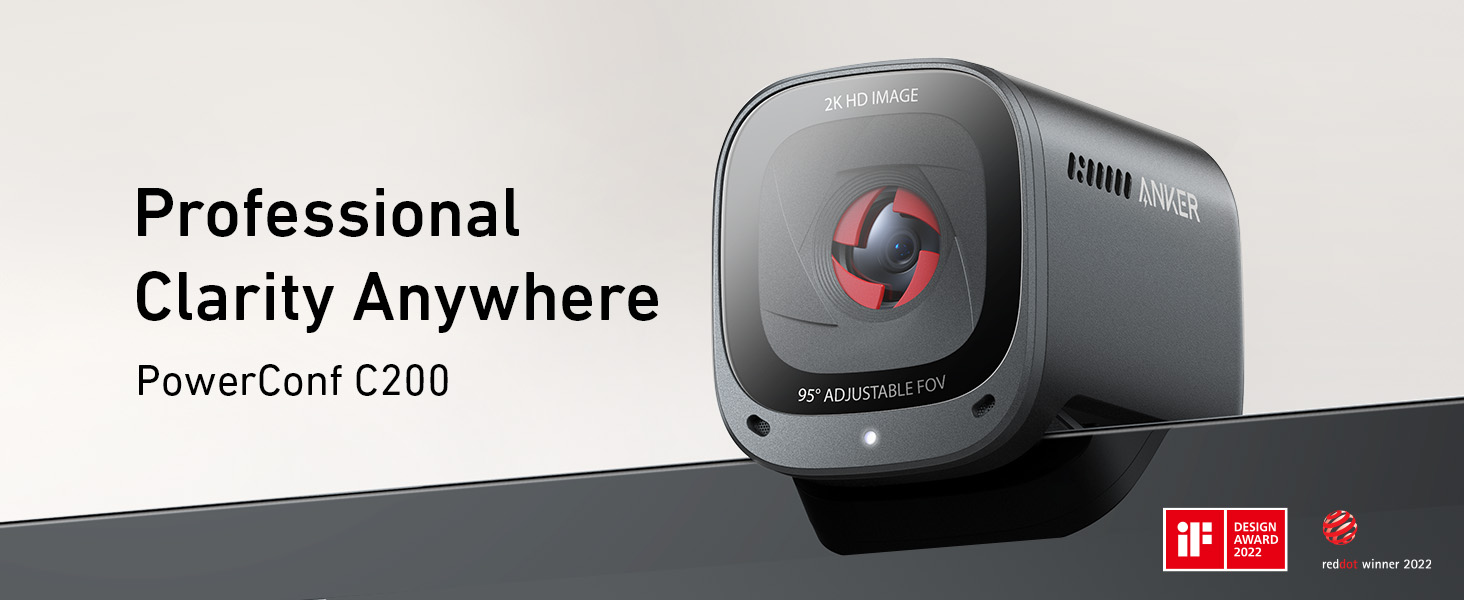
The C200 is the only camera here specified as if groups exist. Start with check two, the gate: its dual stereo microphones are rated for voice pickup to 3 m — three times the rated reach of the two Logitech dual-microphone cameras below — with AI noise cancellation and a choice of directional or omnidirectional pickup, so the pickup pattern can follow the seating. Then check one: the field of view selects 65, 78 or 95 degrees in the AnkerWork software, and 95 degrees is the widest setting we review — two or three people side by side at a desk or small table fit without the camera retreating to the far wall. Then check three: at 2K, 2560×1440 at 30 fps, the sensor carries more headroom than either 1080p camera, so faces in the wide frame — and in the cropped narrower views — hold up better. Autofocus runs 15 cm to 3 m, a built-in sliding privacy cover switches it off between calls, and a tripod thread lets it sit at the group's centre.
Fit check: the settlement is honest. The narrower fields of view are digital crops, so the 65-degree solo frame is a slice of the 2K image, not a second lens — good, not free. The frame rate is 30 fps at every resolution, so this is a meeting camera, not a motion camera. And 3 m is a rating, not a room: a group spread past that has outgrown any single camera's microphones and belongs in the separate-audio or separate-joins territory below. Inside the case this page is about — a pair or small group sharing one home-office camera — nothing else we review passes all three checks at once. Our full review records the whole picture.
The wide-room pick, with a microphone gate: Logitech Brio 4K
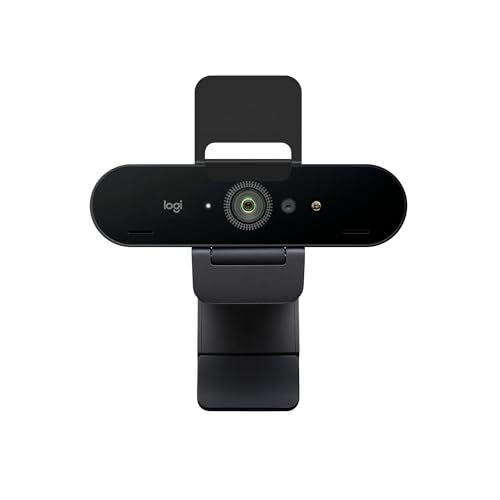
On picture alone, the Brio 4K is the strongest group camera here. Its field of view selects 90, 78 or 65 degrees, and because the narrower views are crops of a 4K sensor, they hold detail the other cameras' crops cannot — the group can be framed at 90 degrees, or the frame can tighten on whoever is presenting, with 5x digital zoom in Full HD and an autofocus glass lens. It records 4K at 30 fps and 1080p at up to 60 fps, and RightLight 3 with HDR keeps faces readable when the group's room has a bright window in it — the lighting case our low-light guide ranks it first for. For a wide room where the camera sits back and the frame must cover a table, this is the sensor you would choose.
Fit check: then check two collects its fee. The Brio 4K's dual microphones are rated to 1 m only — the same reach as the desk-bound C920s — and a group spread around a table outruns that rating from most of its seats. So this pick carries a condition the C200 does not: buy it for a group when the group sits close to the camera, or when an external microphone placed with the group handles the audio and the Brio is only responsible for the picture. Bought as a one-box answer for a spread-out group, it will look excellent and sound distant — the wrong half of the call to win. Our full review has the rest.
Two at a desk, conditionally: Logitech C920s HD Pro
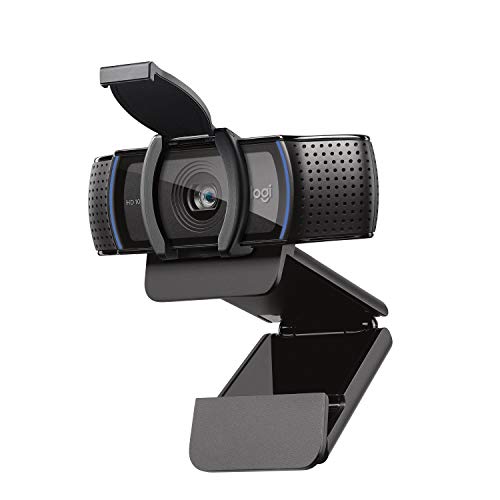
The C920s earns a conditional place because one group arrangement sits entirely inside its fixed specifications. Its 78-degree view — fixed, with no wider setting — fits two people shoulder-to-shoulder at a desk, its autofocus glass lens keeps both faces sharp as they lean and turn, and its dual stereo microphones are rated to 1 m, roughly the distance a desk pair sits from a monitor-top camera. The tripod-ready mount adds placement the fixed view needs: on a small tripod behind the keyboard, the camera can sit centred between the pair instead of favouring whoever owns the monitor. For a pair who take calls together at one desk, this proven 1080p camera does the job without buying width it will never use.
Fit check: the conditions are the specification sheet's edges, and they are hard edges. Spread out, add a third person, move from the desk to a table, and the 78-degree frame and the 1 m microphone rating run out at the same moment — there is no wider setting to open and no longer reach to fall back on. At 1080p and 30 fps there is also no resolution headroom to crop your way out. Buy it when the desk-pair arrangement is the whole of your group calling, which for many households it genuinely is; buy the C200 the moment the group or the room is likely to grow. Our full review covers what else this design does well.
The honest skip for group calls: Logitech Brio 101

The Brio 101 is in this guide to be ruled out of it, cleanly and by its own specifications. Its field of view is fixed at a tight 58.9 degrees — a solo head-and-shoulders frame by design, with no wider setting and only a digital zoom that crops further in. Its focus is fixed, its microphone is a single mono unit rated to 4 ft, and it has no tripod thread and no swivel, so it cannot even be repositioned toward a second person. A second seat at the desk falls outside the frame; a second seat across a table falls outside the frame and the microphone rating together. None of this is a defect — our general webcam guide recommends this camera for exactly the solo, still, simply-framed seat it was built for.
Fit check: if you already own a Brio 101 and a group call is coming, the honest options are seating theatre — one person framed, others leaning in and out — or the separate-joins answer below, not a setting you have missed, because there is no wider setting to find. And if you are buying new with any group calling in the picture, this is the one purchase on the page that cannot grow into the job: every other camera here serves at least one group arrangement, while the Brio 101's arrangement is a party of one. Our full review makes its solo case in full.
When no group-call camera is the right buy
Price the free option first: everyone joins on their own laptop. Separate joins give every person their own framing and their own microphone at speaking distance — precisely what a shared camera strains to provide with one wide frame and one set of microphones doing the work of several. Two people in the same house who each have a desk and a laptop will usually look and sound better joining separately than crowding into one frame, and the cost of finding out is one call. A shared camera earns its place where separate laptops handle badly: one room joining another room, a family on one sofa facing one screen, a pair presenting together, or a single shared desk where a second laptop has nowhere to sit. If none of those is your call, the right purchase may be no purchase — spend the effort on camera height and front light instead, which our video call setup guide works through in order.
The second honest exit is size. These cameras serve a desk and a small room; a group spread across a large table, or several seats deep, outruns every microphone rating and most fields of view here, and the fix is a room system or separate audio, not a fourth webcam comparison. Name your actual situation — a desk pair, a small-room group, a room joining a room, or several people who happen to share a house — and the decision mostly makes itself: this guide ranks the first two, and the last two are answered by separate joins or room gear.
Group-call webcam questions, answered honestly
Which webcam is best for group calls in a home office?
Of the four webcams we review, the Anker PowerConf C200. It is the only one that passes both group gates at once: its field of view selects up to 95 degrees in the AnkerWork software, wide enough for people side by side, and its dual stereo microphones are rated for voice pickup to 3 m, with directional or omnidirectional pickup and AI noise cancellation. Its 2K sensor also holds faces better in a wide frame than a 1080p camera does. The fit conditions are in our full review — the narrower views are digital crops, and the frame rate is 30 fps at every resolution.
How far from the camera can a group sit and still be heard?
Judge it by the rated pickup distance in each camera's specifications, because the four we review split sharply. The Anker PowerConf C200's dual microphones are rated for voice pickup to 3 m. The Logitech Brio 4K's dual microphones and the Logitech C920s's dual stereo microphones are each rated to 1 m, and the Logitech Brio 101's single mono microphone is rated to 4 ft. A group spread around a table sits well beyond 1 m from a camera at the table's end, which is why a wide picture with short-reach microphones still fails the call.
Is a wider field of view always better for a group?
No — wider is a trade, not a free upgrade. A wider frame fits more people, but it also shows more of the room and gives each face a smaller share of the picture, so faces read smaller and softer. And on cameras that select their view by cropping the sensor — the Anker PowerConf C200 and the Logitech Brio 4K both do — stepping down to a narrower view spends resolution rather than moving a lens. The right width is the narrowest one that still fits your group with a little margin: enough to lean and gesture, no more.
Can two people share a 1080p webcam at a desk?
Yes, in one specific arrangement: two people shoulder-to-shoulder at normal desk distance, on the Logitech C920s. Its fixed 78-degree view is wide enough for that frame, and its dual stereo microphones are rated to 1 m, which desk distance stays inside. There is no wider setting if you spread out, add a third person or move to a table, and at 1080p a wider group frame would soften faces anyway. The Logitech Brio 101 cannot do the job at all — its fixed 58.9-degree view is a solo frame by design.
Should everyone just join the call on their own laptop instead?
Often, yes — and it is the option to price against any camera on this page, because it costs nothing. When each person joins separately, everyone gets their own framing and their own microphone at speaking distance, which is exactly what a shared camera struggles to provide: one wide frame and one microphone doing the work of several. A shared camera earns its place when the group is physically together in a way separate laptops handle badly — one room joining another room, a family call from one sofa, a pair presenting together at one desk. If you are simply two people in the same house who could each take the call at a desk, separate joins are usually the better call.
Bottom Line
Fit the frame, clear the microphones, then pick
Run the checks in order: how wide the frame must be, how far the farthest seat sits from the camera, and how much resolution the wide frame leaves each face. A pair or small group sharing one camera: the Anker PowerConf C200, the only camera here that passes the width and reach checks together. A wide room where an external microphone handles audio: the Logitech Brio 4K and its 4K crops. Two people at one desk and no wider, ever: the Logitech C920s. And the Logitech Brio 101 stays the simple solo camera it is — buy it for one face, not a group. For the solo ranking of the same four, see our webcams for video calls guide, for after-dark calls our webcams for low light guide, or browse all our webcam reviews.