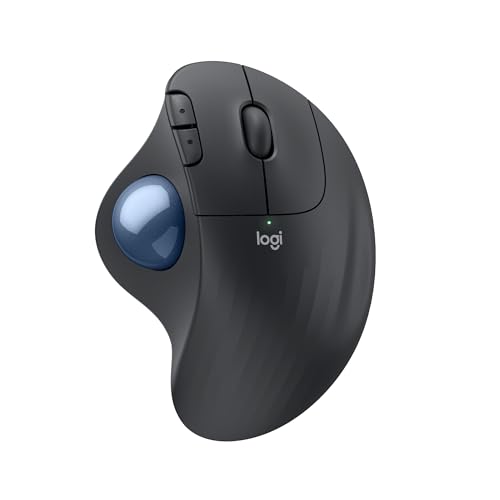
Stationary thumb trackball that never moves on the desk — quiet clicks, Logi Bolt and Bluetooth, up to 18 months on a single AA battery.
Buy if your desk is too small for mouse travel, or sweeping your arm all day is the strain you feel — the sculpted right-hand body stays in one spot while your thumb moves the cursor, the clicks are quiet, and one AA battery is rated for up to 18 months.
Skip if you mouse left-handed (there is no left version), you need a DPI button, horizontal scrolling or multi-device Easy-Switch, or your work is fast precision editing or gaming — a trackball's learning curve and thumb precision are the wrong tool there.
Check Price on Amazon →Logitech ERGO M575S review: a stationary thumb trackball for right hands — quiet clicks, Logi Bolt and Bluetooth LE, and up to 18 months on a single AA battery. That stillness is the whole design: the mouse never travels, so it needs no mouse pad, no clear run of desk, and no arm movement — your thumb rolls a ball to move the cursor while the sculpted body sits where you put it, in a shape Logitech says is certified by United States Ergonomics for 25 percent less forearm muscle strain than a standard Logitech mouse. It is the 2024 update of the long-running M575, and the update is specific rather than sweeping: the clicks are now quiet clicks, the older Unifying receiver is replaced by an encrypted Logi Bolt receiver, and the app is the current Logi Options+. Owners back the shape on the listing itself: 4.5 stars across 2,767 ratings on Amazon's listing for this exact ASIN (read October 2026), with comfort, desk-space savings and smooth thumb control the recurring themes. The honest limits are a trackball's limits plus this model's own: right-hand only with no left version, a real learning curve measured in days, no DPI button, no horizontal scrolling, no tilt adjustment, and one device at a time rather than the MX line's three-device switching. Judge it as the small-desk, low-movement pointing device it is — the right buy when arm travel or desk space is the problem, and the wrong one when your work is fast, precise pointer placement from the first minute.
| Shape | Stationary thumb trackball, right-hand only; sculpted ergonomic body, certified by United States Ergonomics; the mouse itself never moves on the desk |
|---|---|
| Dimensions | 5.28 × 3.94 × 1.89 inches (134 × 100 × 48 mm) |
| Weight | 145 g (5.11 oz) with the AA battery |
| Sensor | Logitech Advanced Optical Tracking, 400 DPI nominal, adjustable up to 2,000 DPI in Logi Options+ — there is no DPI button on the mouse |
| Buttons | 5 buttons (left/right click, back/forward, scroll wheel with middle click); 3 customisable in Logi Options+; quiet clicks; rated for 3 million clicks |
| Scroll Wheel | Standard vertical scroll wheel with middle click; no horizontal tilt scrolling and no free-spin mode |
| Connectivity | Logi Bolt USB receiver (included, stores inside the battery compartment) or Bluetooth Low Energy; 10 m (33 ft) range. Note the receiver is Logi Bolt, not Unifying — the two standards do not pair with each other |
| Battery | 1 × AA battery (included), rated up to 18 months; not rechargeable and no wired mode |
| Compatibility | Windows 10/11, macOS 12 or later, ChromeOS, Linux, iPadOS 15 or later, Android 12 or later (basic functions without the app outside Windows/macOS) |
| In the Box | ERGO M575S trackball mouse, Logi Bolt USB receiver, 1 × AA battery, user documentation |
| Warranty | 1-year limited hardware warranty (per Amazon's listing for this ASIN) |
| Model | Logitech 910-007027, Graphite with Blue Ball (UPC 097855186744) — the Black with Silver Ball listing (B0D6PZ5DPN, model 910-007392), the Off-White listings and the UK Graphite listing (B0DB5DMDW3, model 910-007029) are different listings; do not substitute |
The desk-space math is unlike anything else in our mice coverage. Every other mouse we review needs a clear run of desk and room to travel; this one needs its own footprint and nothing more, because the body stays put and the thumb does the moving. Owners who switched for exactly that reason — a keyboard tray, a crowded desk, a laptop on a couch arm — describe it in the listing's review pool as the fix that finally fit, and reviewers testing it on tight setups say the same. If your mouse currently runs into your keyboard, your mug, or the edge of the desk several times a day, a stationary trackball removes the problem rather than shrinking it.
The arm stays still, and that is the ergonomic claim owners actually report. Logitech's own figure for this model is 25 percent less forearm muscle strain against its standard M650 mouse, in a design certified by United States Ergonomics, and the owner pool's strongest theme is comfort over long days: reviewers and owners describe the ache moving out of the forearm and shoulder because the sweeping motion is simply gone. Read it the way the honest accounts put it: the strain is redistributed — to the thumb — not magically deleted, and owners with thumb complaints say so. For arm-and-shoulder strain, though, no vertical angle removes as much movement as not moving the arm at all.
The 2024 update fixed the original M575's two loudest complaints. The clicks are now quiet clicks — Logitech measures them at roughly 80 percent quieter than the original M575's, and reviewers in shared rooms and on calls single that out as the upgrade that matters most day to day. And the receiver is now Logi Bolt, the encrypted standard the rest of Logitech's current office line uses, so the M575S shares a receiver family with the MX Keys S and the Lift instead of the retired Unifying one the original shipped with. The Bolt receiver also stores inside the battery compartment, the small travel detail owners of the MX Vertical wish that mouse had.
The battery asks almost nothing of you. One AA cell, included, is rated for up to 18 months, and long-term owners of the M575 family consistently describe battery changes as a yearly-or-rarer event they forget about between times. There is no cable, no charge schedule, and no dead-battery afternoon — the trade, covered below, is that when the cell does fade you swap it rather than plug in.
It is right-hand only, completely, and the thumb does all the work. There is no left-hand M575S and the sculpted body cannot be used left-handed at all — left-handed readers have no version of this mouse, which is a harder wall than most ergonomic gear puts up. The mirror-image limit is the thumb itself: every cursor movement is thumb movement, so anyone whose strain lives in their thumb is moving the problem, not solving it, and reviewers are plain that this redistribution is the first thing to test in the return window.
The learning curve is real and front-loaded. Reviewer and owner experience agrees that a thumb trackball feels clumsy for the first days — overshooting small targets, fighting fine placement — with ordinary office work becoming comfortable over the first week or so and precision work (photo masking, timeline trimming, small spreadsheet targets) taking longer to feel natural. Logitech mitigates this with sensitivity adjustment in Logi Options+, but there is no DPI button on the mouse itself, a gap the listing's critical reviews call out by name: changing speed means opening the app. Budget a learning week, and do not start it on a deadline.
It is a one-device, one-job tool next to the MX line. There is no Easy-Switch across three computers, no Flow, no horizontal or tilt scrolling, no free-spin wheel, and no adjustable tilt — the body angle is fixed. The scroll wheel is a plain notched wheel with a middle click. A multi-computer desk that lives on the MX Master 3S's switching will feel each of those absences; this mouse pairs with one machine at a time over Bolt or Bluetooth and expects that to be enough.
Two ownership chores come with the format. The ball and its socket collect lint and skin oil on the support points, and when they do, tracking turns gritty — the fix is genuinely two minutes (the ball pops out from underneath, a swab cleans the contact points, the ball drops back in) but it recurs every few weeks, and owners who skip it blame the sensor for what is a dirty socket. And the AA battery, for all its longevity, is still a disposable cell: there is no USB-C recharge and no wired fallback mode.
In ordinary office work — documents, browsers, email, code, dashboards — reviewers describe tracking as smooth and responsive once the thumb is trained, with the 400–2,000 DPI range set in Logi Options+ covering both a single laptop screen and travel across a wide or dual-monitor desktop. The stationary body is also why it works where other mice cannot: on a glass desk edge, a tray, an armrest — any surface it can sit on, since the surface plays no part in tracking at all.
The precision boundary is the honest one every trackball review lands on. Small-target work is slower and less certain than with a good conventional sensor, especially early on: reviewers found detailed photo and video editing the workload where the thumb's resolution shows, and gaming is simply outside the design — no one reviewing this mouse recommends it for fast pointer work. What improves with practice is consistency, not the ceiling; after the learning week, owners describe ordinary placement as thoughtless, while still reaching for a conventional mouse for fine retouching in some setups.
Connection and endurance are the quiet strengths. Bolt and Bluetooth pairings are reported stable at ordinary desk distances, the Bolt receiver's encryption is the current Logitech standard for crowded offices, and the up-to-18-month AA rating is the figure long-term M575-family owners corroborate rather than laugh at — the sensor sleeps when the ball is still, so idle draw is minimal. The clicks' quietness, Logitech's headline measurement this generation, is the performance change a shared room actually notices: reviewers on calls describe them as a muffled press rather than a snap.
Right-handed desk workers whose problem is movement itself — a small or crowded desk with no mouse run, a keyboard tray, or forearm and shoulder strain that builds up from sweeping a mouse all day — who work on one computer and can give a new pointing method a fair learning week: this is the stationary answer, and it pairs with the placement rules in our ergonomic desk setup guide, where a trackball's fixed position makes the elbow-height, close-in placement automatic rather than something to keep correcting. Readers deciding between pointing styles should read the comparison section below before the specifications: how you want to move the cursor, not features, is what separates this mouse from the verticals.
Skip it if you mouse left-handed — no version exists, and the honest Logitech alternative remains the Logitech Lift, the one ergonomic mouse in our coverage that sells a left-hand model. Skip it if you switch between two or three computers all day, live in fine-detail editing timelines, or game — that workload belongs to the conventional shape, and our Logitech MX Master 3S review covers it. Skip it, too, if your pain is in your thumb: a trackball hands your thumb the whole job.
However you choose, keep the pointing device at the same height as the keyboard and close to the body's midline, as the setup guide's first layer sets out — a trackball makes that easy to keep, because once it is placed it never drifts outward the way a travelling mouse does.
A trackball carries three fit facts that matter more than any feature on it: the body never moves, your thumb moves the cursor, and the shape is right-handed and fixed. Everything else about fit follows from those three, so check them against your desk, your hand and your workload before anything else on this page matters.
The desk check runs in the trackball's favour almost everywhere — it needs only its own 5.28 × 3.94 inch footprint, on any surface, with no pad and no travel clearance. The habit check is the one to be honest about: reviewer and owner experience puts basic comfort at days and full ease at a week or more, so time the switch for an ordinary week, and use the return window deliberately if your thumb, rather than your forearm, starts doing the complaining.
| Small or crowded desk, keyboard tray | Fits — the reason to buy | The body stays in one footprint and never travels; no mouse pad or clear run needed. |
| Forearm or shoulder strain from mousing | Fits | The arm stays still; Logitech rates the design at 25 percent less forearm muscle strain than its standard mouse. |
| Thumb pain or thumb arthritis | Poor fit | Every cursor movement becomes thumb movement — the strain moves here instead. |
| Left-handed mouse user | No version exists | Right-hand sculpted body only; the Lift is the ergonomic mouse in our coverage with a left-hand model. |
| One computer, all day | Fits well | Bolt or Bluetooth pairing, up to 18 months per AA battery, nothing to charge or switch. |
| Two or three computers, switched hourly | Outside its design | No Easy-Switch or Flow; one pairing at a time rather than the MX line's three-device switching. |
| Fine photo, video or CAD detail work | Mixed | Workable after practice for general placement; the thumb's precision ceiling is real for detailed editing. |
| Gaming | Outside its design | Office-tuned 2,000 DPI optical tracking and a stationary body; not built for fast pointer work. |
Our mice coverage now holds three genuinely different answers to the same strain question, and the choice between them is a movement fork, not a quality ladder. The M575S (this review) removes arm movement entirely and hands the cursor to your thumb. The Lift keeps ordinary mouse movement but rotates the hand to a 57-degree handshake angle in a compact body. The MX Master 3S keeps the conventional palm-down shape and answers with refinement — the best scroll wheel in the coverage and three-device switching — for hands whose strain was never about the shape.
The practical rule: name the movement that hurts or the space that fails first. No desk run, or an arm tired of sweeping — trackball. Forearm twist on an ordinary desk — vertical. Neither, but all-day scrolling and multi-device work — conventional MX. Our Logitech Lift review and MX Master 3S review cover those sides in full, and our mouse comparison guide walks the same fork in guide form.
| How the cursor moves | Thumb rolls a stationary ball; the mouse never moves | Hand moves the mouse at a 57-degree handshake angle | Hand moves the mouse palm-down, conventionally |
| Desk space needed | Its own footprint only; works on any surface | A normal mouse run at elbow height | A normal mouse run, plus room for the larger body |
| Hand fit | Right-handed, sculpted; most hand sizes | Small-to-medium hands (plus a left-hand version) | Medium-to-large right hands |
| Scroll | Plain notched wheel, middle click; no horizontal scroll | SmartWheel dual-mode scrolling | MagSpeed wheel plus a thumb wheel for horizontal scroll |
| Receiver | Logi Bolt (included, stores in the mouse) | Logi Bolt (included) | Logi Bolt (included) |
| Battery | 1 × AA, up to 18 months; not rechargeable | 1 × AA, up to 24 months; not rechargeable | Rechargeable, up to 70 days; USB-C |
| Devices | 1 pairing at a time | Up to 3 with Easy-Switch | Up to 3 with Easy-Switch and Flow |
| Owner pool | 2,767 ratings, 4.5 stars (Oct 2026) | 13,783 ratings, 4.4 stars (Oct 2026) | 10,907 ratings, 4.3 stars (May 2026) |
The Graphite with Blue Ball consumer version: model 910-007027, ASIN B0BBQ3ZYNY, UPC 097855186744. The Black with Silver Ball listing (B0D6PZ5DPN, model 910-007392), the Off-White listings, and the UK Graphite listing (B0DB5DMDW3, model 910-007029) are different listings — do not substitute one for another when comparing ratings or specifications.
Reviewer and owner experience clusters at days, not hours and not months: the first days feel clumsy, with overshot targets, ordinary office work settles within about a week, and fine placement takes longer. Setting the sensitivity in Logi Options+ — start slower than feels natural — is the adjustment owners credit most. Time the switch for an ordinary week rather than a deadline, and judge it at the end of that week, not the end of the first day.
No. This generation replaced the original M575's Unifying receiver with Logi Bolt, and the two standards do not pair with each other. It connects over the included Logi Bolt receiver — which stores inside the battery compartment when you travel — or directly over Bluetooth Low Energy. The good news for a Bolt-standardised desk is that it shares that receiver family with the Lift, the MX Vertical's newer siblings, and the MX Keys S.
It is the mouse in our coverage built for exactly that: the body is stationary, so it needs only its own 5.28 × 3.94 inch footprint, no mouse pad, and no clear run for travel, and it tracks on any surface it can sit on — a tray, a desk edge, an armrest — because the surface plays no part in tracking. That is also why it suits keyboard trays and laptop-at-the-couch setups that defeat a travelling mouse.
Logitech rates the single included AA battery for up to 18 months, and long-term owners of the M575 family report battery changes as a roughly yearly event. It is not rechargeable and has no wired mode — the trade for that longevity is swapping a common AA cell when it fades rather than plugging in a USB-C cable, so keep one spare in the drawer.
Almost always the socket, not the sensor. Lint and skin oil build up on the ball's support points over a few weeks of use. Push the ball out from underneath, wipe the ball and the contact points inside the socket with a dry or slightly damp swab, and drop the ball back in — owners describe it as a two-minute job that restores the smooth tracking, and the recurring maintenance difference between a trackball and a conventional mouse.
The Logitech ERGO M575S is the stationary fork in our mice coverage: a sculpted right-hand thumb trackball that never moves on the desk, with ergonomist-certified posture claims, quiet clicks, an encrypted Logi Bolt receiver, and up to 18 months on one AA battery. Its limits are just as plain: right-hand only, a learning curve measured in days, thumb-done precision with a real ceiling, no DPI button, no multi-device switching, and a ball socket that wants a two-minute clean every few weeks. Buy it when desk space or arm movement is the problem it solves; buy a vertical or the MX Master 3S when it is not.