
Buying Guide — Webcams
Best Webcam for Streaming and Recording
The short answer first: a call throws the picture away, a recording keeps it. That single difference reorders everything. Specs a meeting app compresses into irrelevance — a 4K sensor, 60 frames per second, resolution you can crop in editing — become the whole decision when the video is streamed, saved and rewatched, and the specs that win calls, like microphone reach, step back. Of the four webcams we've reviewed, exactly one was built to be recorded. One covers seated tutorials honestly at 2K. One is the proven 1080p starter. And one should not be bought for this job at all.
Affiliate disclosure: Home Office Stack is a participant in the Amazon Services LLC Associates Program. As an Amazon Associate, we earn from qualifying purchases made through links on this page — at no extra cost to you. Picks are research-based, grounded in manufacturer specs and published owner feedback; we don't accept sponsored placements.
Check one: frame rate — the spec calls let you ignore
On a call, frame rate barely matters; in a recording, motion is content. A seated face talking moves slowly, and every camera here records that at 30 frames per second, which is why our video calls guide never had to rank on this number. The moment the video includes movement — hands demonstrating a product, a pen on a whiteboard, gameplay, a workout, anything you would describe with a verb — 30 fps smears what 60 fps keeps readable. The four cameras split absolutely on this check. The Logitech Brio 4K records 1080p at up to 60 fps and 720p at up to 90 fps, alongside its 4K at 30 fps. The Anker PowerConf C200, the Logitech C920s and the Logitech Brio 101 are 30 fps cameras at every resolution they offer. There is no setting, firmware or software switch that changes that; it is the sensor's ceiling, printed in each review.
So name your motion before you name your camera. Talking head, tutorial, course lesson, recorded meeting: 30 fps serves all of it, and this check eliminates nobody. Hands, demonstrations, fast screen work or sport: this check eliminates three of the four, and the guide effectively ends at the first pick below. Most home-office recording is the first kind — which is exactly why the honest version of this guide keeps all four cameras in play for it, instead of pretending everyone needs the ceiling.
Check two: resolution headroom — what editing spends
A recording is rarely published exactly as framed. You tighten the shot on your face, cut out the door frame, reframe for a vertical clip, stabilise a bump — every one of those edits is a crop, and a crop spends resolution. Record at the resolution you publish and any crop publishes soft. Record above it and the crop is free. That arithmetic ranks the sensors: the Brio 4K's 4096×2160 frame carries four times the pixels of the 1080p you will publish, and its own narrower fields of view — 90, 78 or 65 degrees — are crops of that 4K sensor, which is why they hold detail, with 5x digital zoom in Full HD. The C200's 2K sensor, 2560×1440, carries a more modest surplus over 1080p: enough to tighten a frame, not to reframe one. The two 1080p cameras, the C920s and the Brio 101, record exactly what you publish and no more; their framing must be right at record time because editing cannot buy it back.
Hold the boundary honestly: none of this survives a meeting app. Live call platforms downscale and compress whatever you send, which is why 4K buys almost nothing for ordinary calls — our general guide says so plainly. Headroom is a production argument. It applies when the file is kept: streamed productions that broadcast your full feed, recorded tutorials, course videos, clips cut for other platforms. If your camera's whole life is other people's meeting windows, spend nothing on this check and buy from the calls guide instead.
Check three: focus and framing while you move
A recording session is longer and less still than a call. You lean in to emphasise a point, hold a product up to the lens, step to a whiteboard and back. A camera for this job has to refocus as the distance changes and hold a frame you may not be centred in. Three of the four autofocus: the Brio 4K and the C920s through glass lenses, the C200 across a stated 15 cm to 3 m focus distance — the product-held-to-camera case is literally inside its specification. The Brio 101's focus is fixed: sharp at the distance it was set for, softer as you move away from it, which is a design for a still solo seat and a real limit for anyone who presents standing or shows objects.
The Brio 4K's autofocus carries this guide's most important caveat. Windows reviewers praise it, but a detailed owner report for this model describes it consistently failing to autofocus in Zoom, Webex and Teams on macOS, with manual focus in Logitech's software kept open as the standing workaround — and PC Gamer found a related finickiness on Windows, locking close and struggling to refocus farther away. Our full review quotes that report before any praise. A recording camera you must focus by hand is not a small flaw; Mac buyers should weigh it as a first-order fact, not a footnote. Placement helps every camera here except one: the Brio 4K, C200 and C920s all have tripod threads or tripod-ready mounts, so they can sit at standing height or beside a demonstration; the Brio 101 has no tripod thread and no swivel.
The webcams we've reviewed, compared for streaming and recording
| Logitech Brio 4K | The streaming and recording pick — the only camera here built to be kept | 4K at 30 fps · 1080p to 60 fps · 720p to 90 fps · autofocus · 90°, 78° or 65° fields of view (crops of the 4K sensor) | 5x digital zoom in Full HD · RightLight 3 with HDR · dual mics rated to 1 m · tripod thread · 4K needs USB 3.0 |
| Anker PowerConf C200 | The seated-tutorial pick — 2K headroom and the longest microphone reach | 2K at 30 fps · 30 fps at every resolution · autofocus, 15 cm to 3 m · 65°, 78° or 95° fields of view (narrower views are crops) | Automatic low-light correction · dual mics rated to 3 m · sliding cover switches the camera off · tripod thread |
| Logitech C920s HD Pro | The proven 1080p starter — frame it right at record time | 1080p at 30 fps · autofocus · five-element glass lens · fixed 78° view | Dual stereo mics rated to 1 m · clip-on privacy shutter · tripod-ready mount |
| Logitech Brio 101 | The honest skip for recording — a still, solo call camera | 1080p at 30 fps · fixed focus · fixed tight 58.9° view | Single mono mic rated to 4 ft · sliding privacy shutter · no tripod thread · no swivel |
Specs above are the manufacturers' figures as recorded in each camera's full review on this site. Read the table's honest shape: one camera passes all three checks, one passes focus and audio but is capped at 30 fps and 2K, one passes focus alone at 1080p, and one passes none — which is a ranking, not an insult, because the fourth camera was never designed for this job.
The streaming and recording pick: Logitech Brio 4K
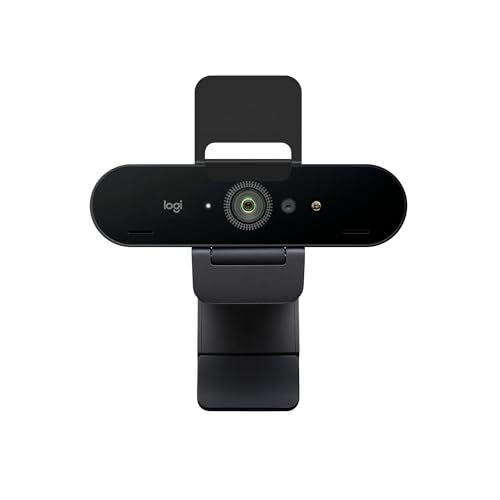
The Brio 4K is the only camera we review that passes all three checks, and it passes two of them alone. Check one: it is the sole camera here past 30 fps — 1080p at up to 60 fps for smooth motion, 720p at up to 90 fps — while still recording its headline 4K at 30 fps. Check two: the 4K sensor is the headroom every edit spends, and the camera spends it for you in advance — its 78 and 65-degree views are crops of that sensor rather than a lesser camera's whole picture, with 5x digital zoom in Full HD for reframing a presentation live. Check three: an autofocus glass lens, RightLight 3 with HDR for the window-lit rooms home offices actually have, and a tripod thread under a detachable clip, so the camera can live at recording height instead of meeting height. For a home-office creator recording tutorials, courses or streamed sessions from a desk, this is the ceiling of what a plug-and-play webcam does.
Fit check: the conditions are printed, not buried. The autofocus caveat above is this camera's best-documented weakness — a Mac owner report of manual-focus workarounds that our review quotes in full. 4K requires a USB 3.0 port and compatible software, and the cable ends in USB-A at the computer, so a USB-C-only laptop needs an adapter that carries data and power. Its dual microphones are rated to 1 m only, so serious recording audio wants an external microphone — true of every camera here, but budget it with this one. And its attachable privacy shutter covers the lens without switching anything off, and can be mislaid. Buy it for the file you keep, knowing the focus report; our full review records the whole picture.
The seated-tutorial pick: Anker PowerConf C200
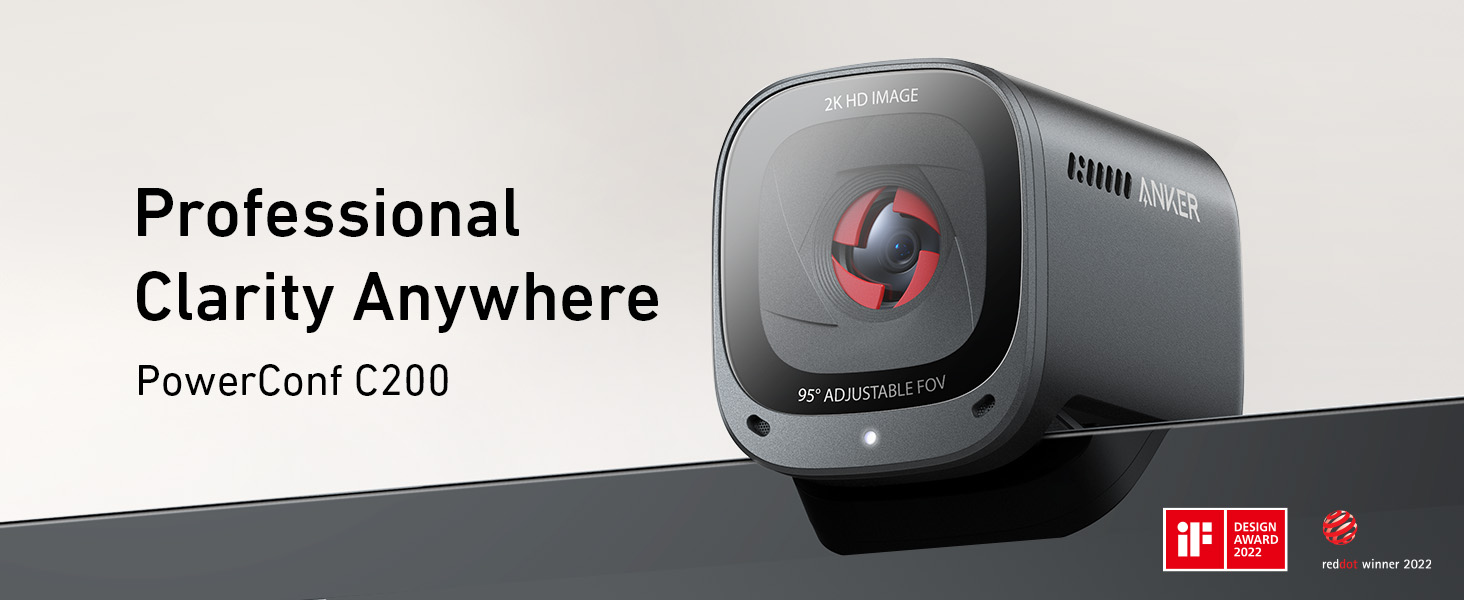
Most home-office recording is not motion content. It is a person at a desk, teaching: tutorials, course lessons, walkthroughs, recorded updates. For exactly that case, the C200 covers more of this guide than its ceiling suggests. Its 2K sensor — 2560×1440 at 30 fps — holds a modest crop surplus over a 1080p publish. Its autofocus is specified from 15 cm to 3 m, so the reach-for-the-product gesture every tutorial makes stays in focus. Its low-light record is the strongest we review — Tom's Guide called its low-lighting performance excellent, Laptop Mag rated its image quality and low-light performance outstanding — which matters because recording happens when the workday ends and the room dims. And uniquely here, its dual microphones are rated to 3 m with AI noise cancellation, so a tutorial recorded on the camera's own audio sounds like it was planned, not overheard.
Fit check: its own review prints the boundary in the skip-if line: this is the wrong camera if you need 60 fps motion or 4K for streaming or recording. The frame rate is 30 fps at every resolution, the narrower fields of view are digital crops spending the 2K surplus, the body cannot swivel and there is no tracking or auto-framing, and the software holding its manual controls has rough edges reviewers name. Inside the seated, talking, teaching case those limits never bind; one step outside it — a demonstration with real movement, a 4K deliverable — and the Brio 4K above is the buy instead. Our full review has the rest.
The proven 1080p starter: Logitech C920s HD Pro
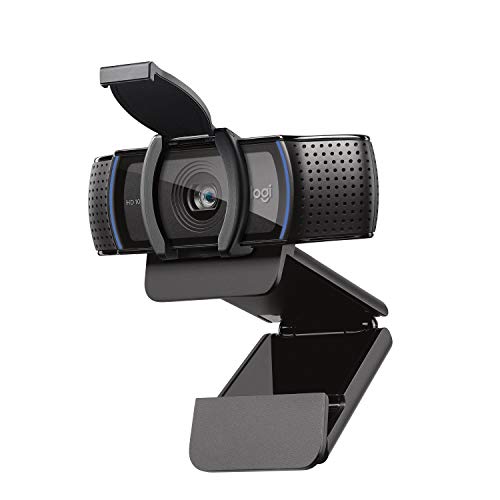
The C920s is the camera a generation of tutorial-makers started on, and its specification still describes a workable recording tool: 1080p at 30 fps through an autofocus five-element glass lens, a fixed 78-degree view wide enough for a desk presenter with room to gesture, dual stereo microphones rated to 1 m — desk distance, which is where tutorials record — and a tripod-ready mount so it can sit at the height the frame needs rather than the height the monitor offers. If your recording is a talking head published at 1080p, framed carefully once and repeated, this camera does the job with nothing left over and nothing missing that the format uses.
Fit check: nothing left over is the operative phrase. At 1080p there is no headroom: crop in editing and the publish softens, so framing is a record-time decision, permanently. The view is fixed at 78 degrees, the frame rate is fixed at 30 fps, and our low-light guide ranks it the skip after dark — record a C920s in a lit room or not at all. Buy it as the known, bounded starter it is; buy the C200 for dim rooms and camera-audio, or the Brio 4K the moment your editing or your motion needs headroom. Our full review covers its long record.
The honest skip for recording: Logitech Brio 101

The Brio 101 fails this guide's three checks in a row, by design. Frame rate: 1080p at 30 fps, like the C920s — but headroom: the same 1080p ceiling with a fixed-focus lens, so the frame must be right and the presenter must stay at the one distance the focus was set for. Framing: a fixed, tight 58.9-degree view with no tripod thread and no swivel, so it points where the monitor points and frames a still head and shoulders. Audio: a single mono microphone rated to 4 ft. A recording asks a camera to follow movement, survive editing and hold a presenter's frame for an hour; this camera was specified to sit still on a monitor and make one person readable on a call — a job our general webcam guide recommends it for without reservation.
Fit check: if you already own a Brio 101 and want to record a first tutorial, record it — a seated, still, well-lit talking head is inside its limits, and publishing something imperfect beats buying gear for a habit that does not exist yet. But buy it new for recording and you have purchased the ceiling on day one: the first time you lean in, hold something up, or crop the frame, you meet a specification, not a setting. Our full review makes its actual case — the simple solo call — in full.
When no webcam on this page is the right buy
Name the requirement that breaks the category, because there are three honest ones. 4K at 60 fps: no webcam we review records it — the Brio 4K's 4K mode is 30 fps and its faster modes live at 1080p and below. Real depth and lens choice: every camera here is a small fixed lens; the blurred-background, low-light-cinema look belongs to dedicated cameras. Recording away from the desk: these are monitor-top devices with metre-scale microphone ratings. For the first two, the step is a dedicated camera — or the phone already in your pocket, whose 4K 60 fps recording outruns every webcam here, mounted on a tripod and accepted as a production tool rather than a peripheral. Webcams win on being always mounted, always framed and recognised instantly by every platform; buy past them only when a named requirement outvotes that convenience.
The second honest exit is simpler: you may not need a recording camera yet. A first month of tutorials recorded on the camera you own — even the Brio 101, inside its limits — teaches you your actual motion, light and editing habits, and turns this guide's checks from theory into a shopping list written by your own footage. Gear bought before that month is bought against a guess. Our video call setup guide covers the parts that transfer to recording unchanged — camera height, front light, framing — and they improve a recording more than any sensor on this page improves a badly lit one.
Streaming and recording questions, answered honestly
Which webcam is best for streaming and recording from a home office?
Of the four webcams we review, the Logitech Brio 4K. It is the only one built for the recording case on all three checks: it records 4K at 30 fps with 1080p at up to 60 fps and 720p at up to 90 fps, its narrower fields of view are crops of the 4K sensor so reframing in editing holds detail, and it autofocuses. Meeting apps compress most of that away, which is why our video-calls guide ranks differently — a recording keeps what the sensor captured. The conditions are real: 4K requires a USB 3.0 port and compatible software, and some Mac owners report needing manual focus, as our full review records.
Do you need 60 fps to stream or record yourself talking?
For a seated talking head, no — 30 fps is the frame rate of most recorded talks, webinars and tutorials, and all four webcams we review record at 30 fps at their headline resolution. Frame rate starts to matter when the picture moves: demonstrations with your hands, a whiteboard, gameplay or any fast motion looks visibly smoother at 60 fps. Of the four, only the Logitech Brio 4K goes past 30 fps — 60 fps at 1080p, and up to 90 fps at 720p. If smooth motion at 4K is the requirement, none of these four does it: the Brio 4K's 4K mode is 30 fps.
Is 4K worth it if your videos are published at 1080p?
It can be, for one specific reason: headroom. A 4K frame recorded and published at 1080p can be cropped — tightened on your face, reframed off-centre, steadied — and still publish at full 1080p detail, because the crop is spending pixels the published frame never needed. The Logitech Brio 4K's narrower fields of view work the same way in the camera itself, as crops of the 4K sensor, with 5x digital zoom in Full HD. What 4K does not do is survive a meeting app: live calls compress and downscale the picture, so the headroom argument belongs to recording and streaming production, not to ordinary calls.
Can the Anker PowerConf C200 work for recording tutorials?
Yes, inside a specific case: a seated talking head or screen-share tutorial, recorded at your desk, in ordinary or dim light. Its 2K sensor — 2560 by 1440 at 30 fps — gives modest crop headroom over 1080p, its autofocus runs from 15 cm to 3 m, reviewers praise its low-light performance, and its dual microphones are rated to 3 m, the longest reach we review, which matters if you record voice with the picture. The limits are printed in its own review: 30 fps at every resolution and no 4K, so it is a tutorial camera, not a motion or 4K streaming camera.
What should you buy if no webcam does what your recording needs?
Price the gear you may already own first. A recent phone on a tripod records 4K at 60 fps, which no webcam we review matches, and a dedicated camera with an HDMI capture path is the step beyond webcams entirely. Webcams win on convenience — always mounted, always framed, plug-and-play into streaming software — and the Logitech Brio 4K is the ceiling of that convenience here. Buy past it only when the requirement that forces it is named: 4K at 60 fps, interchangeable lenses, or depth of field no fixed webcam lens offers.
Bottom Line
Buy for the file you keep, not the call you join
Run the checks in order: does your picture move, will editing crop it, and do you move inside the frame. Recording or streaming as the main job: the Logitech Brio 4K, the only camera here with 4K, faster-than-30-fps modes and crop headroom — with its Mac autofocus report read first. Seated tutorials in imperfect light, recorded on the camera's own microphones: the Anker PowerConf C200 at 2K and 30 fps. A proven 1080p starter, framed right at record time: the Logitech C920s. And the Logitech Brio 101 stays the simple solo call camera it is. For the call-first ranking of the same four, see our webcams for video calls guide; for dim and backlit rooms, our webcams for low light guide; for shared frames, our webcams for group calls guide — or browse all our webcam reviews.