
Buying Guide — Mice
Best Mouse for Wrist Comfort at a Desk
The short answer first, with the limit stated up front: no mouse treats, prevents or cures wrist pain, carpal tunnel or repetitive strain injury, and nothing below is presented that way. What a mouse can change is geometry — the rotation your forearm works in, how much your arm and wrist travel to point, and whether your fingers have to claw to reach the controls. Of the four mice we've reviewed, two change the rotation, one removes the movement, and one is the best conventional shape we cover while keeping the flat posture a wrist-driven shopper is usually trying to leave. Here are the three checks, then how the four split.
Affiliate disclosure: Home Office Stack is a participant in the Amazon Services LLC Associates Program. As an Amazon Associate, we earn from qualifying purchases made through links on this page — at no extra cost to you. Picks are research-based, grounded in manufacturer specs and published owner feedback; we don't accept sponsored placements.
Three checks decide it, not a comfort claim
Start by separating what a mouse can do from what it cannot. A mouse is a shaped piece of plastic with a sensor in it. It can put your hand at one angle rather than another, it can travel across the desk or stay still, and it can fit your hand or force your hand to fit it. It cannot diagnose why a wrist hurts, and a shape change is not a treatment for the conditions people most often shop with — carpal tunnel and repetitive strain injury among them. This guide is written inside that limit on purpose: where reviewers and owners describe working more comfortably after a shape change, that is reported as their experience of a geometry change, not as a medical outcome.
First check: forearm rotation. A conventional mouse asks for a flat hand: palm down, forearm rotated into pronation, held there for as long as the hand is on the mouse. A vertical mouse changes that one variable. Instead of lying flat, the hand stands up in the position Logitech calls the natural handshake, and on both verticals in our coverage that angle is fixed at 57 degrees. Neither vertical is adjustable, and neither is fully upright — 57 degrees is a specific middle position, arrived at the same way on both mice, so rotation is a yes-or-no check rather than a dial to tune. If the palm-down twist is the posture you notice most, this is the check that answers it, and two of the four mice below are built around it in two sizes.
Second check: movement load. Rotation is only half the job a mouse asks of an arm. A travelling mouse also asks for repeated movement: the hand, wrist and forearm sweeping the body across the desk, thousands of small trips a day, plus the grip held while it travels. One of the four removes that variable entirely. A stationary thumb trackball never moves on the desk; the cursor moves because a thumb rolls a ball, while the hand rests on a fixed body and the arm stays still. That is a different answer from a vertical mouse, not a stronger version of the same one — and it carries its own trade: the pointing work moves to the thumb, so a reader whose discomfort lives in the thumb is relocating the load, not removing it.
Third check: fit, so fingers don't claw. Either change fails if the body is the wrong size. A mouse that is too small for the hand on it makes the fingers fold into a claw to keep their tips on the buttons, the heel of the hand runs out of shell, and the grip becomes work the hand does all day on top of the pointing. A mouse that is too large stretches the reach the same way from the other direction. The two verticals make this check easy to run because they share an angle and differ in size: the Lift is a 4.25-inch body sized for small-to-medium hands, and the MX Vertical is a 4.72-inch body sized for medium-to-large hands. Same rotation, different fit — which is why this guide splits them by hand first and treats the trackball and the conventional pick as separate answers rather than larger or smaller versions of the verticals.
The mice we've reviewed, compared by wrist-comfort checks
| Logitech Lift Vertical Ergonomic Mouse | The wrist-comfort pick for small-to-medium hands | 4.25 × 2.76 × 2.80 in · 4.4 oz (125 g) · 57-degree handshake angle, fixed | Quiet clicks · SmartWheel · Bluetooth and Logi Bolt, up to 3 devices · single AA, up to 24 months |
| Logitech MX Vertical Ergonomic Mouse | The wrist-comfort pick for larger hands | 4.72 × 3.11 × 3.09 in · 135 g · 57-degree handshake angle, fixed | Rechargeable, up to 4 months · Bluetooth, Unifying or wired · cursor-speed switch · right-hand only |
| Logitech ERGO M575S Wireless Trackball Mouse | The travel answer — the mouse never moves | 5.28 × 3.94 × 1.89 in · 145 g with battery · stationary thumb trackball, right-hand only | Quiet clicks · Logi Bolt and Bluetooth, 1 device · single AA, up to 18 months |
| Logitech MX Master 3S Wireless Mouse | The honest skip for wrist-driven shoppers — best standard shape, flat posture | 4.92 × 3.32 × 2.01 in · 4.97 oz (141 g) · sculpted conventional right-hand shape | MagSpeed and thumb wheels · rechargeable, up to 70 days · tracks on glass · no left-hand version |
Specs above are the figures as recorded in each product's full review on this site. Read the table's honest shape: the first two mice answer the rotation check at two hand sizes, the third answers the movement check by removing travel, and the fourth is a warning as much as a pick — a sculpted conventional mouse does not become a wrist-comfort answer, because its posture is the flat one the first check is about.
The wrist-comfort pick for small-to-medium hands: Logitech Lift

The Lift leads this guide because it is the rotation answer in the size most wrist-driven shoppers actually need first. Instead of asking the hand to lie flat and the forearm to twist palm-down to meet a conventional mouse, it stands the hand up at a fixed 57-degree handshake angle, on a compact 4.25-inch body shaped for small-to-medium hands, with a softly textured grip and a snug thumb rest. It is ergo-certified — designed, developed, tested and approved against criteria set out by leading ergonomists — and the published testing behind its review is specific about the adaptation involved: long-term switchers worked longer before needing a wrist stretch once they learned to move from the forearm, which is the movement pattern a vertical shape asks for instead of wrist flicks.
Reviewers who live on vertical mice also found the Lift easier to grasp than any other vertical mouse they had used, with side buttons easier to reach than its larger rivals — and reach is the third check of this guide, not a footnote. On a body this size, a small-to-medium hand keeps its fingers resting on the buttons rather than folded toward them. The rest of its file supports a full workday: quiet clicks, a SmartWheel with precision and speed-scroll modes, Bluetooth or Logi Bolt to up to three devices, and up to two years on a single AA battery. Our full review records the reviewer and owner feedback behind this section in full, and our mouse guide for small hands reads the same body by length and reach alone.
Fit check: the 57-degree angle is fixed, there is no rechargeable battery, and it is a work mouse rather than a gaming or fast-precision tool. Large hands crowd this body — that is not a close call but the split its own review states — and this listing is the right-hand Graphite version, so left-handed readers should follow the model rather than this exact listing.
The wrist-comfort pick for larger hands: Logitech MX Vertical
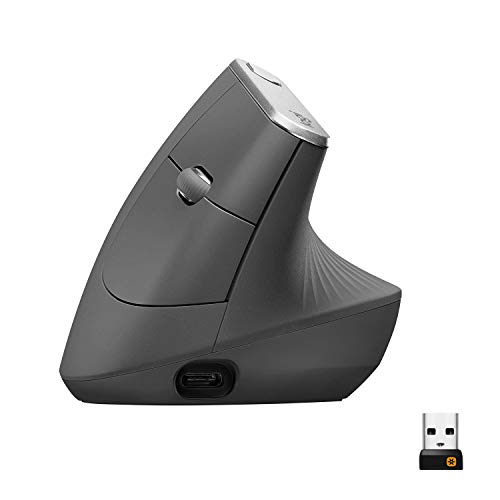
The MX Vertical is the same headline as the Lift — a fixed 57-degree handshake angle instead of the palm-down twist — built at the scale a larger hand needs to get the benefit of it. Logitech's own guidance sizes it for medium-to-large hands and routes small-to-medium hands to the Lift, and the dimensions show the split in both directions that matter for the fit check: 4.72 inches long against the Lift's 4.25, and 3.09 inches tall against 2.80. That height is not a styling number: it is the shell long fingers wrap around, and too little of it folds the fingers into the claw the third check warns about.
The rest of its file is the grown-up vertical's: a textured rubber surface with a thumb rest placed for the larger hand, a rechargeable battery rated up to four months with a one-minute quick charge worth about three hours, a cursor-speed switch on top for instant DPI changes, and three ways to connect — Bluetooth, the included Unifying receiver, or wired over USB-C, usable while charging. Owners do report one foible of the tall, narrow-based shape: it is easy to knock over in the first weeks, catching it with a sleeve while reaching across the desk. Our full review covers the angle's case and that feedback in full, and our mouse guide for large hands reads this body by palm support and shell height alone.
Fit check: size is the variable between the two verticals, angle is not — both are fixed at 57 degrees, so a reader who wants a flatter or fully upright position is outside what either offers. It is right-hand only, with no left-hand version, and it does not offer the Lift's quiet clicks, which matters in a shared room.
The movement-elimination answer: Logitech ERGO M575S
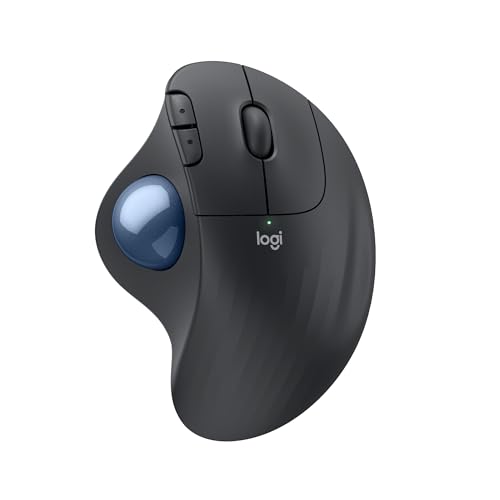
The M575S answers the second check completely, by removing the variable the other three mice only manage. The sculpted body — 5.28 by 3.94 inches, the largest body we review, certified by United States Ergonomics — sits in one place on the desk and never moves. Your thumb rolls a ball to move the cursor while your hand rests on the body and your arm stays still, so the repeated sweeping travel of a travelling mouse, and the grip held through it, largely leave the pointing job. That is also why it suits the desks a travelling mouse struggles on: it needs only its own footprint, no mouse pad and no clear run of surface, on a keyboard tray, a shallow desk or a crowded corner.
Read the trade as plainly as the benefit. Every cursor movement becomes thumb movement, and reviewers are plain that the strain is redistributed to the thumb rather than deleted; owners whose discomfort lives in the thumb say so, and for that reader this mouse moves the problem rather than answering it. The body is also a sculpted conventional shape rather than a vertical handshake, so it does not change forearm rotation — it answers movement, not rotation. The rest of its file is a one-device tool's: quiet clicks, Logi Bolt or Bluetooth to a single computer, up to 18 months on one AA battery, and a ball socket that wants a two-minute clean every few weeks. Our full review records the learning curve and the owner feedback behind this section.
Fit check: budget the learning week — a thumb trackball feels clumsy for the first days and fine placement takes longer — and use the return window to test the thumb question specifically. It is right-hand only, with no left version at all, and there is no multi-device switching.
The honest skip for wrist-driven shoppers: Logitech MX Master 3S

The MX Master 3S is in this guide because it is the mouse a wrist-driven shopper is most likely to buy by mistake — by reading its sculpted shape as an ergonomic answer. It is genuinely the best conventional mouse in our coverage: a palm-filling sculpted body at 4.92 inches long, built for medium-to-large hands, with a thumb rest, quiet clicks, a MagSpeed wheel that shifts between ratchet precision and free-spin, a second thumb wheel, a sensor that tracks on glass, three-device switching and a rechargeable battery rated up to 70 days. For scroll-heavy desk work with no wrist complaint driving the purchase, our full review makes its case and this guide does not argue with it.
But run it through this guide's checks and the answer is plain. On rotation, it changes nothing: the hand works palm-down in the flat pronated posture, held by a more comfortable shell. Its own short version states the limit in so many words — skip it if the palm-down twist is the strain you feel. On movement, it travels like any conventional mouse. What it improves is fit for a larger hand, and scrolling with less wheel effort. If scroll volume is what you notice, that improvement is real. If the twist or the travel is what you notice, a better-fitting version of the same posture is not the change the first two checks point to.
Fit check: medium-to-large hands in a palm grip; small hands are crowded by this body, and there is no left-hand version. Judge it as the conventional pick it is — the right buy when posture is not the problem, and the wrong one presented as if it were.
When no mouse is the right buy
Gear is not a treatment, and this section is part of the guide rather than a disclaimer under it. If pain persists rather than easing with rest, if there is numbness or tingling in the hand or fingers, weakness or dropping things, pain that wakes you at night, or symptoms that keep spreading or getting worse, the next step is a clinician — not a fifth mouse, not a more expensive vertical, and not a longer shortlist. Those are the presentations where what is needed is a diagnosis, and no product page, including this one, can supply it. The same applies in the milder direction: a new shape that makes an existing symptom noticeably worse is information to act on, not a break-in period to push through.
Before any purchase, set the workstation basics that matter more than the mouse, because they decide the posture every mouse is then used in. As general workstation guidance — the same targets our posture coverage works from, not medical advice — the keyboard belongs at or just below elbow height, the mouse belongs close enough that the shoulder stays down rather than reaching forward, and the screen belongs at eye level so the neck is not setting the position the rest of the arm works from. A desk at the wrong height sets the wrong angles before the mouse enters the picture, and no shape compensates for it. Our ergonomic desk setup guide works through those layers in order, and it states the same limit this section does: heights and distances can be fixed by buying and setting things, and pain that persists once they are right belongs with a medical professional.
If your measurements and your symptoms land in the ordinary band — discomfort tied to a long day in a flat posture, no warning signs above — then the shopping question is the one this guide opened with, and our mouse guide for working from home splits the same four mice on the general checks of angle, hand size, movement and scroll workload, while our small-hands guide and large-hands guide read them by fit alone.
Wrist-comfort mouse questions, answered honestly
Can a mouse cure wrist pain, carpal tunnel or RSI?
No. No mouse in this guide — and no mouse anywhere — is a treatment, and none of the four reviewed here is presented as one that treats, prevents or cures pain, carpal tunnel or repetitive strain injury. A different shape can change the posture your forearm works in, how much your arm travels, and whether your fingers have to claw to reach the controls. Those are geometry changes, not medical ones. Pain that persists, numbness, tingling, weakness, or pain that wakes you at night is a reason to see a clinician, not a reason to keep shopping.
Vertical mouse or trackball — which changes more for wrist comfort?
They change different things. A vertical mouse changes rotation: the Logitech Lift and the Logitech MX Vertical both hold the hand at a fixed 57-degree handshake angle instead of the flat, palm-down posture of a conventional mouse, while your arm still travels to move the cursor. A trackball changes movement: the Logitech ERGO M575S never moves on the desk, so arm and wrist travel largely leave the pointing job and your thumb does it instead. Choose by which load matches what you notice — the twist, the travel, or both read together.
Which reviewed mouse is the wrist-comfort pick for small-to-medium hands?
The Logitech Lift, on fit as much as angle. It holds the hand at a 57-degree handshake angle in a compact 4.25-inch body sized for small-to-medium hands, with a softly textured grip, a snug thumb rest, quiet clicks and a SmartWheel. Its limits are stated in its own review: the angle is fixed, it runs on a single AA battery rather than a rechargeable cell, and large hands crowd it — which is why the larger vertical below exists. This listing is the right-hand Graphite version.
Which reviewed mouse is the wrist-comfort pick for larger hands?
The Logitech MX Vertical. It is the same fixed 57-degree handshake angle as the Lift, built at the larger scale: 4.72 inches long and 3.09 inches tall against the Lift at 4.25 inches long and 2.80 inches tall, and sized for medium-to-large hands. It is rechargeable for up to four months, connects by Bluetooth, the included Unifying receiver or a wired USB-C cable, and adds a cursor-speed switch on top. It is right-hand only, and the angle is fixed exactly as on the Lift — size is the variable between them, angle is not.
When should I stop shopping for a mouse and see a clinician instead?
Before you buy, if any of these are already true: pain that persists rather than easing with rest, numbness or tingling in the hand or fingers, weakness or dropping things, pain that wakes you at night, or symptoms that keep spreading or getting worse. A mouse changes posture and movement load at one desk; it does not diagnose or treat a condition. Set the workstation basics first as well — screen and keyboard heights, elbow height, and the mouse close enough that your shoulder stays down — because no mouse compensates for a desk set at the wrong height.
Bottom Line
Run the three checks, then read the four mice in order
Name the load first — the palm-down twist, the arm and wrist travel, or a grip your fingers have to claw to hold — and buy the mouse that changes that one, knowing none of them treats a condition. The rotation answer at the smaller scale is the Logitech Lift: a fixed 57-degree handshake angle in the compact body small-to-medium hands fit. The same angle at the larger scale is the MX Vertical, rechargeable and sized for medium-to-large hands. The movement answer is the Logitech ERGO M575S, which never moves and puts the pointing on your thumb — test that trade in the return window. And let the MX Master 3S be what it is: the best conventional, scroll-heavy mouse we review, in the flat posture a wrist-driven shopper is usually trying to leave. For the general comparison, see our mouse guide for working from home, or browse all our mouse reviews.