
Buying Guide — Keyboards
Best Keyboard for Wrist Comfort
Start with the honest limit: no keyboard treats, prevents or cures wrist pain, carpal tunnel or repetitive strain injury, and nothing below is presented that way. What a keyboard can change is geometry — the angle your wrists bend at, whether anything supports your palms, and how far your mouse hand sits from your shoulder. Of the four keyboards we've reviewed, one changes all three with a split frame, a built-in rest and negative tilt; the other three are low, flat boards that keep wrists nearer neutral while shipping no rest at all.
Affiliate disclosure: Home Office Stack is a participant in the Amazon Services LLC Associates Program. As an Amazon Associate, we earn from qualifying purchases made through links on this page — at no extra cost to you. Picks are research-based, grounded in manufacturer specs and published owner feedback; we don't accept sponsored placements.
Three checks decide it — and one honest limit
The limit first, because it shapes everything below. A keyboard is a board with keys on it. It can hold your wrists at one angle rather than another, it can put support under your palms or leave them hovering, and it can be narrow or wide enough to decide where your mouse lives. It cannot diagnose why a wrist hurts, and a geometry change is not a treatment for the conditions people most often shop with — carpal tunnel and repetitive strain injury among them. Where reviewers and owners describe working more comfortably after a shape change, that is reported as their experience of a geometry change, not as a medical outcome. Set the workstation basics first, too: above all, the keyboard belongs at or just below elbow height, so your forearms are not reaching up to the desk before a key is pressed.
First check: wrist angle, and tilt direction decides it. The posture to avoid is wrists bent upward, fingers climbing to keys that sit higher at the back than the front. Three designs answer that here, and they are not interchangeable. Negative tilt lowers the far edge: one board's front palm-lift legs offer 0, -4 and -7 degrees, keeping wrists straight instead of bent upward. A flat low profile answers by having almost no height to bend over — two boards sit 0.81 to 0.82 inches tall at a fixed angle. Rear tilt feet do the opposite: they raise the rear edge, the direction that bends wrists upward, so on the one board that has them, the wrist-comfort setting is feet down. Tilt's direction is the feature.
Second check: palm support — only one of the four ships a rest. A wrist rest gives your palms somewhere to land between keystrokes instead of hovering, held up by your forearms, all day. Exactly one keyboard in this guide includes one, built in and not removable; the other three include none in the box, full stop. A typist who already rests their palms to type should read the three rest-free sections below as conditional picks: a separate palm rest is an extra accessory for each of them, and one carries a detailed critical review from exactly that kind of typist, covered in its section.
Third check: reach, because wrist comfort bought at shoulder cost is a trade. A keyboard centres on the letter keys, so everything to the right of them — above all a full-size numpad — pushes a right-handed mouse further out, and the shoulder rotates to reach it, hour after hour. The widths here span more than six inches: 11.65 inches for the one board with no numpad, 16.94 and 17.08 for the two full-size straight boards, and 17.95 for the split board, which is also 9.17 inches deep including its rest. Judge all three together, not the wrist checks alone.
The keyboards we've reviewed, compared by wrist-comfort checks
| Logitech Ergo K860 Wireless Ergonomic Keyboard | The wrist pick — the only board that changes angle, support and shape together | 17.95 × 9.17 × 1.89 in incl. rest · 2.56 lb · split curved full-size, halves do not separate, split angle fixed | Integrated pillowed wrist rest, not removable · palm lift 0, -4 and -7 degrees · no backlight · Bluetooth and Unifying receiver, up to 3 devices |
| Logitech MX Keys Mini Wireless Keyboard | The reach answer — a low flat board that pulls the mouse back in | 11.65 × 5.19 × 0.82 in · 506.4 g · compact, NO numpad, straight low profile, fixed angle, no tilt feet | No wrist rest in the box · dished scissor keys · smart backlight · Bluetooth only, no receiver included |
| Logitech MX Keys S Wireless Keyboard | The low-profile full-size answer — with the rest caveat stated plainly | 16.94 × 5.18 × 0.81 in · 810 g · full-size straight low profile, fixed angle, no tilt feet, no split | No wrist rest and no angle adjustment · dished scissor keys · smart backlight · Bluetooth and Logi Bolt receiver included |
| Logitech MX Mechanical Wireless Keyboard | The feel answer — low and flat, with rear feet to leave down | 17.08 × 5.18 × 1.02 in incl. keycaps · 828 g · full-size straight low profile, two rear flip-out tilt feet | No wrist rest included · Tactile Quiet switches, not hot-swappable · smart backlight · Bluetooth and Logi Bolt receiver included |
Specs above are as recorded in each product's full review on this site. Read the table's honest shape: one board changes the geometry itself, three keep a familiar straight shape and answer with height — or the lack of it — and only the first row puts anything under your palms.
The wrist pick: Logitech Ergo K860

The K860 leads this guide because it is the only keyboard we review that works on all three checks at once. Its keyframe is split and curved in a single piece — the halves do not separate, and the split angle is fixed — so the letter keys angle toward each hand instead of asking both wrists to bend outward to meet a straight row. Under the palms sits the feature owners and reviewers praise first: an integrated pillowed wrist rest in three layers — stain-resistant fabric over high-density foam over memory foam. Logitech's own figures credit that rest and shape with 54% more wrist support and 25% less wrist bending than a traditional Logitech keyboard without a palm rest — attribute those numbers to Logitech, as this guide does, rather than reading them as independent findings.
The angle check is where it separates furthest from the straight boards. Tilt legs at the front of the board — the palm lift — set it at 0, -4 or -7 degrees, a negative tilt you can use seated or standing, so the far edge sits lower and wrists stay straight instead of bent upward toward raised keys. The typing itself is familiar: Perfect Stroke scissor keys, scooped, matte and quiet, connecting by Bluetooth or the included Unifying receiver to up to three devices, on two AAA batteries rated for up to 24 months. There is no backlight — the plain trade for that battery life.
Fit check: the split angle is fixed, so it cannot be adjusted to an exact anatomy — if the built-in angle is not your angle, there is no dial to correct it. The rest does not come off, and the footprint is the largest we review at 17.95 by 9.17 inches and 2.56 pounds, so it needs desk depth a shallow tray may not have. Its full-size numpad also pushes a right-hand mouse further out, the shoulder-reach cost named in the third check. Our full review records the owner feedback behind this section in full.
The reach answer: Logitech MX Keys Mini

The MX Keys Mini answers the third check better than any board here, and for some readers that is the wrist question in disguise: a mouse parked past a full-size board loads the whole arm the wrist sits at the end of. At 11.65 inches wide with no numpad, the Mini pulls a right-hand mouse about five inches closer than the full-size MX Keys S does — roughly five inches of shoulder reach returned, every time you reach for the mouse. On the angle check it answers with height, or the lack of it: a straight, low-profile board 0.82 inches tall at a fixed angle, with the same spherically dished Perfect Stroke scissor keys as the MX Keys S and a smart white backlight.
Its palm-support answer has to be stated as plainly as the K860's: there is no wrist rest in the box, no split, and no tilt feet to change the angle. What softens that is the profile itself — RTINGS judged the Mini so low-profile that it does not need the wrist rest it does not include, because wrists sit nearer neutral over a board this flat than over a tall one they have to climb onto. That judgement is about geometry, not support: a palm-resting typist should still read this as a rest-free board. The rest of its file is a compact board's trades: Bluetooth only in the box, no receiver included — a Logi Bolt receiver is available separately and is not Unifying-compatible — and a rechargeable battery rated at 10 days with the backlight on or 5 months off.
Fit check: buy it when reach is the load you notice and numbers are not your day; the missing numpad is not a fit detail, it is the product. Our full review covers its receiver gap and Flow pairing in full.
The low-profile full-size answer, with the rest caveat: Logitech MX Keys S
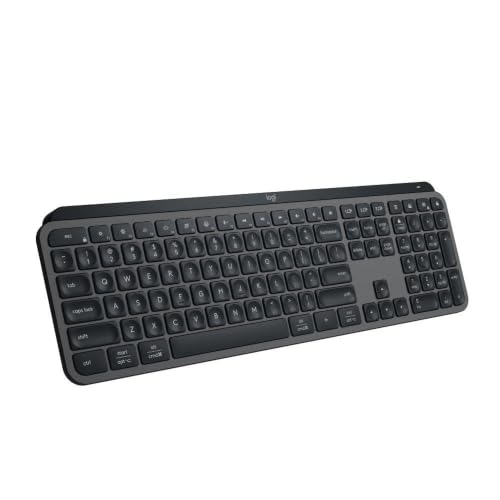
The MX Keys S is the full-size version of the Mini's argument: a straight, low-profile board, 16.94 inches wide and just 0.81 inches tall, whose flatness keeps wrists nearer neutral than a tall board does. Its dished scissor keys are quiet, its smart backlight wakes as your hands approach, and it fixes the Mini's receiver gap — Bluetooth or the included Logi Bolt receiver, to up to three devices, rechargeable for up to 10 days lit or 5 months unlit. For a number-heavy typist whose wrists are untroubled by a straight, flat board, this keyboard asks for no compromise on the work itself.
Now the caveat, stated as plainly as this guide can state it, because it is central rather than incidental: the MX Keys S offers no wrist support and no angle adjustment. The angle is fixed at what Logitech calls its optimum, there are no tilt feet, there is no split, and the box contains no palm rest — a rest for this board is a separate accessory, or part of a Combo, not something in front of you when you open it. The listing's most detailed critical review makes the consequence concrete: it is from a long-time palm-rest user whose wrists and fingers fatigued within a week on this board. One review is one typist, not a verdict — but it is exactly the typist the second check exists to warn.
Fit check: the S fits wrists that are comfortable flat and unsupported, at full width — its numpad parks a right-hand mouse at full-size reach, like any board this wide. If you already type resting on a palm rest, treat that absence as the decision, not a footnote. Our full review covers its backlight, Flow pairing and battery trade in full.
The feel answer, feet down: Logitech MX Mechanical
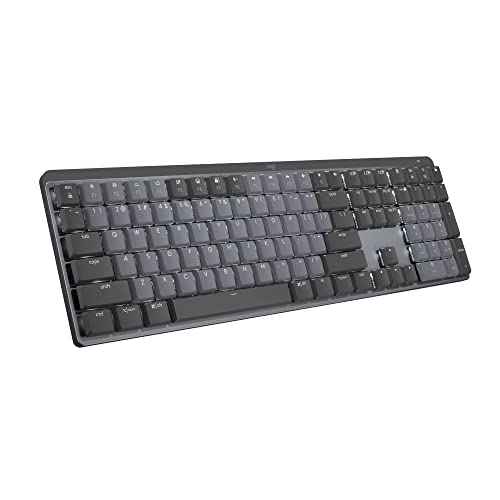
The MX Mechanical belongs in a wrist guide for two reasons, and the first is its profile: at 1.02 inches tall including the keycaps, with shorter key travel than a traditional mechanical board, it keeps wrists nearer the neutral angle a laptop board gives than a tall mechanical frame would. RTINGS judged it comfortable for long periods even without a wrist rest — which matters, because no wrist rest is included, and there is no split or tenting either. Its Tactile Quiet switches give a bump you feel rather than hear, chosen at purchase because they are not hot-swappable, and the rest of its file is complete: smart backlight, Bluetooth or the included Logi Bolt receiver, and a rechargeable battery rated at 15 days lit or 10 months unlit.
The second reason is its feet, and this guide's tilt-direction reasoning rather than any manufacturer claim: the MX Mechanical has two flip-out tilt feet at the rear of the board. Raising the rear edge is the opposite direction from the K860's negative tilt — it lifts the far keys higher and asks the wrists to bend upward toward them, which is the posture the first check exists to avoid. So the wrist-comfort setting on this board is feet down, flat and low. That habit costs nothing and is worth more than the switch choice to a wrist-driven buyer.
Fit check: buy it when key feel is the thing you miss and a flat, unsupported, full-size board — 17.08 inches wide, 828 grams, numpad included — is a posture your wrists already accept. Our full review records the rattle, keycap and owner feedback behind this section.
When none of the four fits
Read the four together and the gaps are specific. None is a separating two-piece split whose halves can be placed at your exact shoulder width, and none offers tenting; the one split board here is a single piece whose angle is fixed. None of the three straight boards ships a palm rest, and none lets you change its angle except the mechanical board — whose feet tilt the way a wrist-driven reader should not use. If your anatomy needs a separating, tenting board, you are outside what we review.
Gear is not a treatment, and this paragraph is part of the guide rather than a disclaimer under it. If pain persists rather than easing with rest, if there is numbness or tingling in the hand or fingers, weakness or dropping things, pain that wakes you at night, or symptoms that keep spreading or getting worse, the next step is a clinician — not a fifth keyboard, not a more expensive split board, and not a longer shortlist. What is needed there is a diagnosis, and no product page can supply it. A new board that makes a symptom noticeably worse is information to act on, not a break-in period to push through.
Before any purchase, set the workstation basics that matter more than the keyboard, because they decide the posture every board is then used in. As general workstation guidance, not medical advice — the keyboard belongs at or just below elbow height, the mouse close enough that the shoulder stays down, and the screen at eye level so the neck is not setting the position the arm works from. Our ergonomic desk setup guide works through those layers in order. And a separate palm rest, for readers who land on one of the three rest-free boards, is an accessory none of those boxes includes — only the K860's rest is integrated, and it does not come off to lend to another board.
Wrist-comfort keyboard questions, answered honestly
Can a keyboard treat, prevent or cure wrist pain or carpal tunnel?
No. No keyboard in this guide — and no keyboard anywhere — treats, prevents or cures pain, carpal tunnel or repetitive strain injury, and none of the four reviewed here is presented that way. A keyboard can change geometry: the angle your wrists work at, whether your palms have support under them, and how far your mouse hand reaches. Those are geometry changes, not medical ones. Pain that persists, numbness or tingling, weakness, or pain that wakes you at night is a reason to see a clinician, not a reason to keep shopping.
Which reviewed keyboard is the wrist-comfort pick?
The Logitech Ergo K860, because it is the only one of the four that changes all three checks at once: a split curved frame, an integrated pillowed wrist rest that owners and reviewers praise first, and front palm lift at 0, -4 and -7 degrees that keeps wrists straight instead of bent upward. Logitech's own figures credit that rest and shape with 54% more wrist support and 25% less wrist bending than a traditional Logitech keyboard without a palm rest — those are the manufacturer's own figures, not independent findings. Its limits are a fixed split angle, a large 17.95 by 9.17 inch footprint, and no backlight.
What if the keyboard I like has no wrist rest?
Then know that before you buy, because three of the four keyboards we review ship with no rest at all: the MX Keys Mini, the MX Keys S and the MX Mechanical include none in the box. Their low profiles keep wrists nearer neutral than a tall board, and reviewers judged the Mini and the Mechanical comfortable for long periods even without one — but a typist who already depends on palm support is in a different position, and the most detailed critical review of the MX Keys S is from a long-time palm-rest user whose wrists and fingers fatigued within a week. A separate palm rest is an accessory none of those three boxes includes.
Should I raise a keyboard's tilt feet for wrist comfort?
It depends which edge the feet raise, and that direction is the whole check. The Ergo K860's legs are at the front and tilt the board negatively, at 0, -4 and -7 degrees, so the far edge sits lower and wrists stay straight instead of bending upward toward raised keys. The MX Mechanical's two flip-out feet are at the rear and raise the rear edge — the opposite direction — so for wrist comfort leave them down and use the board flat and low. The MX Keys Mini and MX Keys S settle the question for you: a fixed low-profile angle and no tilt feet at all.
When should I stop shopping for a keyboard and see a clinician instead?
Before you buy, if any of these are already true: pain that persists rather than easing with rest, numbness or tingling in the hand or fingers, weakness or dropping things, pain that wakes you at night, or symptoms that keep spreading or getting worse. A keyboard changes wrist angle, palm support and reach at one desk; it does not diagnose or treat a condition. Set the workstation basics first as well — above all the keyboard at or just below elbow height, with the mouse close enough that your shoulder stays down — because no keyboard compensates for a desk set at the wrong height.
Bottom Line
Run the three checks, then read the four keyboards in order
Name the geometry first — wrists bending upward, palms hovering with nowhere to land, or a mouse parked far enough out to load the whole arm — set the keyboard at or just below elbow height, and buy the board that changes the check you named, knowing none of them treats a condition. For most wrist-driven readers the answer is the Logitech Ergo K860: the split curved frame, the integrated pillowed rest and negative palm lift, bought with its fixed angle and large footprint in view. When reach is the load, the MX Keys Mini pulls the mouse about five inches closer on a low, flat, rest-free board. When the numpad is non-negotiable and flat and unsupported already works for you, the MX Keys S is those same keys at full size — with no rest in the box. And the MX Mechanical is the feel answer, used feet down. Smaller hands? See our keyboard guide for small hands; larger hands, our keyboard guide for large hands. Wrist comfort on the mouse side too? See our mouse guide for wrist comfort. For the general comparison, see our keyboard guide for working from home, or browse all our keyboard reviews.