
Buying Guide — Standing Desks
Best Standing Desk for Dual Monitors
The short answer first: a second monitor tests a standing desk three ways at once — the two screens have to fit across the top, everything on the desktop has to fit inside the load limit, and the whole doubled setup has to stay steady and cabled while the desk moves. Three of the four electric desks we've reviewed are 48-inch tops, and that width is the first gate: a pair of 24-inch screens fits one, a pair of 27-inch screens honestly doesn't. Here's the arithmetic for each check, then how the four desks split.
Affiliate disclosure: Home Office Stack is a participant in the Amazon Services LLC Associates Program. As an Amazon Associate, we earn from qualifying purchases made through links on this page — at no extra cost to you. Picks are research-based, grounded in manufacturer specs and published owner feedback; we don't accept sponsored placements.
Two monitors run three checks at once
Check one is width, and it's arithmetic, not taste. A monitor's headline size is its diagonal; what a desk feels is its width. A 24-inch 16:9 panel carries about 21 inches of viewable width — roughly 21.5 to 22 inches across the bezel — so two of them span about 43 to 44 inches side by side. A 27-inch panel is about 23.5 inches viewable, roughly 24 to 24.5 across, so a pair spans 48 to 49 inches: wider than a 48-inch desktop before a laptop, a speaker or a notebook asks for any of it. Angling the pair inward is the usual answer, and it works geometrically — but the angle is paid for in depth, swinging each screen's outer edge forward into the space a 24-inch-deep top keeps for the keyboard. On a 48-inch desk, dual 24s are a fit and dual 27s are a negotiation. Know which one you're having before the desk arrives.
Check two is load, and a dual setup is where it stops being theoretical. Everything on the desktop counts against the desk's published limit: two panels, their stands or arms, the laptop or machine, speakers, the rest. In our coverage the limits split hard — 110 lb per the SHW's manual against 176 lb for each of the other three desks. A single-monitor laptop setup never gets near either number, which is why load rarely decides our other standing-desk guides. Two screens, two arms and a desktop machine on top is the setup that can actually approach the lower figure, so this is the guide where the sum gets run before the pick, not after. The method is in the questions below: spec-sheet weights, added plainly, compared with the manual's number.
Check three is movement — of the screens, and of the cables under them. A standing desk's wobble, whatever its size, shows up at the screens first, and two panels moving against each other at their shared seam is more visible than one panel moving alone. Under the desk, the cable count doubles with the screens: two display cables and two power cables now travel through the full height range, and the slack run that suited one monitor pulls tight or pools with four. Our cable management for standing desks guide sets the pattern — tray under the desk, one slack run to the wall — and a dual setup is that pattern with twice the cables counted in from the start. Our standing desk setup guide runs the order to assemble it all in: heights, feet, screen, cables.
The desks we've reviewed, compared for two screens
| VIVO Electric 63 x 32 Inch Standing Desk | The dual-monitor pick — the only top here wide enough for two 27-inch screens and a laptop | 63.1 × 31.5 in · 25.3–51 in range incl. top · 3 presets + timer | 176 lb on the desktop, per its manual |
| FLEXISPOT EN1 One-Piece Standing Desk | The 48-inch pick for dual 24s — a seamless one-piece top under both screens | 48 × 24 in · 28.9–46.5 in range incl. top · 4 presets | 176 lb limit · no drawer or cable tray included |
| Marsail Electric Standing Desk | The plain 48-inch alternative — same width answer, capacity on paper, feedback caveat attached | 48 × 24 in · 28.3–46.5 in range · 4 presets | 176 lb rating · hook and cable clip only |
| SHW 48-Inch Electric Standing Desk | The complete box with the honest limit — dual 24s only, and only after the load sum clears 110 lb | 48 × 24 in · 28–45 in range · 4 presets | 110 lb limit, per its manual · drawer and cable tray included |
Specs above are the manufacturers' figures as recorded in each product's full review on this site, stated on the including-the-top basis wherever the review records both. Read the table's honest shape: width splits it first — one desk takes dual 27s flat, three take dual 24s and negotiate with 27s — and load splits it again, because the desk with the most helpful box for a dual setup carries the lowest limit we review.
Two 27-inch screens, flat, with room left: VIVO 63 x 32

The VIVO is the dual-monitor pick because it is the only desk here that passes the width check without a negotiation. Its curved top is 63.1 by 31.5 inches — 28 inches deep at the centre where you sit — so a pair of 27-inch monitors spanning 48 to 49 inches sits flat across it with roughly fourteen inches left for the laptop beside them, and the extra depth keeps the keyboard zone honest even if you angle the screens slightly. The load check passes on the manual's figure too: 176 lb on the desktop, with three-stage legs running 25.3 to 51 inches including the top and a touch-screen controller storing three presets plus timer reminders, so a seated and a standing dual-screen height are both one press away. Owner feedback praises a quiet, smooth lift and legs described as seriously beefy — the combination a tall, doubled screen load asks for. The listing and manual record a 3-year warranty.
Fit check: width this generous is bought with footprint. A 63-inch top needs its wall; the top arrives in three pieces whose seams some owners feel under the mouse; the desk ships in two cartons and its manual recommends two people for the build; and there is no drawer or cable tray in the box, so the doubled cable run is hardware you add — the tray pattern in our cable guide is the assumed companion. Load to the manual's 176 lb, not the 220 lb frame-support figure in the listing title — our full review records both numbers and why they differ. If the room rules the VIVO out, dual 27s on a 48-inch top are the angled compromise in the next section, taken knowingly.
On 48 inches: the EN1 and the Marsail take dual 24s
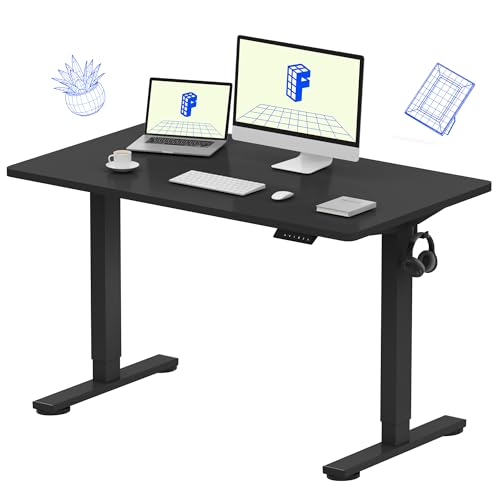
If your pair is 24-inch — two screens spanning 43 to 44 inches across a 48-inch top, a few inches to spare — the width check passes on the 48-inch desks and the choice turns to surface and box. The FLEXISPOT EN1 leads this pair on its top: a single seamless 48 by 24 inch desktop, one inch thick, with no centre seam for a dual setup to straddle — two stands or two arm clamps sit on one continuous surface, and a wrist crossing between screens never crosses a join. Its range is 28.9 to 46.5 inches including the top, its limit is 176 lb, its handset stores four presets, its frame manual documents an anti-collision system, and its single motor is rated under 50 dB. For dual 27s it is the angled version of the same desk: workable, with the depth cost from the first section understood, and arm-mounting recovers some of the desktop the two stands would have taken.
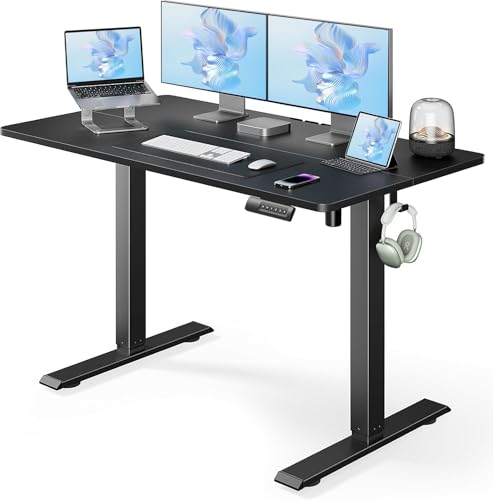
The Marsail answers the same width question from the plainer direction: a 48 by 24 inch Black top on T-shaped steel legs, a 28.3 to 46.5 inch range, four presets, a 176 lb rating, a motor rated under 50 dB at about an inch per second — and a headphone hook and a cable clip as the whole extras list, on a desk whose cables just doubled. Its owner pool is smaller and newer, and it reads honestly mixed at the points a dual setup stresses: assembly feedback splits between easy and confusing, stability is praised at sitting and mid heights with wobble reported at full height, and some owners report the motor straining past about 100 lb despite the rating. That caveat matters more here than in our other guides — a dual setup is precisely the load case where you would rather the rating be boring. On paper the Marsail matches the EN1's capacity; on surface and feedback depth, the EN1 is the calmer dual-monitor buy, and the Marsail the pick when its plainer box is the point.
Fit check: neither desk includes a cable tray, and a dual setup's four travelling cables are the strongest argument in this guide for adding one — a clamp tray under the desktop, sized for the strip both monitors plug into, is planned equipment on either desk, not an accessory. Both desks also stop well short of the VIVO's standing ceiling — a tall dual-screen user checks that against the standing elbow test in our standing desks for tall users guide before width even gets a vote.
The SHW, honestly: the best box for dual cables, the lowest limit for dual weight

The SHW is the tension in this guide made into a desk. For the cable half of a dual setup it is the best-equipped 48-inch desk we review, out of the box: an under-desk cable tray for the strip both monitors plug into, a desktop grommet, cable clamps and two utility hooks included, on a Walnut 48 by 24 inch top with four presets and a storage drawer. Nothing else here ships the doubled-cable answer in the carton. For the load half, its manual states the lowest limit we review — 110 lb — and a dual setup is the one configuration in our standing-desk coverage that can genuinely approach a number like that once two panels, two arms, a machine and speakers are all counted. Its range also tops out at 45 inches, the lowest ceiling here, which the standing elbow test settles independently.
Fit check: the SHW is a dual-monitor desk for a specific, lighter build — two 24-inch panels, a laptop rather than a desktop tower on top, the load sum run from spec sheets and clearing 110 lb with room to spare. That build is real and common, and for it the SHW's box is a genuine advantage. What it is not is the desk to buy hopefully with dual 27s, a tower and a pair of arms uncounted: the width negotiates, the ceiling may bind, and the limit is a manual figure, not a marketing one. Run the three checks; if all three pass, buy it for the box. If the load sum is the one that fails, the EN1 above is the same footprint with 176 lb and the tray bought separately.
When none of the four is the right dual-monitor desk
Three setups outgrow this page, and it hands them the checks rather than a fifth name. Dual 32-inch monitors span roughly 56 to 57 inches across before a laptop asks for anything — past the 48-inch tops entirely and tight even on the VIVO once a machine joins them; a triple-monitor setup is wider again. An ultrawide-plus-second-screen pairing mixes the width arithmetic of our ultrawide monitor arm guide with this page's, and should be added up panel by panel the same way. And a setup whose spec-sheet sum passes 176 lb — a heavy tower, large panels, audio gear on top — is outside every limit we review; put it on a fixed desk, or shop the next class up on its own manual figures, with width, load and range checked in that order.
If your pair is smaller or your room is, the neighbouring guides split the same four desks on their own checks: our standing desks for a home office guide runs the general range-desktop-load comparison, the small spaces guide runs the room math that may rule the 63-inch pick out, and the monitor arms for a home office guide covers the two single arms a dual setup mounts on. This page exists for the readers whose second screen changed the answer the general guides gave.
Dual-monitor standing desk questions, answered honestly
Can a 48-inch desk hold two monitors?
Two 24-inch monitors, yes — a 24-inch 16:9 panel is about 21 inches of viewable width, roughly 21.5 to 22 inches across the bezel, so a pair spans about 43 to 44 inches and sits flat across a 48-inch top with a few inches to spare. Two 27-inch monitors are the borderline case: each spans roughly 24 to 24.5 inches across, so the pair is about as wide as the desk itself and only fits angled inward — and angling spends the depth a 24-inch-deep top needs for the keyboard zone in front of the screens. On stands, the two stands also compete for the same centre of the desktop; on arms, each panel's weight counts against its own arm's range and both clamps need back-edge room. Width is arithmetic you can do before ordering: add the two panels' full widths, bezels included, and compare with the top.
How much weight does a dual-monitor setup put on a standing desk?
Everything on the desktop counts, and a dual setup roughly doubles the screen line of that sum: two panels, two stands or two arms, the laptop or desktop machine if it lives on top, speakers, and whatever else shares the surface. Add the figures from each product's own spec sheet — a panel's weight without its stand is the number the arm guides use — and compare the total with the desk's published limit, taken from the manual where a manual figure exists. In our coverage that comparison is lopsided: the SHW's manual limit is 110 lb while the FLEXISPOT EN1, Marsail and VIVO are rated 176 lb, the VIVO's per its manual. A dual setup is exactly the case where the SHW's conservative number binds first, and the honest move is to run the sum before choosing it, not after the motor starts complaining.
Do I need two monitor arms for a dual-monitor standing desk?
If you arm-mount, yes — every monitor arm we review is a single-monitor arm, so a dual setup uses two of them, each holding one panel inside its own size and weight range. Two singles clamp independently along the back edge, which lets each screen sit at its own height and angle; the desk-side requirements are a back edge with room for two clamps and a top thick and solid enough for both. Our monitor arm guides run the per-panel checks — panel weight without the stand, VESA pattern, and headroom under each arm's rating. Keep the arms' combined load, panels included, inside the desk's own limit from the question above: the arms hold the screens, but the desk holds everything.
Why do two monitors make desk wobble more noticeable?
Because the movement doubles where your eyes live. Any frame movement at standing height shows up at the screens first — they are the tallest, lightest-loaded parts of the setup, out at the ends of stands or arms — and with two panels, both move, and they move against each other at the seam between them, which is the part of the screen area your eyes cross all day. A setup that feels solid with one centred monitor can read as restless with two. Judge stability at your standing height with both screens mounted, not at sitting height with one: our standing desk setup guide's order — heights, feet, screen, cables — exists partly so the wobble check happens with the full setup in place.
What changes for cables when two monitors ride a moving desk?
The count. One monitor sends one display cable and one power cable down from the desk; two monitors send two of each, plus the laptop or dock connection, and every one of them has to travel through the desk's full height range without pulling tight at the top or pooling on the floor at the bottom. The working pattern is the one in our cable management for standing desks guide, doubled: everything that can live on or under the desktop does — a tray under the desk carries the strip both monitors plug into — and a single slack run to the wall, sized at full standing height with slack to spare, carries the rest. Two screens do not need a new system; they need the same system with twice the cables counted into it from the start.
Bottom Line
Run the width arithmetic, then the load sum, then pick
Measure first: add your two panels' full widths, bezels included. At 48 to 49 inches — a pair of 27s — the VIVO 63 x 32 is the only desk we review that takes them flat, with depth and load to spare. At 43 to 44 inches — a pair of 24s — the seamless FLEXISPOT EN1 is the 48-inch pick and the plainer Marsail its capacity-on-paper alternative, feedback caveat attached. The complete-box SHW 48-Inch joins them only for the lighter dual build whose spec-sheet sum clears its 110 lb manual limit — its tray and grommet are the best dual-cable start here, and its limit is the honest reason most dual setups should pass it by. Past two 27s, or past 176 lb all-in, buy nothing here and shop the larger class on its own figures. Running one screen after all? Our standing desks for a home office guide splits the same four desks on the general checks. For the whole setup around the desk, see our ergonomic desk setup guide, or browse all our standing desk reviews.