
Buying Guide — Keyboards
Best Keyboard for a Quiet Home Office
A home office is rarely a room of one's own: it is a partner on a call in the next room, a child asleep down the hall, a microphone that hears your typing more clearly than your voice. All four keyboards we've reviewed are sold as quiet — but they get there by different routes, and one of them carries a rattle caveat its switch name does not warn you about. Three use scissor keys with shallow, laptop-style travel; the fourth is a mechanical board whose quiet is real but conditional.
Affiliate disclosure: Home Office Stack is a participant in the Amazon Services LLC Associates Program. As an Amazon Associate, we earn from qualifying purchases made through links on this page — at no extra cost to you. Picks are research-based, grounded in manufacturer specs and published owner feedback; we don't accept sponsored placements.
Three checks decide how quiet a keyboard really is
First check: the switch makes the sound, so start there. A keyboard's volume is decided before its size, its backlight or its price — it is decided by what happens under each keycap. A switch built with a click mechanism makes a deliberate noise on every press, thousands of presses a day. None of the four boards here does that, but they avoid it two different ways. Three use scissor switches — the shallow-travel mechanism under most laptop keyboards — and their listings describe the result the same way: quiet, laptop-style travel. The fourth is a low-profile mechanical board, and its sound depends entirely on which variant of it you buy: the listing we review is the Tactile Quiet version, a tactile bump you feel with no click bar to hear, while the Clicky version is a different listing entirely. Because these switches are not hot-swappable, the variant chosen at purchase is the sound you live with.
Second check: the board around the keys adds its own noise. Switches are not the only thing a room hears. A long keystroke typed hard lands with a knock the switch never made; a board that flexes or rattles answers every press with a second, cheaper sound; a spacebar is the largest key on the board and the one most likely to sound hollow. This check is where the mechanical board's file stops being simple: reviewers of the MX Mechanical note construction rattle and a hollow-sounding spacebar, neither of which appears in the feedback behind the three scissor boards. Weight is the quiet board's friend here — the full-size boards here run 810 and 828 grams and stay planted rather than skating and tapping across the desk.
Third check: the room, the call and the hour. Quiet is not a property of a keyboard alone; it is a property of a keyboard in a household. A microphone sits closer to your keys than anyone else in the home does, so the board that is inaudible through a wall can still be the loudest thing on your call — one board here puts a dedicated Mic Mute key in its top row, which is a quiet feature of a practical kind. Size is a room question too: the boards here span 11.65 to 17.95 inches wide, and the compact one suits the kitchen-table and living-room desks shared space actually means. And after dark, in a room someone else is using, a backlight is a quiet feature as well — three of these boards are backlit, and the largest one is not, so it asks for room light the others do not. One honesty note before the picks: this guide publishes no decibel figures, because the sources behind our reviews describe these keyboards as quiet rather than rating them in decibels — and a number measured on someone else's desk, with someone else's typing force, would not predict the volume on yours.
The keyboards we've reviewed, compared by quiet checks
| Logitech MX Keys S Wireless Keyboard | The quiet pick — the board our own MX comparison names as the quieter one | 16.94 × 5.18 × 0.81 in · 810 g · full-size with numpad, straight low profile, fixed angle, no tilt feet | Perfect Stroke scissor keys, quiet laptop-style travel · smart backlight · Bluetooth and Logi Bolt receiver included, up to 3 devices · no wrist rest in the box |
| Logitech MX Keys Mini Wireless Keyboard | The shared-desk pick — the same quiet keys on the smallest board, with a Mic Mute key | 11.65 × 5.19 × 0.82 in · 506.4 g · compact, NO numpad, straight low profile, fixed angle, no tilt feet | Perfect Stroke scissor keys, quiet laptop-style travel · Smart Keys row with Dictation, Emoji and Mic Mute · smart backlight · Bluetooth only, no receiver included |
| Logitech Ergo K860 Wireless Ergonomic Keyboard | The quiet ergonomic pick — quiet keys on a split frame, with no backlight | 17.95 × 9.17 × 1.89 in incl. rest · 2.56 lb · split curved full-size, halves do not separate, split angle fixed | Perfect Stroke scissor keys, quiet laptop-style travel · integrated pillowed wrist rest · NO backlight · Bluetooth and Unifying receiver, up to 3 devices |
| Logitech MX Mechanical Wireless Keyboard | The feel pick, conditionally — Tactile Quiet switches, with a rattle caveat | 17.08 × 5.18 × 1.02 in incl. keycaps · 828 g · full-size with numpad, straight low profile, two rear tilt feet | Tactile Quiet low-profile mechanical switches, no click bar, NOT hot-swappable · reviewers note construction rattle and a hollow-sounding spacebar · smart backlight · Bluetooth and Logi Bolt receiver included |
Specs above are as recorded in each product's full review on this site. Read the table's honest shape: the three scissor boards are quiet by mechanism, with nothing in their feedback complicating that; the mechanical board is quiet by variant — the right variant, bought deliberately — and carries the only board-noise caveat in the group.
The quiet pick: Logitech MX Keys S
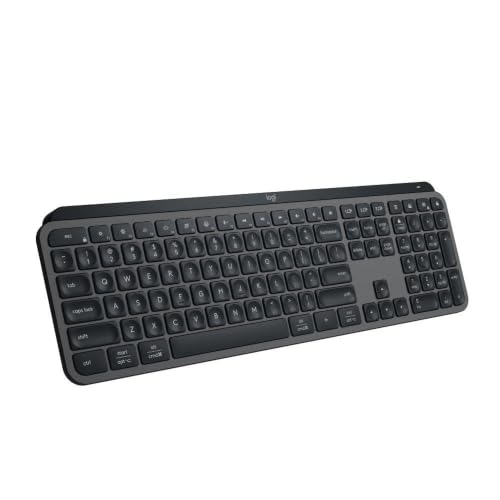
The MX Keys S leads a quiet guide on direct evidence rather than inference: its own listing data describes its Perfect Stroke scissor keys as quiet, with shallow, laptop-style travel, and when our coverage puts the MX boards head to head, the MX Keys S is the one named as the quieter, slimmer MX keyboard against the MX Mechanical. The mechanism is the reason. Scissor keys travel a short distance and land softly; there is no click mechanism and, in the feedback behind our review, no rattle answering the press. At 810 grams the board stays planted, so the desk hears keystrokes and nothing else.
The rest of its file suits a shared home well. The smart white backlight wakes as your hands approach and adjusts to the room, so evening typing does not need a room light switched on. It connects by Bluetooth or the included Logi Bolt receiver to up to three devices, and its rechargeable battery is rated at up to 10 days with the backlight on or up to five months with it off — the backlight is the battery trade, and in a dark shared room it is usually the right one to make. Its spherically dished, matte keycaps are the same quiet scissor design as the Mini's, at full size.
Fit check: full size is the condition — 16.94 inches wide with a numpad, a fixed typing angle with no tilt feet, and no wrist rest in the box. None of those is a noise problem; all of them are fit facts to accept alongside the quiet. Our full review records the backlight, battery and owner feedback behind this section in full.
The shared-desk pick: Logitech MX Keys Mini

The MX Keys Mini is the MX Keys S's quiet mechanism in the body a shared room actually has space for: the same Perfect Stroke scissor keys, described the same way — quiet, laptop-style travel — on a board 11.65 inches wide and 506 grams, with no numpad. On a kitchen table, a living-room desk or a spare-room corner, that footprint is itself a household feature: the board that packs away, or leaves room for the rest of the family's table, disturbs the room less before a key is pressed.
Its most practical quiet feature is not a switch at all. The Mini's Smart Keys row carries Dictation, Emoji and a dedicated Mic Mute/Unmute key — and on calls, muting fast is worth more than any switch choice, because your microphone hears your typing from inches away even when the next room hears nothing. The smart backlight matches the S's evening behaviour, and the rechargeable battery carries the same rating: up to 10 days lit, up to five months unlit. What the small body costs is stated in its file: Bluetooth only in the box, with no receiver included — a Logi Bolt receiver is a separate purchase, and Unifying receivers do not work with it at all.
Fit check: buy it when the desk is shared or small and the numpad is negotiable; a numbers-heavy day is the honest reason to take the S instead, at the same quiet. Our full review covers the receiver gap and its Flow pairing in full.
The quiet ergonomic pick: Logitech Ergo K860

A reader who needs a split board does not have to give up quiet to get one. The Ergo K860's keys are the same family as the MX boards' — Perfect Stroke scissor keys, scooped and matte, described in its specs as quiet with laptop-style travel — set into a split, curved frame with an integrated pillowed wrist rest and front palm lift at 0, -4 and -7 degrees. The sound story and the posture story are the same purchase here: nothing about the ergonomic shape adds a mechanism, a rattle or a click.
Its household trades are size and light, and both are plain. At 17.95 by 9.17 inches including the non-removable rest, and 2.56 pounds, it is the largest board we review — a permanent resident of a dedicated desk, not a board that clears away when the room changes shifts. And it has no backlight at all: the trade that buys its two-AAA battery life of up to 24 months is that after dark it types by room light, where the three backlit boards here do not ask anyone for that. It connects by Bluetooth or the included Unifying receiver to up to three devices.
Fit check: buy it when wrist geometry is the first decision and quiet the second — it answers both, provided the desk is yours alone and the room light is yours to switch on. Our full review records the wrist-rest and owner feedback behind this section in full, and our keyboard guide for wrist comfort reads the same four boards by angle and support.
The feel pick, with its caveat stated first: Logitech MX Mechanical
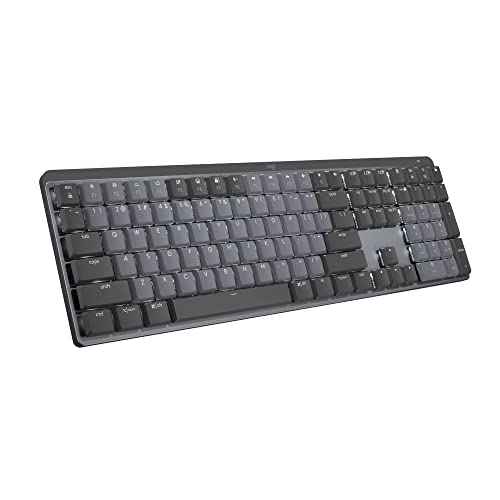
The caveat first, because a quiet guide owes it in that order: reviewers of the MX Mechanical note construction rattle and a hollow-sounding spacebar, and our own MX comparison names the MX Keys S as the quieter board outright. Neither fact disqualifies it — both define what its quiet actually is. The Tactile Quiet switch on this listing is genuinely a quiet design: a low-profile mechanical switch with a tactile bump and no click bar, so the feedback lands in your fingers rather than the room. For a typist who misses mechanical feel and works within earshot of other people, that is a real and honest middle.
Two buying facts decide whether you get that middle. First, the variant is the product: the Clicky and Linear versions are different listings, the switches are not hot-swappable, and the sound is chosen at checkout — a buyer who orders the Clicky board has not bought a quiet keyboard with a setting wrong, but a different keyboard. Second, the rattle caveat scales with typing force in a way scissor boards forgive more easily: a mechanical stroke typed hard gives the board more to answer with. The rest of its file is complete — smart backlight, Bluetooth or the included Logi Bolt receiver, a battery rated at up to 15 days lit or 10 months unlit, and two rear tilt feet.
Fit check: buy it when feel outranks absolute quiet and the room can take a mechanical board's honest volume — a door that closes, a household that is awake. In a room where someone sleeps, the scissor boards above are the answer and this one is the skip. Our full review records the rattle, keycap and owner feedback behind this section in full.
When none of the four is quiet enough
Read the four together and the honest gap is specific: we review no keyboard with dampened or silent-rated switches of the kind enthusiast boards advertise, and none of the four's sources rates it in decibels — so a reader whose requirement is a number, or whose desk sits in the same room as a sleeping baby rather than the next one, is outside what this guide can certify. What we can say is comparative, and it is said above: scissor before mechanical, the right variant before the wrong one, and no rattle caveat anywhere except the one attached to the feel pick.
Before replacing a keyboard for noise, spend nothing and check the two variables no product page controls. The first is typing force: the same board bottomed out hard on every key is a louder instrument than the same board typed lightly, and an afternoon of deliberately lighter typing is a free test of how much of the problem is the board at all. The second is the surface, as general guidance rather than a product claim: a hard, hollow desk passes each landing on as a knock, and a mat layer under the board softens that contact — our desk mat guide covers the desktop mats we have reviewed, either of which sits under a keyboard as readily as under a mouse.
And separate the two audiences your typing has. A household hears through walls and doors, at a distance; a call hears through a microphone at arm's length, live. A board can pass the first test and fail the second, which is why mute discipline — the Mini's dedicated Mic Mute key is the only hardware answer among these four — belongs in a quiet guide at all. Judge the board by the stricter audience if both apply to you.
Quiet keyboard questions, answered honestly
What makes a keyboard quiet?
Mostly the switch. A switch with a click mechanism makes a deliberate sound on every press; the four keyboards reviewed here avoid that two ways. Three use scissor switches with shallow, laptop-style travel, described in their listings as quiet. The fourth uses a low-profile mechanical switch in its Tactile Quiet variant — a tactile bump you feel, with no click bar to hear. Travel and the board around the keys matter after that: shorter travel lands softer than a long mechanical stroke typed hard, and a board that rattles adds its own noise on top of the switches. This guide publishes no decibel figures, because the sources behind our reviews describe these keyboards as quiet rather than rating them in decibels — and a decibel number measured on someone else's desk would not predict yours.
Which reviewed keyboard is the quiet pick?
The Logitech MX Keys S. Its Perfect Stroke scissor keys are described in its own listing data as quiet, with shallow laptop-style travel, and when our coverage compares the MX line directly, the MX Keys S is the board named as the quieter, slimmer MX keyboard against the MX Mechanical. It is a full-size board — 16.94 inches wide with a numpad, 810 grams — with a smart backlight and Bluetooth or the included Logi Bolt receiver for up to three devices. Its trades are a fixed typing angle, no tilt feet, and no wrist rest in the box.
Is the MX Mechanical's Tactile Quiet switch actually quiet?
It is the quiet end of mechanical, with two honest caveats. The Tactile Quiet variant on this listing has a tactile bump and no click bar, so nothing in the switch is designed to make a sound — the Clicky version is a different listing, chosen at purchase, because the switches are not hot-swappable. The caveats: reviewers of this board note construction rattle and a hollow-sounding spacebar, which add board noise the switch itself does not make, and our own comparison names the MX Keys S as the quieter board outright. Buy the Tactile Quiet for feel at a shared-room volume, not as the quietest keyboard here.
Scissor or mechanical for a shared room or a baby's nap schedule?
Scissor, on this evidence. The three scissor boards here — the MX Keys S, the MX Keys Mini and the Ergo K860 — pair quiet switches with shallow travel, so there is less stroke to land hard, and none of them carries a rattle caveat in reviewer feedback. The MX Mechanical Tactile Quiet is a workable shared-room board if mechanical feel is the thing you miss, but it is the conditional pick: the noisier of the MX boards in our comparison, with the rattle and spacebar notes attached. And whichever board you choose, typing force is the variable no specification controls — the same keyboard typed lightly is a different volume from the same keyboard bottomed out on every key.
What else makes typing carry through a home, besides the keyboard?
The desk and the hour, as general guidance rather than a product claim. A hard, hollow desk surface passes keystrokes on as a knock where a mat layer under the keyboard softens the contact — our desk mat reviews cover the two desktop mats we have reviewed, and either sits under a keyboard as readily as under a mouse. On calls, a microphone hears typing from closer than your household does, which is one reason the compact MX Keys Mini's Smart Keys row is worth naming in a quiet guide: it carries a dedicated Mic Mute key alongside its Dictation and Emoji keys. And the largest board here, the Ergo K860 at 17.95 by 9.17 inches, has no backlight — in a shared room after dark, the three backlit boards let you type without turning a room light on.
Bottom Line
Run the three checks, then read the four keyboards in order
Name who has to live with your typing — a partner on calls, a household after dark, a microphone on your own calls — then buy the board whose quiet is built for that audience. For most shared homes the answer is the Logitech MX Keys S: the quietest mechanism we review, at full size, backlit for the evening. Where the desk is shared or small, the MX Keys Mini brings the same quiet keys down to 11.65 inches and adds the Mic Mute key a call-heavy day actually uses. Where wrists choose first, the Ergo K860 keeps the quiet and adds the split shape — at the price of the largest footprint here and no backlight. And the MX Mechanical in Tactile Quiet is the feel answer, bought with its rattle caveat in view and its Clicky sibling left alone. Smaller hands? See our keyboard guide for small hands; wrists? See our keyboard guide for wrist comfort. For the general comparison, see our keyboard guide for working from home, or browse all our keyboard reviews.