
Buying Guide — Mice
Best Mouse for a Glass Desk
A glass-topped desk asks the one question most mice were never specified to answer: can the sensor read this surface at all? Of the four mice we've reviewed, one carries a sensor recorded as tracking on glass, one never reads the desk because its sensor reads a ball instead, and two — the vertical pair — carry no glass figure in their recorded specs at all, so their honest answer is to change the surface, not the mouse. Here are the three checks a glass desk runs, then how the four split.
Affiliate disclosure: Home Office Stack is a participant in the Amazon Services LLC Associates Program. As an Amazon Associate, we earn from qualifying purchases made through links on this page — at no extra cost to you. Picks are research-based, grounded in manufacturer specs and published owner feedback; we don't accept sponsored placements.
Three checks decide it, and glass runs all of them
First check: does the sensor read the surface at all? An optical mouse points by reading tiny texture in the surface under it, over and over, and working out which way the detail moved. Wood, laminate and a desk mat are full of that detail; clear, smooth glass is almost empty of it, which is why a healthy mouse stalls and skips on a glass top — the surface failed the sensor, not the other way round. In our coverage the recorded answer to glass is singular: the Logitech MX Master 3S, whose Darkfield sensor is specified in its review to track on glass of 4 mm minimum thickness, across a 200–8,000 DPI range. The other three mice carry no glass figure in their recorded specs, so this guide claims none for them: on bare glass, treat them as unproven rather than as maybes.
Second check: does the mouse move across the surface? The trackball design deletes the question. The Logitech ERGO M575S never travels — your thumb rolls the ball and its sensor reads the ball, so the material underneath the body never enters the pointing at all. Its entire desk ask is the patch it stands on, 5.28 by 3.94 inches. That matters beyond glass: glass-topped desks are often shallow, display-led pieces in living rooms and spare rooms, with little clear run beside the keyboard, and a mouse that needs no run fits the desk as found. Judge this check by whether your pointing can move to your thumb — for some hands that trade is free, for others it never stops feeling like one.
Third check: if the shape is settled, can the surface change instead? A reader who chose a 57-degree vertical mouse for their forearm should not have to surrender the angle because the desk is glass. Put an opaque surface under the sensor and a standard optical mouse is back on recorded ground. Of the desk mats we've reviewed, the YSAGi comes in sizes from 24 by 14 inches — enough for a keyboard and a proper mouse run — in waterproof PU leather with stitched edges, and the Satechi, at 26.8 by 12.4 inches, is the shallow option for a shallow glass top. Our desk mat guide splits the two in full. A mat is also the honest first move for any mouse you otherwise like, before a replacement enters it.
One caution before the checks harden into a verdict: glass is not one surface. A frosted, etched or textured top hands an optical sensor more detail to read than a polished clear one, which is why the same mouse can half-work on one glass desk — fine in the middle, lost at a clear edge — and fail outright on another. Treat behaviour that comes and goes as the surface telling you it is borderline, not as a mouse dying by instalments. The checks above are written for the hard case, clear polished glass, because a pick that survives that one survives the rest.
The mice we've reviewed, compared by glass-desk checks
| Logitech MX Master 3S Wireless Mouse | The bare-glass pick — the sensor recorded as tracking on glass | Darkfield sensor, 200–8,000 DPI · tracks on glass of 4 mm minimum thickness | Sculpted conventional right-hand · 4.92 × 3.32 in · rechargeable, up to 70 days |
| Logitech ERGO M575S Wireless Trackball Mouse | The no-surface pick — the desk never enters the pointing | Stationary thumb trackball · the sensor reads the ball, not the surface | 5.28 × 3.94 in footprint is the whole desk ask · single AA, up to 18 months |
| Logitech Lift Vertical Ergonomic Mouse | The vertical pick, on a mat — small-to-medium hands | Optical, up to 4,000 DPI · no glass figure in its recorded specs | 57-degree vertical · 4.25 × 2.76 in · single AA, up to 24 months |
| Logitech MX Vertical Ergonomic Mouse | The larger vertical, on a mat — medium-to-large hands | Optical, 400–4,000 DPI · no glass figure in its recorded specs | 57-degree vertical · 4.72 × 3.11 in · rechargeable, up to 4 months |
Specs above are the figures as recorded in each product's full review on this site. Read the table's shape: exactly one bare-glass answer, exactly one answer that ignores the surface entirely, and a pair whose answer is a mat — that split is the whole decision, and everything below is about which of the three routes is yours.
The bare-glass pick: Logitech MX Master 3S

The MX Master 3S is the only mouse in our coverage whose review records a glass specification, and it records it precisely: a Darkfield high-precision sensor, 200–8,000 DPI settable in 50 DPI increments, that tracks on glass of 4 mm minimum thickness. That one line is the whole reason it leads a glass-desk guide — on a glass top of ordinary thickness it points where the other optical mice here stall, with no mat, no pad and nothing added to the desk. If your desk is glass and you want to mouse directly on it, this is the pick, and the check is over before shape or scroll wheels enter it.
The rest of its file is the desk case our full review makes in full: a sculpted conventional body for medium-to-large palms, a MagSpeed wheel that free-spins up to 1,000 lines per second beside a thumb wheel, quiet clicks, seven buttons, and connection to three devices by Bluetooth or the included Logi Bolt receiver, with Flow across computers. Power is rechargeable — rated up to 70 days, with about three hours of use from a one-minute USB-C charge when it does run low. None of that is glass-specific; it is why the one glass-capable sensor in the guide is also a mouse worth having on every other surface, which our general mouse guide compares on the desk checks.
Fit check: the 4 mm floor is a gate, not a detail — glass thinner than that is outside the recorded specification, and this guide does not promise tracking on it. If you cannot confirm your top's thickness, run the mat route in the third check first. The body is right-hand only, with no left-hand version, and small hands are crowded by it, as its review states plainly.
The no-surface pick: Logitech ERGO M575S
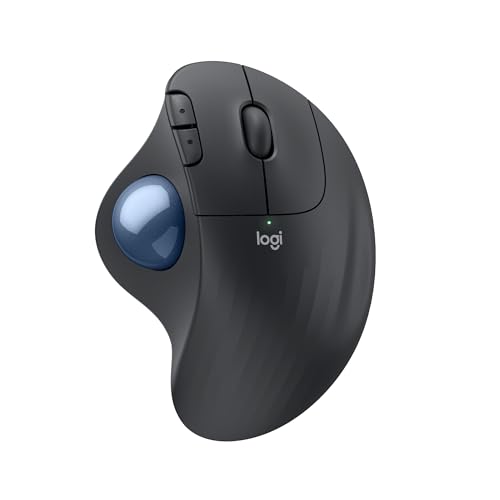
The M575S answers glass by never asking it anything. The body stands still; your thumb rolls the ball; the sensor reads the ball. Its recorded tracking figure — 400 DPI nominal, adjustable up to 2,000 in Logi Options+ — describes ball pointing, not desk tracking, so glass, gloss laminate and a bare tabletop are all the same surface to it: none. For a glass desk in a tight room it offers a second, quieter win as well — the desk only has to fit the body, 5.28 by 3.94 inches, with no clear run beside the keyboard to find or defend.
Its supporting file is built for staying put: a single AA battery rated up to 18 months, quiet clicks, a body certified by United States Ergonomics, and the one receiver detail in our coverage that sounds designed by someone who has lost one — the Logi Bolt receiver stores inside the battery compartment. It connects by that receiver or Bluetooth to one device at a time. Our full review records the owner feedback behind this section, including the ball socket's two-minute clean every few weeks, which is a wipe, not a tool.
Fit check: the pointing work moves to your thumb, and a thumb trackball takes a learning week before fine placement feels precise — owners with thumb discomfort should read that as a warning, not a footnote. It is the largest body we review, though the flattest at 1.89 inches tall, and it is right-hand only.
The vertical pair, honestly: keep the angle, change the surface
The Lift and the MX Vertical share a 57-degree handshake angle and a limit this guide will state once, plainly: both are optical mice — the Lift to 4,000 DPI, the MX Vertical across 400–4,000 — and neither review records a glass figure, so neither gets a bare-glass claim here. On a glass top, expect the standard optical failure from the first check: stalls and skips on a healthy mouse. Their route is the third check — a desk mat under the sensor (the desk mat guide runs the two reviewed mats in full) — after which the choice between them is the hand-size fork their reviews already draw. Neither mouse is being marked down for a specification it never claimed; a glass desk simply isn't the surface their sensors were specified for.

The Logitech Lift is the smaller vertical: 4.25 by 2.76 inches and 4.4 ounces (125 g), shaped for small-to-medium hands, with quiet clicks and a softly textured grip. Its power is the forgettable kind — a single AA battery rated up to 24 months — and it switches between up to three devices by Bluetooth or its included Logi Bolt receiver. On a mat, it is the vertical most glass-desk readers with smaller hands should start from. Our full review records the fit case, and our small-hands guide reads the same body by reach alone.
Fit check: this listing is the right-hand Graphite version; the left-hand Lift is a different listing. It is not rechargeable, which its review counts as a limit and a two-year battery makes easy to live with.
Check price on Amazon → Read our full review →
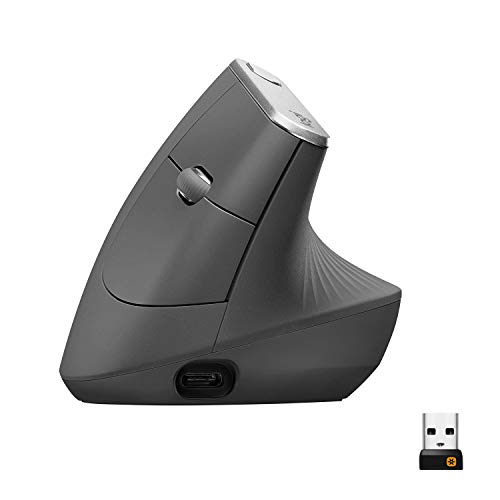
The Logitech MX Vertical is the same angle in the larger body: 4.72 by 3.11 inches and 135 g, for medium-to-large hands the Lift crowds. It adds a cursor-speed switch on top for instant DPI changes inside its 400–4,000 range, and where the Lift runs on a cell, it is rechargeable — rated up to four months, with about three hours from a one-minute charge, and usable wired over USB-C while it charges. It connects to three devices by Bluetooth, its included Unifying receiver, or that cable; note the receiver standard is Unifying, not the Logi Bolt the other three mice here use, which matters if your other gear already runs on Bolt. Our full review covers its desk case, and our wrist-comfort guide picks it for larger hands.
Fit check: right-hand only, and the tallest body we review at 3.09 inches — on a mat it asks for the mat's full depth in front of the keyboard, so measure a shallow glass top before choosing it over the Lift.
When none of the four is the right buy
Start with the thin-glass case, because it defeats the headline pick: if your glass measures under the MX Master 3S's recorded 4 mm floor, you will not use a mat, and you will not move your pointing to a thumb ball, then the product you want is a glass-rated sensor outside the four mice we have reviewed, and this guide will not stretch one of its picks across a specification it does not carry. Left-handed readers face the same total limit as everywhere in our mouse coverage: all four bodies are right-hand in the listings reviewed — the MX Master 3S and MX Vertical have no left-hand version, the trackball has no left version, and the Lift's left-hand version is a different listing from the one reviewed here.
The other honest case is that the mouse was never the problem. If your current mouse suits your hand and your forearm, a reviewed desk mat is the entire fix — the smaller change, made once, under a mouse you already trust — and our desk mat guide is the right next page, not a product section above. And if the glass desk waiting for you is at the other end of a trip rather than in your own room, our travel mouse guide runs the same glass check alongside the bag and battery checks a trip adds.
Before you buy: the two-minute surface test
Two minutes with what is already on the desk settles which route is yours. First, the paper test: put a sheet of ordinary paper under the mouse you already own. If it points perfectly on paper and stalls on the bare top, the surface is the problem and the mouse is healthy — that single result routes you to a mat, or confirms that a glass-rated sensor is the purchase. If it stalls on paper too, the mouse itself wants attention before any desk decision. Second, measure the glass: at the desk's edge, or from its specification sheet, find the top's thickness. Four millimetres or more keeps the MX Master 3S inside its recorded specification; under that, or unmeasurable, the honest routes are the trackball or the mat. Third, if the mat route wins, measure the depth the top can spare in front of the keyboard — the Satechi's 12.4 inches is the shallow fit, the YSAGi's smallest size asks for 14. Run the test before the order, and the guide above becomes a confirmation instead of a gamble.
Glass desk mouse questions, answered honestly
Which mouse works on a glass desk?
Of the four mice we review, the Logitech MX Master 3S is the one recorded as working on bare glass: its Darkfield sensor is specified to track on glass of 4 mm minimum thickness, across a 200 to 8,000 DPI range. The Logitech ERGO M575S trackball also works at a glass desk, by a different route — it never moves, so its sensor reads the ball and the desk surface never enters the pointing. The two vertical mice, the Lift and the MX Vertical, carry no glass figure in their recorded specs, so this guide does not claim bare-glass tracking for them; on glass they belong on a desk mat.
Why does my mouse not work on my glass desk?
A standard optical mouse points by reading tiny texture and detail in the surface under it, many times a second, and working out which way that detail moved. Clear, smooth glass gives the sensor almost no detail to read, so the pointer stalls, skips or drifts even though the mouse is healthy. It is a surface problem, not a broken mouse — the same mouse usually works perfectly the moment a mat, a pad or even a sheet of paper goes under it. Sensors specified for glass, like the Darkfield sensor in the MX Master 3S, are the exception, and they state a minimum glass thickness — 4 mm in that case.
Will a desk mat fix a mouse on a glass desk?
Yes — a mat puts an opaque, textured surface between the sensor and the glass, which is all a standard optical mouse needs. Of the desk mats we review, the YSAGi comes in sizes from 24 by 14 inches, enough for a keyboard and a mouse run, in waterproof PU leather with stitched edges; the Satechi is 26.8 by 12.4 inches, the shallower option for a shallow glass top. A mat is also the honest first move if your current mouse otherwise suits your hand: change the surface before you change the mouse.
Does a trackball mouse work on a glass desk?
Yes, and the glass is irrelevant to it. The Logitech ERGO M575S never moves on the desk: your thumb rolls the ball and its sensor reads the ball, so the surface underneath — glass, gloss laminate, a tray table — never enters the pointing. The desk only has to fit the body, 5.28 by 3.94 inches. The trades are the thumb doing the pointing work, a learning week before fine placement feels precise, and a right-hand-only body.
How thick does the glass have to be for the MX Master 3S?
Four millimetres, minimum, as recorded in its review — that is the floor of the Darkfield sensor's glass specification, not a typical value. Thinner glass is outside the recorded spec, so this guide does not promise tracking on it. If you do not know your desk's glass thickness, or it measures under 4 mm, the reliable routes are the ERGO M575S trackball, which ignores the surface, or any of the four mice on a desk mat.
Bottom Line
Name your route — bare glass, no surface, or a mat — then pick
A glass desk offers a mouse three honest routes, and the right pick is the one that takes yours. Bare glass, on a top of 4 mm or more: the Logitech MX Master 3S, the one sensor in our coverage recorded as tracking on glass. No surface at all: the Logitech ERGO M575S, whose sensor reads a ball and never the desk. Keep the angle, change the surface: the Logitech Lift for small-to-medium hands or the Logitech MX Vertical for larger ones, each on a desk mat from our desk mat guide. For the full desk-side comparison of the same four, see our mouse guide for working from home, or browse all our mouse reviews.