
Buying Guide — Mice
Best Mouse for Two Computers
A work laptop and a personal machine on one desk usually means two mice, or one mouse endlessly re-paired. Three of the four mice we've reviewed end that: each pairs with up to three devices, hops between them with Easy-Switch, and can carry the pointer — and copy-paste — across both machines with Logitech Flow. The fourth pairs with one machine at a time, and this guide names it as the skip rather than dressing it up. Because the switching headline is shared three ways, the decision is made by three checks: the switching system each mouse actually has, the receiver standard in its box, and the power model you live with when the mouse is switched all day.
Affiliate disclosure: Home Office Stack is a participant in the Amazon Services LLC Associates Program. As an Amazon Associate, we earn from qualifying purchases made through links on this page — at no extra cost to you. Picks are research-based, grounded in manufacturer specs and published owner feedback; we don't accept sponsored placements.
Three checks decide it, and a two-computer desk runs all of them
First check: the switching system each mouse actually has. Multi-device switching is not one feature with four names here — it is present in three mice and absent in the fourth, and that split is the guide. The Logitech MX Master 3S, the Logitech MX Vertical and the Logitech Lift each pair with up to three devices and move between them with Easy-Switch, so channel one can be the work laptop and channel two the personal machine, with a third channel to spare. All three also support Logitech Flow cross-computer control in Logi Options+: move the pointer off the edge of one screen and it arrives on the other, with copy-paste travelling between the machines. The Logitech ERGO M575S is built differently: it connects by its Logi Bolt receiver or Bluetooth to one machine at a time, with no Easy-Switch and no Flow. Re-pairing it whenever the other computer wakes is not a two-computer system.
Second check: the receiver standard in the box. Bluetooth pairing avoids receivers entirely, and where both machines allow it, that is the cleanest channel plan. Where a receiver is the route — a locked-down work laptop, a desktop with no Bluetooth, a port that is simply more reliable — the standards split the three switching mice. The Lift and the MX Master 3S ship with a Logi Bolt receiver, Logitech's newer USB-A standard. The MX Vertical ships with the older Logitech Unifying receiver instead, not Bolt, and the two standards are not interchangeable: the MX Master 3S records plainly that Bolt is not compatible with Unifying receivers. So one receiver cannot serve a Bolt keyboard and an MX Vertical together — the vertical needs its own port on a receiver route, or Bluetooth on each machine. The M575S is Bolt too, but single-channel.
Third check: the power model, on a mouse that never rests. A two-computer mouse is switched all day, so how it is powered stops being a footnote. Two of the switching mice recharge: the MX Master 3S is rated at up to 70 days, with about three hours of use from a one-minute quick charge over USB-C; the MX Vertical is rated at up to four months, with about three hours from a one-minute charge, and it works wired over USB-C while it charges. The Lift takes the opposite route: a single AA battery rated at up to 24 months, not rechargeable — no cable in its routine, just a battery every couple of years. The M575S shares that AA pattern, at up to 18 months.
One caution: switching the pointer is only one third of a two-computer desk. The keyboard still needs its own multi-device answer — our keyboard guide for two computers runs the same checks for it — and the monitor still needs its own input, hub, dock or KVM answer.
The mice we've reviewed, compared by two-computer checks
| Logitech MX Master 3S Wireless Mouse | The two-computer default — Bolt, Flow and thumb controls | Up to 3 devices with Easy-Switch · Logitech Flow · included Logi Bolt receiver or Bluetooth · Bolt NOT compatible with Unifying | Sculpted conventional right-hand · 4.92 × 3.32 in · rechargeable, up to 70 days, 1-minute charge for about 3 hours |
| Logitech MX Vertical Ergonomic Mouse | The ergonomic two-computer pick — with the Unifying caveat | Up to 3 devices with Easy-Switch · Logitech Flow · included Unifying receiver (not Bolt), Bluetooth, or wired USB-C | 57-degree vertical, medium-to-large hands · 4.72 × 3.11 in · rechargeable, up to 4 months, works wired while charging |
| Logitech Lift Vertical Ergonomic Mouse | The small-hand two-computer pick — 57 degrees on an AA battery | Up to 3 devices with Easy-Switch · Logitech Flow · included Logi Bolt receiver or Bluetooth | 57-degree vertical, small-to-medium hands · 4.25 × 2.76 in · single AA, up to 24 months, not rechargeable |
| Logitech ERGO M575S Wireless Trackball Mouse | The honest skip for two computers — one machine at a time | ONE device at a time · Logi Bolt receiver or Bluetooth · no Easy-Switch, no Flow | Stationary thumb trackball · 5.28 × 3.94 in footprint · single AA, up to 18 months |
Specs above are as recorded in each product's full review on this site. Three mice share the switching row and differ on receiver and power; one leaves the row empty. Everything below is about which switching mouse is yours, and why the fourth still earns its place elsewhere.
The two-computer default: Logitech MX Master 3S

The MX Master 3S is the default because it clears all three checks on the strongest terms. On the switching check it pairs with up to three devices by Bluetooth or the included Logi Bolt receiver, moves between them with Easy-Switch, and supports Logitech Flow across computers — pointer and copy-paste travelling together in Logi Options+, which is the version of two-computer work that stops feeling like two separate desks. On the receiver check its box contains the current standard: Bolt, the receiver a newer Bolt keyboard can share a desk plan with, stated with its own limit in the same breath — Bolt is not compatible with Unifying receivers, so an older Unifying receiver in a drawer does not count as its spare.
On the power check it is the shorter-rated rechargeable of the two here, and the guide will not round that up: up to 70 days on a full charge, against the MX Vertical's four months. What softens the gap is the recovery — about three hours of use from a one-minute USB-C quick charge — so a mouse that wakes flat on the morning two machines both need it is a minute of cable, not a dead channel. The rest of its file is why the default is also worth having on either machine alone: a sculpted body for medium-to-large palms, a MagSpeed wheel that free-spins up to 1,000 lines per second beside a thumb wheel, quiet clicks, and seven buttons. Its full review makes the scroll-heavy case in full.
Fit check: the body is right-hand only, with no left-hand version, and small hands are crowded by it, as its review states plainly. If the hand that will use it on both machines is small, the default is the wrong shape however clean its switching is — read the Lift section below as your starting point instead.
The ergonomic two-computer pick: Logitech MX Vertical
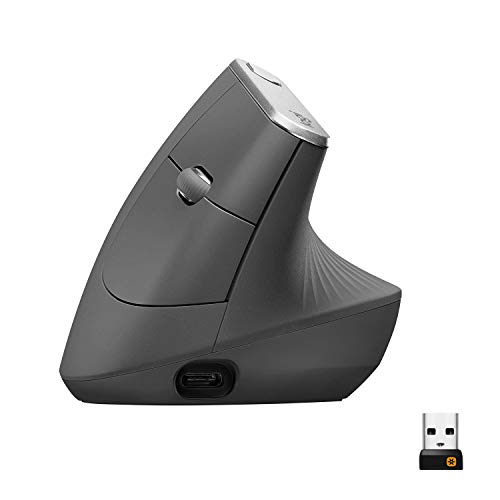
The MX Vertical brings the same switching system to a different hand: up to three devices with Easy-Switch, Logitech Flow across computers, and a 57-degree handshake angle in the larger vertical body — 4.72 by 3.11 inches and 135 g, for medium-to-large hands. If the reason for one mouse across two computers is that your forearm has chosen this angle and you want it on both machines, this is the pick, and its switching needs no apology. Its caveat belongs first-order, in the receiver check: the receiver in its box is the older Logitech Unifying receiver, not Logi Bolt. One receiver cannot serve a Bolt keyboard and this mouse together, so a receiver-based desk gives the vertical its own USB port, and a shared-receiver plan built on Bolt points back to the two Bolt mice in this guide. Bluetooth pairing on both machines avoids the question entirely.
Its power check is the strongest among the rechargeable switching mice: rated at up to four months, with about three hours from a one-minute quick charge — and one detail no other mouse here matches, it works wired over USB-C while it charges. A cursor-speed switch changes DPI instantly inside its 400–4,000 range. Our full review covers its desk case in full.
Fit check: right-hand only, and the tallest body we review at 3.09 inches. Plan the receiver honestly before ordering: Unifying in the box, its own port or Bluetooth per machine, and no Bolt sharing with a keyboard.
The small-hand two-computer pick: Logitech Lift

The Lift is the same switching story in the smaller vertical body: up to three devices with Easy-Switch, Logitech Flow across computers, and connection by Bluetooth or the included Logi Bolt receiver — the current receiver standard, shared with the MX Master 3S, so a Bolt keyboard and this mouse belong to the same receiver family even though each still uses its own channel plan per machine. The shape is the reason it exists as a separate pick rather than a footnote: a 57-degree handshake angle at 4.25 by 2.76 inches and 4.4 ounces (125 g), shaped for small-to-medium hands, with quiet clicks, a softly textured grip and a snug thumb rest. On both computers, that smaller body is the one the hand actually closes around.
Its power check is the simplest in the guide: a single AA battery rated at up to 24 months — the longest figure among the switching three — and not rechargeable, which a two-year battery makes easy to live with. Our full review records the fit case, and our small-hands guide reads the same body by reach alone.
Fit check: this listing is the right-hand Graphite version; the left-hand Lift is a different listing. Large hands will crowd the compact body, and Logitech's larger vertical — the MX Vertical above — is the honest alternative for them.
The honest skip for two computers: Logitech ERGO M575S
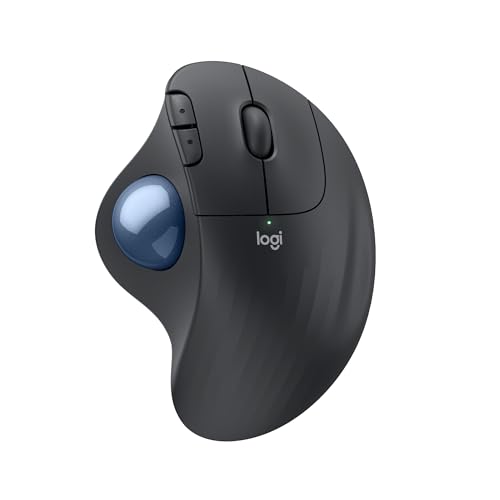
The ERGO M575S is in this guide to be ruled out clearly, because its other strengths make it tempting to assume the switching is there too. It is not: in our recorded specs it connects by its included Logi Bolt receiver or Bluetooth Low Energy to one machine at a time — no Easy-Switch channels, no Logitech Flow, no second pairing waiting on another channel. A two-computer reader who buys it gets a fine mouse for whichever computer it is paired with, and a re-pairing chore every time the work moves. That is the whole verdict for this guide's question, and it is stated without marking the mouse down for a feature it never claimed.
At a one-computer desk it remains the no-surface answer in our coverage: the body never moves, your thumb rolls the ball, and it needs no clear run beside the keyboard — the pick our glass desk guide chose when the surface was the problem. Its AA battery is rated at up to 18 months, its Bolt receiver stores inside the body, and our full review makes that one-computer case in full.
Fit check: buy it for one computer, a tight desk or a surface no optical mouse can read — not for a desk where the pointer has to follow you between two machines. It is right-hand only, and the pointing work moves to your thumb.
When none of the three switching mice solves your desk
Start with handedness, because it limits the whole guide: all three switching mice are right-hand in the listings reviewed — the MX Master 3S and the MX Vertical have no left-hand version, and the Lift's left-hand version is a different listing from the one reviewed here. A left-handed two-computer reader is outside what these picks can honestly cover. The second gap is the locked-down corner the receiver check points at: if the second machine forbids Bluetooth pairing and has no free USB port for a receiver, none of the three has a channel left to arrive on — check that one machine's pairing rules and free ports before choosing among them, because Easy-Switch cannot route around a port that is not there.
The third gap is the rest of the desk: switching the mouse does not switch the monitor or a non-multi-device keyboard. Pair this guide with our keyboard guide for two computers for the typing third, and give the display its own answer — the monitor's input button, a hub or dock, or a KVM, none of which this guide reviews.
Before you buy: the two-minute channel plan
Two minutes with the two machines in front of you settles which switching mouse is yours. First, write the channel plan down: machine one and machine two, each with its route — Bluetooth pairing, or a receiver in a named free port. That single list exposes the MX Vertical's Unifying caveat if a Bolt keyboard is already in the plan, and it exposes a locked-down laptop with no route at all before money moves. Second, check the software half: Flow runs in Logi Options+, so confirm both machines can run it if copy-paste travel is the feature you are buying for; without it, Easy-Switch hopping remains. Third, match the hand to the body — conventional, larger vertical, or smaller vertical — because the mouse you switch is the mouse you hold on both computers.
Two-computer mouse questions, answered honestly
Can one mouse switch between two computers?
Yes — three of the four mice we review can. The Logitech MX Master 3S, the Logitech MX Vertical and the Logitech Lift each pair with up to three devices and move between them with Easy-Switch, so a work laptop on one channel and a personal machine on another is the ordinary setup. The fourth mouse, the Logitech ERGO M575S trackball, pairs with one machine at a time by its Logi Bolt receiver or Bluetooth, with no Easy-Switch and no multi-device channel to hop to — for two computers it is the honest skip in this guide, however good it remains at a one-computer desk.
What is Logitech Flow, and which of these mice support it?
Logitech Flow is cross-computer control that runs in Logi Options+: move the pointer off the edge of one screen and it arrives on the other computer, and copy-paste can travel with it, so two machines feel closer to one long desk. In our recorded specs, the MX Master 3S, the MX Vertical and the Lift each support Flow across computers. The ERGO M575S does not enter that picture, because it pairs with one machine at a time. Flow is an addition to Easy-Switch channel switching, not a replacement for pairing: each computer still needs its own Bluetooth pairing or receiver channel first.
Bolt or Unifying — does the receiver standard matter for two computers?
It decides whether one receiver can serve your whole desk, and the two standards are not interchangeable. The Lift and the MX Master 3S ship with a Logi Bolt receiver, and the MX Master 3S records plainly that Bolt is not compatible with Unifying receivers. The MX Vertical ships with the older Unifying receiver instead, not Bolt — so a Bolt keyboard and an MX Vertical cannot share one receiver, and the vertical needs its own USB port or a Bluetooth channel on each machine. The ERGO M575S is also Bolt, but single-channel, so its standard does not rescue its two-computer case. Pairing both machines over Bluetooth avoids receivers entirely, where both machines allow it.
How do the four compare on power when the mouse is switched all day?
Two recharge over USB-C, and two run on a single AA battery. The MX Master 3S is rated at up to 70 days, with about three hours of use from a one-minute quick charge. The MX Vertical is rated at up to four months, with about three hours from a one-minute charge, and it works wired over USB-C while it charges. The Lift takes one AA battery rated at up to 24 months and is not rechargeable. The ERGO M575S takes one AA rated at up to 18 months — the longest-looking numbers belong to the AA mice, but only the Lift pairs that power model with three-device switching.
Will switching the mouse also switch my keyboard and monitor?
No. Easy-Switch and Flow move the pointer — and, with Flow, copy-paste — between computers; neither switches a monitor input, and neither moves a keyboard that is not itself a multi-device keyboard. A two-computer desk is three separate switching problems: the pointer, which this guide solves, the typing, which a multi-device keyboard solves, and the picture, which still needs the monitor input button, a hub or dock, or a KVM. Readers pairing both halves should read this guide alongside our keyboard guide for two computers, and plan the display answer separately.
Bottom Line
Run the three checks, then read the three switching mice in order
Ask first whether the mouse actually switches — three do, the trackball does not — then which receiver standard its box contains, then how you want to power it. For most two-computer desks the answer is the Logitech MX Master 3S: Bolt receiver in the box, Flow across both machines, and thumb controls for scroll-heavy work. Where the forearm chooses first and its own receiver port or Bluetooth is planned for, the Logitech MX Vertical brings the 57-degree angle, the longer rechargeable rating and a cable it can work through while charging — with its Unifying receiver stated plainly. Where the hand is small-to-medium and a two-year AA battery beats any charging routine, the Logitech Lift is the pick on the same Bolt-and-Flow footing. The Logitech ERGO M575S stays the one-computer, no-surface answer from our glass desk guide. Pairing a keyboard across the same two computers instead? See our keyboard guide for two computers, which runs the receiver and battery checks for the typing half. For the full desk-side comparison of the same four, see our mouse guide for working from home, or browse all our mouse reviews.