
Buying Guide — Keyboards
Best Keyboard for Travel
A laptop keyboard is the one most travellers settle for, and the external board is the one they leave behind — usually because the board at home is a full-size desk object that was never sized for a bag. The four keyboards we've reviewed split sharply on exactly that question. One is a compact board that is materially smaller than the rest; the other three are full-size boards you carry for what they give you at the destination, not for how they pack. This guide is decided by three travel checks — packed size and weight, power away from a charger, and the connection waiting at the other end.
Affiliate disclosure: Home Office Stack is a participant in the Amazon Services LLC Associates Program. As an Amazon Associate, we earn from qualifying purchases made through links on this page — at no extra cost to you. Picks are research-based, grounded in manufacturer specs and published owner feedback; we don't accept sponsored placements.
Three checks decide a keyboard for travel
First check: packed size and weight, because the bag is the first desk. A travel keyboard does not start at the destination desk; it starts in the same bag as the laptop, its charger and everything else the trip needs. Width is the hard dimension — a board wider than the laptop sleeve's world either rides diagonally, sticks out, or gets left behind — and depth and weight decide how much of the bag it argues with on the way. The honest shape of this guide is visible right here: only one of the four boards reviewed is compact, at 11.65 inches wide with no numpad. The other three are full-size boards at roughly 17 inches, differing in depth and weight rather than in kind. A travel guide that ranked all four as equally portable would be lying in its first paragraph; this one names the compact board as the size answer and judges the rest on whether what they offer at the destination is worth their size in the bag.
Second check: power away from home, where the backlight sends the bill. Three of these boards recharge over USB-C, and their published ratings swing enormously on one habit: days with the smart backlight on, months with it off. At home that swing is an inconvenience with a charger in the drawer. On a trip it is a packing decision — the charging cable travels with the board, or the board's working life is whatever the backlight leaves of it — plus a behaviour decision about lit keys in bright airport lounges where the light buys nothing. The fourth board takes the opposite route: replaceable AAA batteries rated in years, and no backlight to spend them on. Neither model wins in the abstract; the right one matches the trip. A long weekend forgives any of them. A long trip on one charge forgives only the board whose power you planned.
Third check: the connection at the other end, which may not be your machine. Travel typing is not always on your own laptop. It is the client machine you may not configure, the borrowed laptop in a rented office, the home machine at the far end paired weeks ago and forgotten. Bluetooth pairing is a minute's work where you are allowed to pair, and a dead end where pairing is managed or forbidden. Then the small USB receiver in the box is the connection — if there is one in the box. Two of these boards include a Logi Bolt receiver and one includes a Logitech Unifying receiver; Bolt and Unifying are not compatible with each other. One board includes no receiver at all and offers no wired typing behind its charging cable. That gap is invisible on a desk at home and decisive in a room you do not control, so this guide states it in the first section of the board it affects, not in a footnote.
The keyboards we've reviewed, compared by travel checks
| Logitech MX Keys Mini Wireless Keyboard | The travel pick — the only materially smaller board, with the receiver caveat stated first | 11.65 × 5.19 × 0.82 in · 506 g (17.86 oz) · compact, NO numpad, straight low profile | Bluetooth ONLY in the box — no USB receiver included, no wired typing · works with a Logi Bolt receiver bought separately, NOT compatible with Unifying · rechargeable USB-C, up to 10 days lit or 5 months unlit, works while charging |
| Logitech MX Keys S Wireless Keyboard | The full-size pick for longer stays — receiver included, familiar layout at the destination | 16.94 × 5.18 × 0.81 in · 810 g (1.79 lb) · full-size, 104 keys with numpad, straight low profile | Bluetooth LE or included Logi Bolt receiver, up to 3 devices with Easy-Switch · Bolt NOT compatible with Unifying · rechargeable USB-C, up to 10 days lit or 5 months unlit, works while charging |
| Logitech MX Mechanical Wireless Keyboard | The feel pick for longer stays — mechanical switches and the longest rechargeable rating | 17.08 × 5.18 × 1.02 in · 828 g · full-size with numpad, straight low profile | Bluetooth LE or included Logi Bolt receiver, up to 3 devices with Easy-Switch · Bolt NOT compatible with Unifying · rechargeable USB-C, up to 15 days lit or 10 months unlit, cable charges only |
| Logitech Ergo K860 Wireless Ergonomic Keyboard | The honest skip for travel — the largest board here, carried only when the shape must travel | 17.95 × 9.17 × 1.89 in incl. rest · 2.56 lb · split curved full-size with numpad and integrated pillowed wrist rest | Bluetooth LE or included Logitech Unifying receiver, up to 3 devices with Easy-Switch · NO backlight · 2 × AAA batteries, rated up to 24 months — nothing to charge |
Specs above are as recorded in each product's full review on this site. Read the table's honest shape: the depth and weight columns separate the one travel-sized board from three desk-sized ones, and everything after that — the receiver, the battery, the layout waiting at the destination — is about which full-size compromise, if any, a given trip justifies.
The travel pick: Logitech MX Keys Mini

The MX Keys Mini is the travel pick because it is the only board here that was sized for the bag in the first place. At 11.65 by 5.19 inches and 506 grams, with no numpad, it is roughly five inches narrower and about forty percent lighter than the full-size boards in this guide — the difference between a keyboard that slides in beside a laptop and one that reorganises the bag around itself. The size is not bought with toy keys: our review records the same spherically dished, quiet scissor keys and smart white backlight as the larger MX Keys S, in the smaller frame. What the destination desk loses is the numpad, and what it gains is the thing compact boards exist for — the mouse pulled in close beside the board, on a hotel desk or a rented bench where width is the scarce resource.
Its power story suits ordinary trips well, with the backlight named as the variable. The rechargeable battery is rated at up to 10 days with the backlight on or up to five months with it off, and the board works while it charges over USB-C — so the practical rule is the one this guide gives every rechargeable board: the cable travels with the board, and the backlight gets switched off in bright rooms where it buys nothing. A traveller who follows both halves of that rule stops thinking about the battery entirely, which is the most a rechargeable travel board can offer.
The caveat belongs in the pick section, not after it: the Mini is Bluetooth only in the box. No USB receiver is included, the charging cable carries no wired typing mode, and while the board works with a Logi Bolt receiver, that receiver is bought separately and Unifying receivers are not compatible with it. On your own laptop this is a one-minute pairing and a closed question. On a machine you do not control, it can be the whole decision — so the traveller whose trips involve client or locked-down laptops should either carry the separate Bolt receiver as part of the kit or take the full-size pick below, whose receiver is in its box. Judged on machines you own, the Mini is the clear travel answer; judged on machines you borrow, its caveat is priced in or it is not the pick.
Fit check: buy it when the keyboard travels in the same bag as the laptop, your own machine is the one being typed on, and no numpad is a fair trade for five inches of bag width. Our full review records the receiver gap, backlight and owner feedback behind this section in full.
The full-size pick for longer stays: Logitech MX Keys S
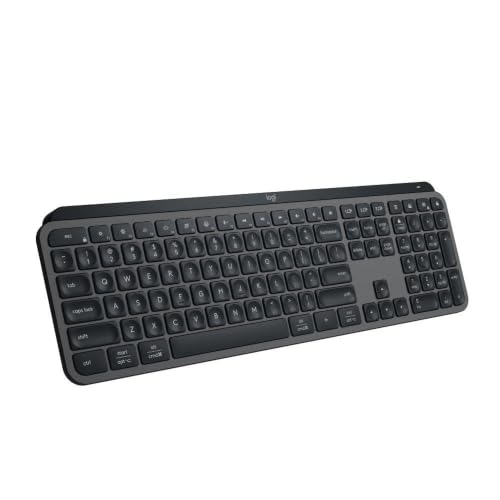
The MX Keys S is the answer for the trip that stops being a trip: the week-plus stay, the second base, the project on site, where the board travels once and then works a full desk at the other end. Carrying it is a deliberate trade, stated plainly — at 16.94 by 5.18 inches and 810 grams it is a full-size board in the bag, wider than many laptop sleeves want to be. What the size buys at the destination is the complete home layout: 104 keys with a numpad, the dished scissor keys owner feedback rates as the quiet, refined end of this guide, and nothing relearned on arrival. For a short hop that trade rarely pays; for a working stay, arriving to your exact board is the point of bringing one at all.
On the connection check it is the most forgiving board here. Bluetooth Low Energy covers your own machines, and the included Logi Bolt receiver covers the one that refuses pairing — a client or managed laptop gets a connection out of the box, on the newer standard, with up to three devices on Easy-Switch keys if the trip involves more than one machine. Its key legends are labelled for both Windows and Mac, so the board reads correctly under your fingers whichever system the destination runs. Bolt is not compatible with Unifying receivers, which matters only to a drawer of older receivers; the receiver this board needs is the one in its box.
Its battery check matches the Mini's exactly: rechargeable over USB-C, rated at up to 10 days with the smart backlight on or up to five months off, working while it charges. On a longer stay that is the easiest power model of the rechargeable three to live with, because the destination has a desk, an outlet and a routine — the cable lives there, the board tops up while you type, and the backlight's proximity wake earns its draw in a dim room in a way it never does in an airport. The board that is worst-sized for the bag is, on arrival, the one that asks the fewest further questions.
Fit check: buy it when the stay is long enough that the destination desk matters more than the bag, a numpad and full layout are part of the work, and a receiver in the box must cover machines you do not control. Our full review records the backlight, battery and owner feedback behind this section in full.
The feel pick for longer stays: Logitech MX Mechanical
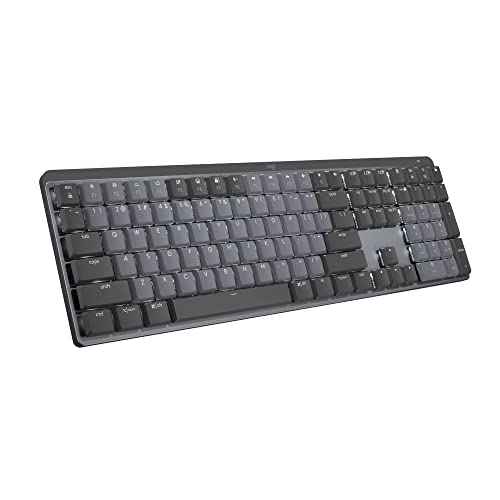
The MX Mechanical travels for one reason: the typist who does not want to spend a working stay on a laptop keyboard or a scissor board, and is willing to carry a full-size mechanical board to avoid it. At 17.08 by 5.18 inches and 828 grams it packs no better than the MX Keys S — marginally heavier, a touch thicker — so this is a destination decision wearing a travel guide's clothes. What arrives is the low-profile Tactile Quiet mechanical feel our review records, chosen at purchase and not hot-swappable, on a full-size frame with a numpad. A traveller who does not care about switch feel gains nothing here over the pick above; a traveller who does, gains the exact board they would have chosen at home.
Its connection story matches the full-size pick's, with one destination-specific note carried from our catalog. Bluetooth Low Energy or the included Logi Bolt receiver, up to three devices, Bolt not compatible with Unifying — the locked-down-laptop route is the same. The note: on a FileVault-enabled Mac, Bluetooth may not enter your password at startup, so use the Bolt receiver for that step. Trips are exactly where that surfaces — a Mac that reboots in a hotel room, at the one moment Bluetooth cannot help — and the fix is simply to keep the receiver with the board rather than in a drawer at home.
On power it is the strongest of the rechargeable boards: rated at up to 15 days with the smart backlight on or up to 10 months with it off. The condition travels with it too — the USB-C cable is for charging only, and the board stays wireless while plugged in, so there is no wired fallback at the destination either. Its honest footnote from reviewer feedback belongs in a travel guide as much as a desk one: construction rattle and a hollow-sounding spacebar are noted against this board, which matters more, not less, when the destination is a shared room or a quiet office — our quiet home office guide reads the same four boards by sound if the room at the other end is shared.
Fit check: buy it when mechanical feel is worth a full-size board in the bag, the stay is long enough to enjoy it, and the Bolt receiver travels with it for the FileVault step and any machine that will not pair. Our full review records the switch, rattle and owner feedback behind this section in full.
The honest skip for travel: Logitech Ergo K860

Every travel guide owes its reader one plainly named skip, and here it is the largest board we have reviewed. The Ergo K860 measures 17.95 by 9.17 inches — the depth is the disqualifier as much as the width, nearly double the other boards', because the pillowed wrist rest is integrated into the frame and does not come off — and it weighs 2.56 pounds before anything else enters the bag. Its split, curved shape, the thing that makes it the ergonomic pick at home, is a rigid shape that does not fold, flatten or nest against a laptop. It also has no backlight, so the dim room at the other end is lit by whatever the room offers. None of this is a criticism of the board; it is a description of a desk instrument being asked to be luggage.
Its one travel virtue is genuine, and this guide records it rather than skipping past it: power. Two AAA batteries rated at up to 24 months mean the K860 is the only board here whose battery never enters the packing list, the charging plan or the trip at all. Its connection is likewise complete as shipped — Bluetooth Low Energy or the included Logitech Unifying receiver, the older standard, up to three devices — so on the second and third checks of this guide it actually passes. It fails the first check by enough that the other two rarely get a hearing, which is exactly how travel gear decisions usually go: the bag votes first.
The exception is narrow and real. The traveller whose wrists have already chosen this split shape — who types at home on the K860 because the alternatives cost them comfort — and who is travelling by car, or staying long enough that the board travels once and then sits for weeks, is not making a mistake by carrying it. For that reader the calculation reverses: the board is big once, in the car, and then the destination desk has the exact geometry their hands know, palm lift and all, with nothing to charge for the whole stay. What this guide advises against is the default, not the exception — the K860 in a carry-on, for a short trip, next to a laptop it outweighs, because it was the board that happened to be at home.
Fit check: buy it for travel only when the split shape itself is the requirement, the journey is by car or the stay is long, and its size travels once rather than daily. For every other trip it is the skip — our full review records the wrist-rest design and owner feedback that make it the right board at home.
When none of the four belongs in the bag
Start with the trip most travellers actually take: short, light and mostly meetings, where the honest answer may be the laptop keyboard itself. None of the four boards reviewed here folds, and this guide recommends no folding board — folding keyboards exist as a category, but no folding model has been reviewed on this site, so their key feel, sizes and reliability are criteria a reader would judge elsewhere, not picks this guide invents. If the bag check fails for all four and the typing load is light, travelling without an external board is a legitimate verdict, not a failure of the guide.
The second gap is protection, stated openly: none of the four boards' recorded box contents includes a case or sleeve. Owners who travel with any of them are putting a bare board in a bag alongside chargers and hard objects, and the board that survives that best is a question this site's catalog does not answer — no case has been reviewed here, and no durability ranking is claimed. A reader for whom the board will travel weekly, in checked or crowded bags, should treat protection as a separate purchase judged on fit for the specific board's dimensions, which are stated in the table above precisely so that judgement can be made.
The third gap is wired typing at the destination. None of the four offers it: the rechargeable boards' USB-C cables charge — the Mini and the MX Keys S work while charging, the MX Mechanical stays wireless while plugged in — and the K860 has no cable at all. A destination that requires a wired keyboard, for policy or for a machine whose wireless is unavailable, is outside what any board here does, and no receiver carried in a pocket changes that. Check the destination's rules the way you would check its pairing rules, before the bag is packed around a board that cannot connect when it arrives.
Travel keyboard questions, answered honestly
What makes a keyboard good for travel?
Three things, in the order a trip tests them. Packed size and weight come first: the board rides in the same bag as the laptop, so its width, depth and weight are bag space before they are desk specs. Power away from home comes second: a rechargeable board whose rating collapses with its backlight on needs its charging cable and a plan, while a battery board needs nothing for months. The connection at the other end comes third: Bluetooth pairing is easy on your own laptop and not guaranteed on a borrowed, client or locked-down machine, where a USB receiver in the box is the connection that simply works. A keyboard that is excellent on a desk can fail any one of the three, which is why this guide judges the four reviewed boards by travel checks rather than desk checks.
Which of the four reviewed keyboards is smallest and lightest?
The Logitech MX Keys Mini, and it is not close. At 11.65 by 5.19 inches and 506 grams (17.86 oz), with no numpad, it is the only one of the four that is materially smaller than a full-size board. The other three are all roughly 17 inches wide: the MX Keys S at 16.94 inches and 810 grams, the MX Mechanical at 17.08 inches and 828 grams, and the Ergo K860 at 17.95 by 9.17 inches and 2.56 pounds, the deepest and heaviest board here by a wide margin because its wrist rest is built in and does not come off. If bag space is the deciding check, the Mini is the only board in this guide that answers it; the rest are full-size boards you choose to carry despite their size, for what they give you at the destination.
Does the MX Keys Mini include a USB receiver for travel?
No — and on a trip that is the Mini's one real caveat. It is Bluetooth Low Energy only in the box: no USB receiver is included, its USB-C cable charges only with no wired typing mode behind it, and while it works with a Logi Bolt receiver, that receiver is a separate purchase and it is not compatible with Unifying receivers. On your own laptop, Bluetooth pairing settles the question in a minute. On a machine you do not control — a client laptop, a borrowed machine, one whose pairing is managed or forbidden — the Mini as shipped may have no way in. Travellers who regularly type on machines they do not own should either carry the separate Bolt receiver or take one of the boards that includes a receiver: the MX Keys S and MX Mechanical on Logi Bolt, or the Ergo K860 on Unifying.
How do the four compare on battery when travelling?
Three recharge over USB-C and one effectively removes the question. The MX Keys Mini and the MX Keys S are each rated at up to 10 days with the backlight on or up to five months with it off, and both work while charging, so a cable and an hour restore a working board. The MX Mechanical is rated longer — up to 15 days lit or up to 10 months unlit — but its cable is for charging only and the board stays wireless while plugged in. The Ergo K860 takes two AAA batteries rated at up to 24 months and has no backlight to spend them on, so on any single trip its power is simply not a planning item. The traveller's version of the rule: the rechargeable boards are fine for ordinary trips if the backlight is treated as the battery it is, and the cable travels with the board.
Is the Ergo K860 worth travelling with?
For most trips, no — and this guide names it the honest skip for travel rather than pretending otherwise. It is the largest board reviewed here at 17.95 by 9.17 inches and 2.56 pounds, its pillowed wrist rest is integrated and not removable, and it has no backlight for a dim room at the other end. Its one travel virtue is real: two AAA batteries rated at up to 24 months mean power never enters the packing list. The exception is the traveller whose wrists have already chosen this split shape and who is travelling by car or staying long enough that the board travels once and then sits — for that reader, carrying the home board preserves the exact geometry their hands know. Everyone else is better served by a smaller board for the trip and the K860 waiting at home.
Bottom Line
Run the three checks, then read the four keyboards in order
Ask first what the bag can carry, then how the board will be powered away from home, and only then what will connect it at the other end. For most travellers the answer is the Logitech MX Keys Mini: the only board here sized for a bag, with its Bluetooth-only box priced into the decision or its separate Bolt receiver carried as part of the kit. Where the stay is long and the destination desk matters more than the journey, the Logitech MX Keys S brings the full home layout with a Bolt receiver in the box, and the MX Mechanical brings mechanical feel on the same footing with the longest rechargeable rating. The Ergo K860 is the honest skip for travel — carried only when its split shape must travel and the journey forgives its size. Choosing for the desk at home instead? See our keyboard guide for working from home. Packing a mouse for the same trip? See our mouse guide for travel, which reads the four reviewed mice by packed size, power and the surface at the other end. Or browse all our keyboard reviews.