
Buying Guide — Monitor Arms
Best Monitor Arm for Dual Monitors
The honest short answer first: we have not reviewed a dual monitor arm, and we will not stretch a single arm into one. Every arm reviewed on this site is a single-monitor arm — so a dual setup built from reviewed gear is two singles, one per screen. That is not a workaround; two singles move, tilt and re-tension completely independently, and each one is judged against exactly one panel. What it costs you is alignment, because two independent arms hold nothing in relation to each other. Here are the three checks a second screen adds — each panel judged on its own, two mounts on one desk edge, and a pair you align by hand — then how the three reviewed arms split as pairs.
Affiliate disclosure: Home Office Stack is a participant in the Amazon Services LLC Associates Program. As an Amazon Associate, we earn from qualifying purchases made through links on this page — at no extra cost to you. Picks are research-based, grounded in manufacturer specs and published owner feedback; we don't accept sponsored placements.
Check one: each panel is its own fit — never add the weights
A single arm carries exactly one panel, so a dual setup runs the single-monitor checks twice, separately. Each screen is judged against its own arm on the same three numbers as always: its weight without its factory stand, from the manufacturer's specification page for that exact model; its size against the arm's stated range; and its VESA pattern, which is 75x75mm or 100x100mm on all three arms we review — none of the three accepts VESA 200x100. Two 15 lb panels are not a 30 lb problem for one arm. They are two 15 lb checks, one per side, and each side passes or fails on its own.
The heavier panel sets the requirement on its side only — which is why the two sides may honestly differ. Dual setups are rarely two identical screens: the common case is a newer main panel beside an older second screen that is heavier, smaller, or both. Nothing in the two-singles route requires matching arms. A heavier main panel can sit on the arm with the highest ceiling while a lighter, rarely moved second screen sits on the set-and-forget arm, provided each panel passes its own arm's checks. The gas-spring floors apply per side, too: both gas springs we review are tensioned from 4.4 lb up, so a very light second panel — an older small screen is the usual case — can fall under a spring's floor on its side even when the main panel sits mid-band on the other. Run each panel through our monitor arm checker separately; it applies these same specs strictly, one panel at a time, which is exactly how a dual setup has to be judged.
Size fails one side at a time as well. All three reviewed arms state a maximum monitor size — 32 inches on the HUANUO and the Amazon Basics, and 17 to 30 inches in the NB F80's manual. A pair of standard 24 to 27 inch panels passes the size check on every arm here. A 34-inch ultrawide used as one of the pair fails on its side regardless of its weight, because a wide panel loads the arm differently from a heavier narrow one; that side belongs to the ultrawide class, and our ultrawide monitor arm guide runs its numbers. The standard panel beside it is unaffected and still takes any of the three.
Check two: two mounts share one desk edge
Each single arm brings its own mount, so going dual doubles the hardware along the back of the desk. All three reviewed arms include both mounting options in the box — a C-clamp that grips the desk edge and a grommet mount that bolts through a hole. Two clamps need two clear stretches of edge, spaced so the two poles stand where the screens need to meet: before ordering, look at what already lives along your desk's back edge — a cable tray, a modesty panel, a wall the desk sits hard against — because that, not the arms, is what usually decides where the poles can go. Two grommet mounts need two holes, which most desks do not offer, so the clamp is the usual dual route: reversible, leaves nothing behind, and each arm can be slid along the edge during setup until the pair lines up.
The return for that doubled hardware is the same as for one arm, paid twice. Each mount moves its screen's factory stand off the desk entirely — the pole sits at the edge — so a dual setup reclaims two stand footprints, which on a smaller desk is often the difference between a keyboard that fits and one that crowds the screens. It is worth being honest about the other direction as well: two poles and two sets of integrated cable channels are more hardware to route and keep tidy than one, and the cable run now serves two screens that may move independently. Our cable management guide covers the runs; the point for this check is simply to walk the back edge of your desk once, tape measure in hand, before two of anything arrives.
Check three: the pair aligns by hand, and stays where you leave it
Two independent arms hold no relationship between the screens. A one-pole dual arm fixes its screens in relation to each other by construction; two singles fix nothing — the meeting point, the matched heights and the inward angle are all set by you, and re-set by you whenever either screen moves. For a pair that is positioned once and left for months, that is a ten-minute cost paid once. For a pair that moves — one screen swung around for a call, the desk shared between two people, a laptop docked and undocked beside them — alignment is a recurring small job, and how easily each arm moves becomes the deciding quality of the pair, ahead of any single-screen virtue.
This is where the mechanism split matters most in dual use. Gas-spring arms adjust height with one hand once tension is set, per owner reports, so re-levelling a pair is a nudge per screen. The NB F80 adds pan — the fine sideways angle — to height, tilt, swivel and rotation, which is the adjustment that squares two screens angled inward toward the chair; the HUANUO covers the four standard adjustments. A set-and-forget pair holds a fixed side-by-side alignment steadily once set, and owners report a steady hold at normal typing speeds — but its adjustment is slightly stiff out of the box and loosens only with use, and on a pair that stiffness is paid on both arms at every re-level. Neither pattern is wrong; be honest about which desk yours is before you buy two of anything.
The arms we've reviewed, compared as pairs
| HUANUO Single Monitor Arm ×2 | The capacity pair — the highest per-panel ceiling we review, on gas springs | Per panel: 13–32 in · 4.4–22 lb · gas spring · height, tilt, swivel, rotation | VESA 75×75 / 100×100 · C-clamp and grommet included per arm |
| NB North Bayou F80 Gas Spring Monitor Arm ×2 | The proven pair — tunable gas springs, pan for the inward angle | Per panel: 17–30 in per its manual · 4.4–19.8 lb · gas spring · height, tilt, swivel, rotation, pan | VESA 75×75 / 100×100 · C-clamp and grommet included per arm |
| Amazon Basics Single Monitor Arm ×2 | The set-and-forget pair — aligned once, steady hold, no springs | Per panel: up to 32 in · up to 20 lb · height, tilt, swivel, rotation | VESA 75×75 / 100×100 · C-clamp and grommet included per arm |
Specs above are the manufacturers' figures as recorded in each product's full review on this site, stated per panel because that is how each arm is rated; the F80's size range is its manual's 17 to 30 inches, the conservative figure where sources differ. One buying link per arm follows below, as in our other guides — a pair means two of the arm. Read the table's honest shape: mounts and VESA patterns are identical across all three, so the decision is each panel's weight band first, then how often the pair gets realigned.
The capacity pair: two HUANUO arms

The HUANUO carries the highest ceiling of the three arms we review — 22 lb per panel, for screens from 13 to 32 inches — and in a dual setup that headroom is the argument twice over, because it only takes one heavier panel to rule a lower-ceiling arm out of its side. The common dual case it fits best is the mismatched pair: a heavier main screen, the kind with a metal back and a built-in hub, sits mid-band instead of near a ceiling, while the second screen — usually lighter — sits comfortably inside the same band on the matching arm. The gas spring adjusts height smoothly with one hand once tension is set, per owner reports, which is the movement pattern check three rewards: re-levelling the pair is a nudge per screen, and owners describe actually using that adjustment through the day rather than only at install.
Fit check: the honest limits carry over from the single review, per side. Owners call the assembly instructions unclear — allow extra time, and expect to pay that install cost twice — and describe a more plastic-heavy feel than pricier arms. The 4.4 lb gas-spring floor applies to each panel separately: a very light second screen may not stay lowered on its side even when the main panel behaves. And 22 lb is still a ceiling, not a suggestion — a panel above it, or beyond the stated 32-inch maximum, is outside this arm's spec on whichever side it sits. Our full review records the whole picture.
The proven pair: two NB North Bayou F80 arms

The F80 is the arm here with the long owner track record, and it brings one adjustment to dual use that the other two do not list: pan, the fine sideways angle, alongside height, tilt, swivel and rotation. Pan is a minor line in a single-screen spec sheet and a genuinely useful one in a pair, because two screens angled inward toward the chair are squared to each other with exactly that fine angle. Its hold is tunable rather than fixed: the manual rates the spring for 2.0 to 9.0 kg and gives the tension screw a direction for each symptom — toward plus for a panel that sinks, toward minus for one that floats — so each side of the pair can be dialled to the panel it actually carries, which matters when the two panels weigh different amounts.
Fit check: the F80 also carries the tightest band of the three, and in a dual setup both panels have to fit it: 4.4 to 19.8 lb each, and 17 to 30 inches each on the manual's figures. A second screen above 19.8 lb without its stand, or a main panel wider than 30 inches, rules this pair out on that side outright — mix arms instead, with the F80 on the side it fits. Assembly instructions are minimal, per owners, who recommend a helper for the final monitor attachment; expect that step twice. The included plastic cable clips feel flimsy to many owners — Velcro ties are the common upgrade, and a dual run gives you twice the reason. Inside its band on both sides, this is the proven gas-spring pair; our full review has the tension procedure and the rest.
The set-and-forget pair: two Amazon Basics arms
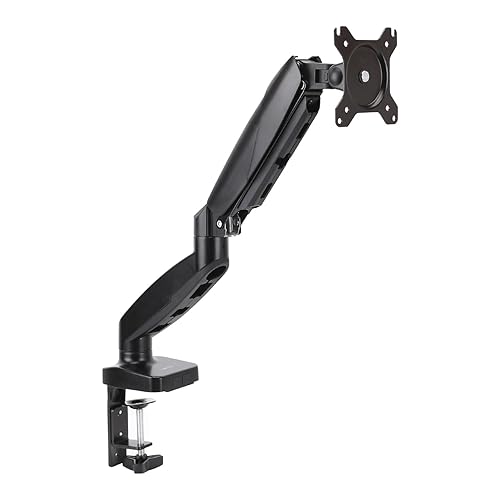
The Amazon Basics pair is the straightforward pick for the dual desk check three describes first: two screens positioned once, at install, and left alone for months. Each arm covers a panel up to 32 inches and 20 lb with the four standard adjustments — height, tilt, swivel and rotation — an integrated cable channel, and both mounts in the box. Owners most often praise exactly what the design promises: a straightforward install with clear instructions and all hardware included, and a steady hold with no wobble at normal typing speeds once mounted. A fixed side-by-side alignment is precisely the job that pattern serves: set the meeting point once, tension both arms, and the pair stays where it was left. Mounting the two arms also returns both factory stands' footprints to the desk — the poles sit at the edge — which owners setting up small desks cite among the changes they notice most.
Fit check: the trade is the adjustment itself, paid per arm. The mechanisms are slightly stiff out of the box, per owners — they loosen after a few days of use, but neither arm will ever move like a gas spring, so a pair that gets re-levelled weekly turns that stiffness into a recurring cost rather than a break-in period. Build quality is functional rather than premium, in line with owner expectations for the line. And the 20 lb ceiling needs the same measuring discipline as the springs' bands, on each panel separately: weight without the stand, from the manufacturer's page, with headroom left over. Our full review covers the install and the limits in full.
When two singles from this page are not the right buy
A panel above 22 lb, wider than 32 inches, or carrying VESA 200x100 sits outside everything we review, on whichever side of a pair it would occupy — the ultrawide case is worked through in our ultrawide monitor arm guide, and heavier professional displays need an arm from the heavy-duty class, shopped on the same per-panel discipline. A true one-pole dual arm is a different product class that this site has not reviewed; if the fixed relationship between screens is the thing you most want — the pair re-levels as one unit and can never drift out of alignment — shop that class on the same checks (per-panel weight without the stand, per-panel size range, VESA on both mounts) rather than taking any verdict from this page for it.
The other honest exits: a monitor plus a laptop is not a dual-arm question at all — our laptop stand vs monitor arm guide runs that fork, and the laptop side usually wants a stand, not a second arm. And if both your screens already sit at eye level on their factory stands on a deep desk and never move, two arms buy you the reclaimed footprints and easier cleaning, nothing more — a real benefit on a small desk, a cosmetic one on a large one. Run each panel through the monitor arm checker before ordering a pair; it will tell you, per screen, when the honest answer for that side is none of these three.
Dual monitor arm questions, answered honestly
Do I need a dual monitor arm, or two single arms?
Two single arms do the same job with one advantage a dual arm cannot offer: each screen moves, tilts and re-tensions completely independently, and each arm is judged against one panel only. Every arm we review is a single-monitor arm, and this site has not reviewed a one-pole dual arm, so we will not invent a verdict on one. The trade is alignment: a dual arm on one pole holds its two screens in a fixed relationship, while two singles hold nothing in relation — matching heights and angles is manual work, every time you move one screen. If your screens move rarely, that trade is cheap. If they move daily, read the alignment check before choosing.
Can I add the two monitors' weights together and check them against one arm?
No — and this is the most common dual-setup mistake. A single arm carries exactly one panel, so each panel is checked against its own arm's band on its own: its weight without the factory stand, its size, and its VESA pattern. Two 15 lb panels do not make a 30 lb problem for one arm; they make two separate 15 lb checks, one per side. The heavier panel sets the requirement on its side only, which is why a mismatched pair — a newer main screen and an older, heavier second screen, say — can honestly take two different arms.
Can the two arms in a dual setup be different models?
Yes, and for a mismatched pair it is often the honest choice. Each side is an independent fit: a heavier main panel can sit on the HUANUO's 22 lb ceiling while a lighter second panel sits on the Amazon Basics set-and-forget arm, as long as each panel passes its own arm's weight, size and VESA checks. What you give up is symmetry — two different mechanisms adjust differently, so aligning the pair takes a little more patience — and what you keep is not paying gas-spring money for a second screen that never moves.
What if one of my two monitors is a 34-inch ultrawide?
Then that side fails every arm we review, whatever it weighs. All three reviewed arms state a maximum monitor size of 32 inches or below — the F80's manual range is 17 to 30 inches — so a 34-inch panel sits outside their printed size range even when its weight without the stand fits under a ceiling. That side needs an arm from the ultrawide class, shopped on the same discipline; our ultrawide monitor arm guide runs those numbers. The other, standard panel is unaffected — it still takes any of the three arms here that its own weight and VESA pattern fit.
Gas-spring pair or set-and-forget pair — which suits dual monitors?
Pick by how often the pair gets realigned, not by how often one screen moves. Two gas springs (the HUANUO or the NB F80) make alignment a one-hand job: nudge each screen to height, angle both inward, done — which suits anyone who docks and undocks, shares the desk, or swings a screen around for calls. A set-and-forget pair (two Amazon Basics arms) holds a fixed side-by-side alignment steadily once set, and owners report a steady hold at normal typing speeds; its stiffness, a minor point on one arm, is paid twice whenever the pair needs re-leveling. Screens set once and left alone for months make the simpler pair the honest buy.
Do two arms need two desk mounts, and will both fit my desk?
Yes: each single arm brings its own mount, so a dual setup puts two mounts along the back edge of the desk. All three reviewed arms include both a C-clamp and a grommet mount in the box. Two clamps need two clear stretches of desk edge — check what already lives back there, such as a cable tray or a modesty panel, before ordering. Two grommet mounts need two holes, which most desks do not have, so the clamp is the usual dual route: reversible, no holes, and each arm can be repositioned along the edge until the pair sits where the screens need to meet.
Bottom Line
Judge each screen on its own, then buy the pair by how often it realigns
Run the checks in order: each panel's weight without its stand, inside its own arm's band with headroom — never added together; two clear mount spots along the desk edge; then how often the pair gets realigned. A heavier or mismatched pair, or the most headroom per side: two HUANUO arms, 22 lb ceiling per panel on gas springs. Two standard panels inside 17 to 30 inches and 19.8 lb, with pan to square the inward angle and a long owner track record: two NB North Bayou F80 arms. A pair set once and left alone: two Amazon Basics arms — and a mismatched pair can honestly mix models, one arm per side, as long as each panel passes its own checks. Putting two screens on a desk that also rises is its own problem — travel, cable slack and clamp behaviour at full height: see our standing desks for dual monitors guide. For the single-screen version of every check here, see our monitor arm guide for a home office, or browse all our monitor arm reviews.