
Buying Guide — Mice
Best Mouse for a Quiet Home Office
A mouse makes its noise in a shared room, on a call microphone, and through a wall after dark — and of the four mice we've reviewed, three were deliberately engineered to click quietly while the fourth clicks at full, ordinary volume. The three quiet ones are not interchangeable: they are a conventional scroll mouse, a vertical mouse for smaller hands, and a trackball that never moves. Here are the three checks a quiet desk runs, then how the four split.
Affiliate disclosure: Home Office Stack is a participant in the Amazon Services LLC Associates Program. As an Amazon Associate, we earn from qualifying purchases made through links on this page — at no extra cost to you. Picks are research-based, grounded in manufacturer specs and published owner feedback; we don't accept sponsored placements.
Three checks decide it, and a quiet desk runs all of them
First check: the click itself. The click is the sharpest sound a mouse makes, the one a call microphone — sitting a forearm's length away — picks up first, and the one that carries through a shared room. Three of our four mice carry a quiet-click design, and each review records its maker's own measure: the Logitech MX Master 3S's clicks are engineered to be 90% quieter than the previous generation's; the Logitech ERGO M575S's clicks measure roughly 80% quieter than the original M575's; and the Logitech Lift's are what Logitech calls whisper-quiet, with owners reporting silent buttons that colleagues on calls do not hear. Read those figures honestly before ranking anything by them: each percentage is against that model's own predecessor, not against the other mice, and no review publishes a decibel figure — so this guide treats quiet clicks as a gate three mice pass, not a podium. The fourth mouse fails the gate outright: the Logitech MX Vertical's clicks are ordinary audible clicks, as its review states plainly.
Second check: the movement. A travelling mouse makes the small sounds of travelling — the glide across the desk, the lift and set-down when it runs out of run, the knock against a mug or a keyboard edge. None of those is loud alone; together, all day, in a quiet house, they are the background a partner or a household actually lives with. One design deletes them: the ERGO M575S never moves, because your thumb rolls its ball and the body stays where you put it, so there is no glide to hear. The other three mice all travel, which is not a mark against them — it simply means their quiet story is only ever the click story, and a reader whose complaint is movement noise rather than click noise should weight this check first.
Third check: the shape the quiet comes in. Quiet narrows the field to three, and then the ordinary fit fork decides — a quiet mouse in the wrong shape is still the wrong mouse, just a silent one. The three split cleanly: the Lift is the vertical, at a 57-degree handshake angle, sized for small-to-medium hands; the MX Master 3S is the conventional sculpted body for medium-to-large hands with the scroll-heavy MX wheel set; and the M575S moves the pointing to your thumb and asks for a learning week in exchange for never moving at all. If your hands or your forearm have already chosen a shape, start from that section below — our small-hands guide, large-hands guide and wrist-comfort guide each split the same four mice on fit alone.
One boundary before the verdicts: a mouse is only half the noise a desk makes. Keystrokes are usually the louder half, and our keyboard guide for a quiet home office runs these same checks over the four keyboards we review. Fix the half your household actually hears first — the call test further down this page tells you which half that is.
The mice we've reviewed, compared by quiet checks
| Logitech MX Master 3S Wireless Mouse | The conventional quiet pick — medium-to-large hands | Quiet Clicks · engineered 90% quieter than the previous generation | Sculpted conventional right-hand · 4.92 × 3.32 in · rechargeable, up to 70 days |
| Logitech Lift Vertical Ergonomic Mouse | The vertical quiet pick — small-to-medium hands | Quiet clicks · Logitech's whisper-quiet; owners report calls don't hear them | 57-degree vertical · 4.25 × 2.76 in · single AA, up to 24 months |
| Logitech ERGO M575S Wireless Trackball Mouse | The stillest pick — quiet clicks and no movement at all | Quiet clicks · roughly 80% quieter than the original M575 · the body never moves | Stationary thumb trackball · 5.28 × 3.94 in footprint · single AA, up to 18 months |
| Logitech MX Vertical Ergonomic Mouse | The honest skip for quiet — the larger vertical | Ordinary audible clicks · no quiet-click design in its recorded specs | 57-degree vertical · 4.72 × 3.11 in · rechargeable, up to 4 months |
Figures above are the ones recorded in each product's full review on this site, and the two percentages measure different predecessors — read the table as three passes and one fail on the click check, split afterwards by movement and shape, because that is the whole decision.
The conventional quiet pick: Logitech MX Master 3S

The MX Master 3S is the quiet pick for the reader who wants a conventional mouse and nothing about their pointing to change except the volume. Its clicks are the engineered kind: Logitech built them to be 90% quieter than the previous generation's, and the owner pool on its listing backs the design in its own words — quiet operation is one of the themes owners praise most, alongside comfort and battery life. If your clicks are what a partner hears through the door or what your microphone passes to a call, this is the mouse whose review answers that complaint most directly, in the shape most desk workers already use.
The rest of its file is the desk case our full review makes in full: a sculpted body for medium-to-large palms, a machined-steel MagSpeed wheel that free-spins up to 1,000 lines per second beside a thumb wheel, seven buttons, a Darkfield sensor that even tracks on glass, and connection to three devices by Bluetooth or the included Logi Bolt receiver, with Flow across computers. Power is rechargeable — rated up to 70 days, with about three hours of use from a one-minute USB-C charge. Our general mouse guide compares it against the other three on the everyday desk checks.
Fit check: medium-to-large hands only, in practice — small hands find the body huge, as its review states, and there is no left-hand version. It still travels, so the movement sounds of the second check remain; its quiet is the click, engineered down, and nothing more claimed.
The vertical quiet pick: Logitech Lift
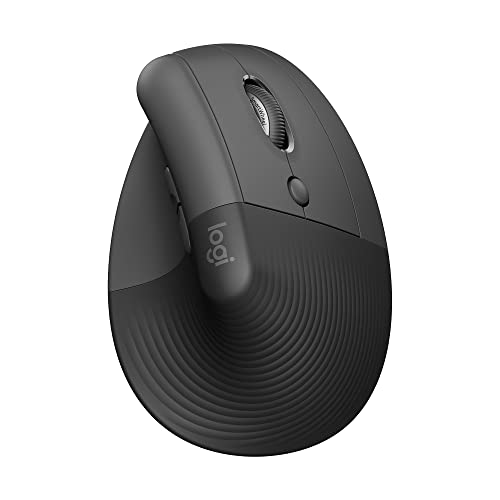
The Lift is the quiet pick for smaller hands and for forearms that chose the handshake angle. Logitech calls its clicks whisper-quiet, and — the detail that earns it a place in a quiet guide rather than a marketing line — owners and reviewers use the same word unprompted: silent buttons that colleagues on calls do not hear, in shared rooms and quiet houses alike. It is the only vertical mouse in our coverage that passes the click check, which makes it the default answer when the angle is settled and the room is shared.
Its supporting file: a 57-degree vertical body at 4.25 by 2.76 inches and 4.4 ounces (125 g), shaped for small-to-medium hands with a softly textured grip and a snug thumb rest; a SmartWheel that shifts between precise and speed scrolling; six buttons; and power of the forgettable kind — a single AA battery rated up to 24 months. It switches between up to three devices by Bluetooth or its included Logi Bolt receiver. Our full review records the fit case in full.
Fit check: this listing is the right-hand Graphite version; the left-hand Lift is a different listing. Large hands will crowd the compact body — and readers with large hands who need the vertical angle should read the MX Vertical section below with its caveat in view, because it is the one place this guide's quiet story runs out.
The stillest pick: Logitech ERGO M575S
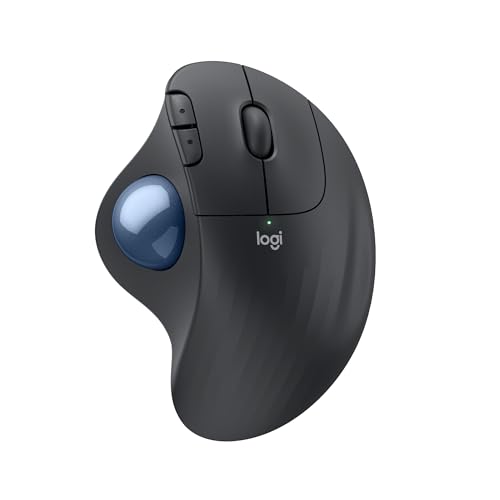
The M575S is the quietest answer this guide can give to the whole desk, because it passes both noise checks instead of one. Its clicks are quiet clicks — the 2024 update's headline fix, measured by Logitech at roughly 80% quieter than the original M575's — and the body never moves on the desk at all: your thumb rolls the ball, so the glide, lift and set-down sounds of the second check simply never happen. For a desk in a living room, a bedroom corner, or a house where someone sleeps on the other side of a thin wall, that stillness is worth more than any single percentage.
The rest of its file suits a desk that wants to be left alone: a single AA battery rated up to 18 months, five buttons, a body certified by United States Ergonomics, and a Logi Bolt receiver that stores inside the battery compartment when it travels. It connects to one device at a time, by that receiver or Bluetooth. Our full review records the owner feedback behind this section, including how the ball socket wipes clean in a couple of minutes every few weeks.
Fit check: the pointing work moves to your thumb, and a thumb trackball takes a learning week before fine placement feels precise — owners with thumb discomfort should read that as a warning. It is right-hand only, with no left version, no DPI button and no horizontal scrolling.
The honest skip for quiet: Logitech MX Vertical
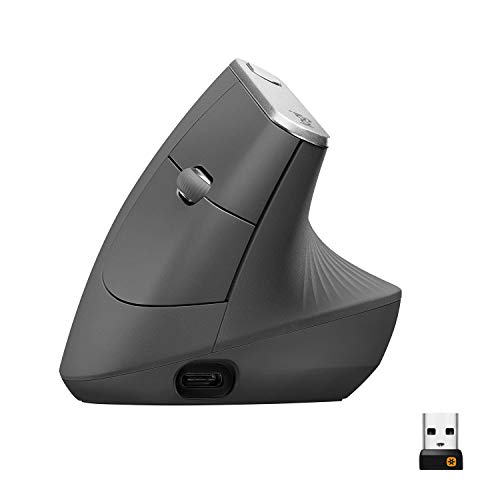
The MX Vertical belongs in this guide precisely so its limit is stated where a quiet-seeking reader will find it: its clicks are ordinary audible clicks rather than the Lift's quiet ones — its review says so in those words, and its own buy-and-skip summary lists needing quiet clicks for a shared room as a reason to skip it. Nothing else about the mouse is a compromise: it is the same 57-degree angle in the larger body (4.72 by 3.11 inches, 135 g) for medium-to-large hands the Lift crowds, rechargeable over USB-C for up to four months with about three hours from a one-minute charge, with a cursor-speed switch on top and three-device switching. It connects by Bluetooth, its included Unifying receiver — note, Unifying, not the Logi Bolt the other three use — or its charging cable. Our full review covers its desk case, and our wrist-comfort guide picks it for larger hands.
Fit check: buy it for the angle, the size and the rechargeable battery, in a room where clicking bothers nobody. If the room is shared, it is the wrong buy however well it fits your hand — that is the honest shape of the gap in our coverage: there is currently no quiet-click vertical mouse sized for large hands among the mice we review.
When none of the four is the right buy
The coverage gap is specific: large hands, a vertical angle, and quiet clicks do not currently meet in one reviewed mouse — the Lift is quiet and vertical but compact, and the MX Vertical is vertical and large but audible. A reader who needs all three is shopping outside the four mice we have reviewed, and this guide will not stretch the Lift's body or the MX Vertical's volume to pretend otherwise. Left-handed readers face the same total limit as everywhere in our mouse coverage: the MX Master 3S and MX Vertical have no left-hand version, the trackball has no left version, and the Lift's left-hand version is a different listing from the one reviewed here.
And sometimes the mouse was never the noise. If the call test below shows your keyboard carrying further than your clicks, the fix is a board, not a mouse — our keyboard guide for a quiet home office is the right next page. If what the household hears is the mouse travelling — glide and set-down on a hard, hollow desktop — a desk mat under the run softens the contact before any mouse is replaced; our desk mat guide splits the two desktop mats we review.
Before you buy: the two-minute call test
Two minutes with the mouse you already own tells you which check is actually failing. First, the microphone test: start a voice recording or an empty call on the machine in front of you, click twenty times at your normal working pace, scroll a long page, and lift and set the mouse down a few times as you would reaching the edge of its run — then listen back. Whatever you hear is roughly what your calls have been sending. Second, the doorway test: have someone click at your desk while you stand where your household hears you — the next room, the doorway, the other end of the sofa — and note whether it is the clicks or the movement that reaches you. Clicks carrying routes you to the three quiet-click picks above, split by the shape check. Movement carrying routes you to the trackball, or to a mat under the mouse you already like. Run the test before the order, and the guide above becomes a confirmation instead of a gamble.
Quiet mouse questions, answered honestly
What is the quietest mouse for a home office?
There is no honest single answer, because no review we publish carries a decibel figure or a cross-measured ranking of the four mice against each other. Three of the four carry a quiet-click design: the Logitech MX Master 3S, whose clicks are engineered to be 90 percent quieter than the previous generation's; the Logitech Lift, which Logitech calls whisper-quiet and owners describe as silent buttons colleagues on calls do not hear; and the Logitech ERGO M575S trackball, whose clicks measure roughly 80 percent quieter than the original M575's. The fourth, the Logitech MX Vertical, clicks audibly. So quiet is a gate three mice pass — then hand size and shape choose among them, which is what this guide's third check is for.
How much quieter are quiet clicks, really?
The recorded figures are these: the MX Master 3S's clicks are engineered to be 90 percent quieter than the previous generation of that mouse; the ERGO M575S's clicks are roughly 80 percent quieter than the original M575's, per Logitech's own measure; and the Lift's are described as whisper-quiet by Logitech, with owners and reviewers using the word silent unprompted. Read the percentages carefully — each is measured against that model's own predecessor, not against the other mice here, so they cannot be lined up as a ranking. What they establish is that each of the three was deliberately engineered down from a louder mouse, which the MX Vertical was not.
Will a quiet mouse stop my clicks disturbing people on calls?
It removes the loudest part of what a microphone hears. A call microphone sits close to the desk, and clicks are the sharpest sound a mouse makes — Lift owners report, in the feedback our review records, that colleagues on calls do not hear its buttons, and quiet operation is one of the themes MX Master 3S owners praise most. Two honest limits: a quiet mouse does nothing for a loud keyboard — our keyboard guide for a quiet home office runs the same checks over the boards we review — and no mouse quiets a voice, a chair or a door, so mute discipline on calls still earns its keep.
Is the Logitech MX Vertical a quiet mouse?
No. Its review states it plainly: the MX Vertical's clicks are ordinary audible clicks, not the Lift's quiet ones, and its own buy-and-skip summary routes readers who need quiet clicks for a shared room away from it. Buy the MX Vertical for what it is — the larger 57-degree vertical body for medium-to-large hands, rechargeable over USB-C — in a room where clicking bothers nobody. If the room is shared and the vertical angle is the requirement, the Logitech Lift is the quiet vertical in our coverage, sized for small-to-medium hands.
Does a trackball mouse make less noise than a regular mouse?
On the two sounds this guide checks, yes. The Logitech ERGO M575S carries quiet clicks — roughly 80 percent quieter than the original M575's, per Logitech — and its body never moves on the desk, so the glide, lift and set-down sounds of a travelling mouse never happen; your thumb rolls a ball inside the body instead. The trades are the pointing work moving to your thumb, a learning week before fine placement feels precise, no multi-device switching, and a right-hand-only body.
Bottom Line
Pass the click gate first — then let shape choose
A quiet desk asks for two passes, not one. Pass the click gate: the Logitech MX Master 3S for medium-to-large hands in a conventional shape, the Logitech Lift for small-to-medium hands at the vertical angle, or the Logitech ERGO M575S when the stillest desk of all — quiet clicks and no movement — is the point. Outside the gate: the Logitech MX Vertical, an excellent larger vertical whose audible clicks rule it out of a shared room. And when the noise was the keyboard's half all along, our keyboard guide for a quiet home office runs the matching checks. For the full desk-side comparison of the same four, see our mouse guide for working from home, or browse all our mouse reviews.