
Buying Guide — Mice
Best Mouse for a Standing Desk
Standing changes what a mouse has to do. The surface is usually a keyboard tray or the narrow strip beside the keyboard, your forearm meets the mouse at standing elbow height, and every inch of travel is an arm movement made standing up. Of the four mice we've reviewed, one never travels at all, two hold the hand at a 57-degree handshake angle, and one is a conventional scroll mouse whose case depends entirely on the run you can give it. Here are the three checks standing runs, then how the four split.
Affiliate disclosure: Home Office Stack is a participant in the Amazon Services LLC Associates Program. As an Amazon Associate, we earn from qualifying purchases made through links on this page — at no extra cost to you. Picks are research-based, grounded in manufacturer specs and published owner feedback; we don't accept sponsored placements.
Three checks decide it, and standing runs all of them
First check: how much the mouse travels. Seated at a full desk, a travelling mouse is a minor expense — there is open surface, and the arm making the crossings rests at sitting height. Standing, the mousing run is usually a keyboard tray or the strip beside the keyboard, and a travelling mouse also means repeated arm movement at standing elbow height, all session: every crossing of that short run, every lift and reset at its edge, is work the standing body notices sooner than the seated one. That is why this check runs first here. One design deletes it outright — a stationary trackball never travels — and the other three mice here all travel: the conventional body travels most, because ordinary pointer work in it is all arm travel, while the vertical pair travel the same way in a different grip. Judge it by measuring your actual run — the two-minute test further down does exactly that.
Second check: the grip at standing height. A standing desk is set from your elbows — our standing desk setup guide builds the whole setup from that one measurement — so the mouse meets a forearm held at standing elbow height, and the angle it works in is set before the mouse is chosen. Two grips are on offer here. The conventional grip lies palm-down on a sculpted shell, the posture most desk workers arrive with. The handshake grip stands the hand up at a 57-degree angle, the shape both vertical mice share — the same fixed angle at two sizes, as the next check splits them. Standing does not invent a third grip or change which grip a forearm prefers; it holds the grip in shorter bouts than a seated afternoon, which makes a grip that already bothers you seated a worse bet standing, not a better one.
Third check: the footprint beside the keyboard. Every mouse here has two space numbers, and a tray or a narrow strip makes both matter: the footprint the body occupies where it sits, and the run it needs beyond that footprint to travel on. The trackball is the largest body we review at 5.28 by 3.94 inches — the biggest footprint of the four, spent once, where it sits — and it needs zero run beyond it. The conventional MX Master 3S is 4.92 inches long and needs the most run. Between them, the MX Vertical is 4.72 inches long and the Lift is the smallest body here at 4.25 inches long, and both need a working run like any travelling mouse. On a wide desktop those numbers are trivia; on a keyboard tray they are the whole decision, because a mouse can pass on footprint and fail on run, or — the trackball's trade — the other way round.
One limit before the verdicts, in the terms our wrist-comfort guide uses: no mouse treats, prevents or cures pain, and standing itself is not a fix. A mouse can change the angle your forearm works in and how far your arm travels; a desk can change the height you work at. Those are geometry changes, not medical ones, and pain that persists belongs with a clinician.
The mice we've reviewed, compared by standing-desk checks
| Logitech ERGO M575S Wireless Trackball Mouse | The standing pick — the mouse that never travels | Stationary thumb trackball · the mouse itself never moves on the desk | 5.28 × 3.94 in footprint is the whole desk ask · single AA, up to 18 months |
| Logitech Lift Vertical Ergonomic Mouse | The vertical pick — small-to-medium hands | 57-degree handshake angle · quiet clicks | Smallest body here, 4.25 × 2.76 in · single AA, up to 24 months |
| Logitech MX Vertical Ergonomic Mouse | The vertical pick — medium-to-large hands | 57-degree handshake angle · rechargeable | 4.72 × 3.11 in · rechargeable, up to 4 months · Unifying receiver |
| Logitech MX Master 3S Wireless Mouse | The conditional conventional pick — scroll-heavy sessions | MagSpeed scrolling · a conventional body that travels, so it needs a clear run | 4.92 × 3.32 in · rechargeable, up to 70 days |
Specs above are the figures as recorded in each product's full review on this site. Read the table's shape: one mouse that removes the first check entirely, a pair that answer the second check at two hand sizes, and one conditional pick whose case stands or falls on the third check's run — that split is the whole decision.
The standing pick: Logitech ERGO M575S
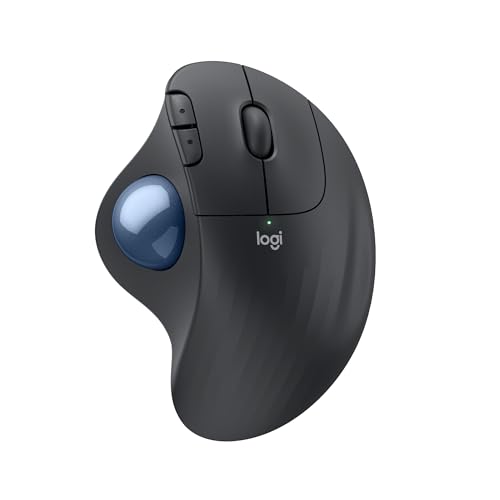
The M575S leads a standing-desk guide because it is the only mouse in our coverage that answers the first check by deleting it. Its recorded shape line says it in so many words — a stationary thumb trackball, certified by United States Ergonomics, in which the mouse itself never moves on the desk. Your thumb rolls the ball; the body stays where you put it; the arm that would have crossed a short tray run all session, at standing elbow height, simply stays still. On the surface standing actually gives you — a tray, the strip beside the keyboard, a narrow top — that stillness is worth more than any sensor figure, because the run the other three mice need is the one thing the setup may not have.
The rest of its file suits a desk that gets raised and lowered around it: quiet clicks, five buttons, a single AA battery rated up to 18 months, and connection to one device at a time by Bluetooth or the included Logi Bolt receiver — which stores inside the battery compartment, a small mercy on a tray with no drawer under it. Our full review records the owner feedback behind this section, including the ball socket's two-minute clean every few weeks, which is a wipe, not a tool.
Fit check: the honest cost is footprint — at 5.28 by 3.94 inches this is the largest body we review, and it spends that desk area once, where it sits, in exchange for needing zero travel run. On the smallest tray even that patch can fail, so measure before ordering. The pointing work moves to your thumb, and a thumb trackball takes a learning week before fine placement feels precise; its wheel is a standard wheel with no free-spin and no tilt mode, and its sensor tops out at 2,000 DPI, adjustable in Logi Options+ with no DPI button on the mouse. It is right-hand only.
The vertical pick for smaller hands: Logitech Lift
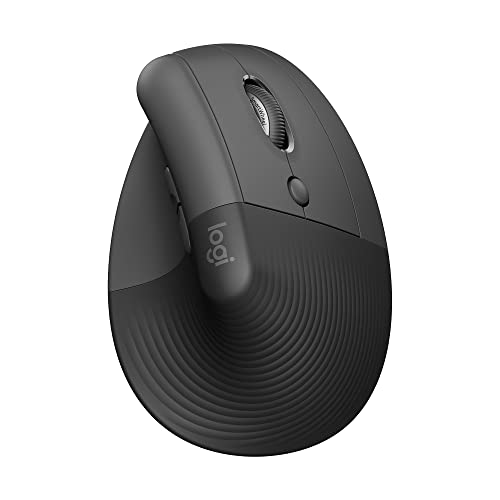
The Lift is the standing pick for the reader whose forearm has already voted against palm-down. It holds the hand at the 57-degree handshake angle — the grip the second check is about — in the smallest body in this guide, 4.25 inches long, shaped for small-to-medium hands with a softly textured grip and a snug thumb rest. That size earns its place standing twice over: the body takes the least space beside the keyboard of any mouse here, leaving more of a short tray or strip for the run a travelling mouse still needs. If the angle is your requirement and your hands are at the smaller end, this is where the guide expects you to land.
Its supporting file is the low-maintenance kind a sit-stand routine rewards: quiet clicks, a SmartWheel that shifts between precise and speed scrolling, six buttons, and a single AA battery rated up to 24 months. It switches between up to three devices by Bluetooth or its included Logi Bolt receiver. Our full review records the fit case in full, and our small-hands guide reads the same body by reach alone.
Fit check: the size is a hard gate — large hands crowd this body, and the next section is theirs. It still travels, so it needs the run the third check measures; the small footprint shrinks the patch, not the run. This listing is the right-hand Graphite version; the left-hand Lift is a different listing. It is not rechargeable, which a two-year battery makes easy to live with.
The vertical pick for larger hands: Logitech MX Vertical
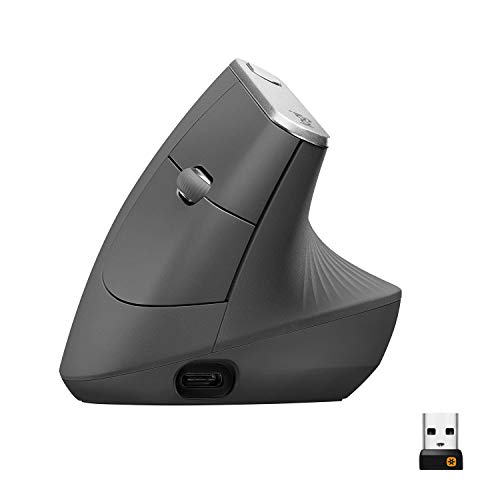
The MX Vertical is the same 57-degree handshake angle in the larger body: 4.72 inches long, for the medium-to-large hands the Lift crowds. At standing elbow height the fork between the two verticals is unchanged — same angle, same fixed posture, different fit — so if your forearm wants the handshake grip and your hand is at the larger end, this is your standing vertical, and our wrist-comfort guide picks it on exactly that basis. Like the Lift it travels, so it asks the tray for footprint plus a working run, and its taller body — the tallest we review, at 3.09 inches — is worth a thought on a tray you reach across often.
Where it parts from the Lift is power and machinery. It is rechargeable — rated up to four months per charge, with about three hours from a one-minute charge, and usable wired over USB-C while it charges — with a cursor-speed switch on top for instant changes inside its 400 to 4,000 DPI range. It connects to three devices by Bluetooth, its included receiver, or that cable. Our full review covers its desk case, and our large-hands guide reads the same body by palm support alone.
Fit check: the receiver in its box is a Logitech Unifying receiver, not the Logi Bolt the other three mice here use — the two standards do not pair with each other, which matters if your keyboard already runs on Bolt and you hoped to share one receiver on a crowded tray. Its clicks are ordinary audible clicks rather than quiet ones, and it is right-hand only, with no left-hand version.
The conditional conventional pick: Logitech MX Master 3S

The MX Master 3S earns its place in a standing guide on one recorded strength: the scroll. Its machined-steel MagSpeed wheel free-spins up to 1,000 lines per second beside a thumb wheel, and for scroll-heavy standing sessions — working down long documents, feeds and spreadsheets in a standing stretch — that wheel set is the best in our coverage. Its supporting file is the familiar one from our full review: a sculpted conventional body for medium-to-large palms, quiet clicks, seven buttons, three-device connection by Bluetooth or the included Logi Bolt receiver with Flow, and rechargeable power rated up to 70 days. One recorded spec earns no points here: its Darkfield sensor's glass tracking is a glass-desk feature, irrelevant to a standing setup unless your standing surface happens to be glass — our glass desk guide is where that figure decides something.
The condition is the first check, and it is a real one. Of the four mice here, this is the mouse that travels most — a conventional body whose pointing is all arm travel — so it needs a clear run beside the keyboard at standing height, on the tray or strip your setup actually has. Give it that run and it is a complete, conditional pick: the scroll case holds, and the travel is a price you have measured and accepted. Without the run, the same mouse becomes a sequence of lifts and resets at standing elbow height, and the sections above are better buys. Measure before you choose it, because the condition is physical, not preferential.
Fit check: the body is 4.92 inches long, right-hand only with no left-hand version, and small hands are crowded by it, as its review states plainly. Its grip is palm-down: if the grip angle is the reason you are shopping, the two vertical sections above are the answer this one cannot give.
When none of the four is the right buy
Start with the standing case itself, because it is the commonest one: if your current mouse fits your hand, your tray or strip gives it a clear run, and your standing stretches feel fine, a standing desk does not by itself create a mouse problem — set the desk's two heights properly first, using our standing desk setup guide, work a week of real sessions, and only shop if one of the three checks actually fails in practice. The mirror case is the thumb: the lead pick works by moving the pointing load to your thumb, so a reader whose strain already lives there is moving the problem, not solving it — for that reader the vertical pair is the honest route, tested inside a return window.
Left-handed readers face the same total limit as everywhere in our mouse coverage: all four bodies are right-hand in the listings reviewed — the MX Master 3S and MX Vertical have no left-hand version, the trackball has no left version, and the Lift's left-hand version is a different listing. And the four are office mice, reviewed for desk work: fast precision editing and gaming are outside what any of them is for, as their reviews state, and standing versions of that work want a mouse from outside this coverage.
Before you buy: the two-minute standing test
Two minutes at your standing preset, with the mouse you already own, settles which route is yours. First, the run test: raise the desk and work normally for one real task, counting how often the mouse reaches the edge of its tray or strip and has to lift and reset. Edge hits every few seconds mean the travel check is your problem, and the trackball — or a wider run — is the fix; a clean run means any of the four can serve. Second, the patch test: measure the clear space beside your keyboard against the footprints in the table above — 5.28 by 3.94 inches for the trackball's single patch, 4.25 inches of length for the Lift — because a tray can fail a mouse on footprint before travel enters it. Third, the height check: at your standing preset, your forearms should rest level with elbows at about 90 degrees and the mouse close enough that your shoulder stays down; if the height itself is wrong, fix the preset before judging any grip, following step one of our standing desk setup guide. Run the test before the order, and the guide above becomes a confirmation instead of a gamble.
Standing desk mouse questions, answered honestly
What is the best mouse for a standing desk?
Of the four mice we review, the Logitech ERGO M575S trackball is the standing pick, because it is the one mouse whose pointing needs no desk run at all: its recorded shape is a stationary thumb trackball, the mouse itself never moves on the desk, and your thumb rolls the ball instead. At a standing desk — where the mousing surface is usually a keyboard tray or the strip beside the keyboard — that removes the repeated arm travel the other three mice all need. The honest cost is footprint: at 5.28 by 3.94 inches it is the largest body here, spent once where it sits, and the pointing work moves to your thumb. If your tray cannot fit it, or your thumb is where your strain lives, the vertical pair in this guide is the next route.
Why does mousing feel different at a standing desk?
Three things change, and they are the three checks this guide runs. First, the run: seated, a mouse usually travels on open desk; standing, it usually travels on a keyboard tray or the strip of surface beside the keyboard, so the clear run is shorter and the mouse reaches its edge more often. Second, the height: the mouse meets your hand at standing elbow height, so the grip angle your forearm works in is set by the standing preset, not the sitting one. Third, the cost of travel: every crossing of that run is an arm movement made standing, repeated all session. A mouse that travels less, or not at all, asks less of a standing session than the same mouse asks seated.
Is a vertical mouse better for a standing desk?
It depends on whether the grip is the thing you are changing. Two of the four mice we review hold the hand at a 57-degree handshake angle instead of palm-down: the Logitech Lift, in the smallest body here at 4.25 inches long, for small-to-medium hands, and the Logitech MX Vertical, at 4.72 inches long, for medium-to-large hands. Standing does not change that fork — the angle is fixed on both, and hand size still chooses between them. If your forearm is content palm-down, a vertical mouse buys you nothing standing that it would not buy you seated; if the palm-down twist is the strain you feel, the angle matters at either height, and our wrist-comfort guide runs the same pair on that check alone.
How much space does a mouse need at a standing desk?
Two numbers, not one: the footprint the body occupies, and the run it needs beyond that footprint. The footprints, as recorded in each review: the ERGO M575S is 5.28 by 3.94 inches, the MX Master 3S is 4.92 inches long, the MX Vertical is 4.72 inches long, and the Lift is the smallest at 4.25 inches long. The run splits them harder: the trackball needs none — its footprint is its whole desk ask — while the other three need clear surface beside the keyboard to travel on, the MX Master 3S most of all in ordinary use. On a keyboard tray, measure both numbers before ordering: a small body with no run still strands a travelling mouse.
Will standing to work, or a new mouse, fix wrist or forearm pain?
No — and this guide will not present either as a fix. No mouse treats, prevents or cures pain, and standing itself is not a treatment: a different mouse can change the angle your forearm works in and how much your arm travels, and a standing desk can change your working height, but those are geometry changes, not medical ones. Owners in the reviews we publish describe working more comfortably after a shape change, and that is reported as their experience, not promised as an outcome. Pain that persists, numbness, tingling or weakness is a reason to see a clinician, not a reason to keep shopping.
Bottom Line
Remove the travel first — then let grip and footprint choose
A standing desk runs its mouse through three checks, and the right pick passes yours. Remove the travel: the Logitech ERGO M575S, whose body never moves and whose only desk ask is its footprint. Keep the travel, change the grip: the Logitech Lift for small-to-medium hands or the Logitech MX Vertical for larger ones, both at the 57-degree handshake angle. Keep the conventional grip and feed it a run: the Logitech MX Master 3S, the scroll pick, conditional on clear surface beside the keyboard. Set the desk itself up first with our standing desk setup guide. For the full comparison of the same four, see our mouse guide for working from home, or browse all our mouse reviews.