
Buying Guide — Webcams
Best Webcam for a Tripod
The short answer first: the top of the monitor is a webcam's default perch, and sometimes it is the wrong place — a clip that will not sit on a thick bezel, a laptop lid that has to close, a camera that needs to sit lower than the screen's top edge or between two seats. Leaving the monitor is a mounting decision before it is a picture decision, and the four webcams we've reviewed were not built equally for it. One has a tripod thread and the focus and microphone reach to match the move. One brings its own desk stand inside its clip. One is tripod-ready inside a short cable radius. And one has no way off the screen at all.
Affiliate disclosure: Home Office Stack is a participant in the Amazon Services LLC Associates Program. As an Amazon Associate, we earn from qualifying purchases made through links on this page — at no extra cost to you. Picks are research-based, grounded in manufacturer specs and published owner feedback; we don't accept sponsored placements.
Check one: the thread — can the camera leave the monitor at all?
A tripod mount is a specification, not an assumption. Most webcams are photographed on monitors, so buyers assume the mounting point underneath is standard. On the four cameras we review, the recorded mounting lines split three ways. The Logitech Brio 4K's detachable universal clip carries a standard tripod thread. The Anker PowerConf C200's specifications record an adjustable clip/stand for a monitor or laptop top, and a tripod thread. The Logitech C920s's mount is recorded as a tripod-ready universal clip. And the Logitech Brio 101's universal clip is recorded with no tripod thread at all — tilting up and down is the whole of its movement.
And no camera on this page brings the tripod with it. None of the four in-the-box lists we record includes one, and the C920s's specifications state it outright: tripod-ready, tripod not included. Read "tripod thread" and "tripod-ready" as descriptions of the mounting point, not the contents of the box — the stand is a separate purchase for every pick below, which is why this guide runs a position test before any purchase. A camera without the thread cannot be adapted into the plan later; a camera with it can wait on the monitor until the day the position earns the stand.
Check two: aim and focus at the new distance
A tripod does not just move the camera — it changes the distance the focus and the frame were set for. On a monitor, the camera sits at a known arm's length and most cameras are tuned around it. On a tripod the camera might sit closer on the desk, farther back on a shelf, or off to the side — and what adjusts to that move differs. Three of the four cameras autofocus: the C200's autofocus is rated from 15 cm to 3 m, the widest working range we record, and the Brio 4K and the C920s autofocus without a stated range. The Brio 101's focus is fixed, so a new distance changes nothing it can correct — the frame is the frame.
Aim is the other half, and it is mostly tilt, not swivel. The C920s's clip tilts up and down and does not swivel; the C200's body cannot swivel either, and its review is plain that there is no pan-tilt mount and no tracking — you will walk out of its picture if you move. So on a tripod, the stand's head does the aiming the camera cannot, and the framing has to be re-set at the new spot: the C200 and the Brio 4K select their field of view in software (65, 78 or 95 degrees on the C200; 90, 78 or 65 on the Brio 4K, the narrower views being crops), while the C920s's view is fixed at 78 degrees, so position is its only framing tool. Judge the move as a package: thread, aim, focus, frame — a camera that passes only the first check strand you at the second or third.
Check three: cable and microphone reach — the distance tax
Every step the camera moves from the monitor is paid for twice: once by the cable, once by the microphones. The cable figures are recorded and short. The C920s's USB-A cable is attached, non-detachable and 5 ft long; the Brio 101's attached cable is also 5 ft. The Brio 4K's cable is detachable, which makes its run the easiest to plan. The C200's included USB-C to USB-A cable carries no length in its recorded specifications — measure your intended run against the cable in the box before the position is settled, not after the tripod is standing in it.
The microphones tax the same distance, and less visibly. A webcam's microphones sit where the camera sits, so a tripod placed for a better frame is also a microphone placed farther from your voice. The rated pickup distances we record: the C200's dual stereo microphones reach 3 m, the Brio 4K's dual microphones 1 m, the C920s's dual stereo microphones 1 m. A tripod position beyond a camera's rating has solved the picture and spent the audio — the failure our group calls guide runs into from the other direction. The honest workarounds are a headset or a separate microphone placed with you, which take the reach requirement off the camera entirely. Camera height, front light and framing in full are worked through in our video call setup guide; this guide is about whether the camera can physically take the position that setup asks for.
The webcams we've reviewed, compared for a tripod
| Anker PowerConf C200 | The tripod pick — the thread, the focus range and the microphone reach in one camera | 2K at 30 fps · autofocus rated 15 cm to 3 m · 65°, 78° or 95° fields of view (narrower views are crops) | Tripod thread · dual stereo mics rated to 3 m · no swivel · sliding cover switches the camera off |
| Logitech Brio 4K | The desk-placement pick — its clip stands the camera on the desk, no tripod needed | 4K at 30 fps · 1080p to 60 fps · autofocus · 90°, 78° or 65° fields of view (crops of the 4K sensor) | Detachable clip with a standard tripod thread; the clip also stands on a desk · detachable cable · dual mics rated to 1 m only |
| Logitech C920s HD Pro | The proven conditional — tripod-ready, inside the radius of its attached cable | 1080p at 30 fps · autofocus · fixed 78° view, no wider setting | Tripod-ready clip (tripod not included) · tilts, does not swivel · attached 5 ft cable · dual stereo mics rated to 1 m |
| Logitech Brio 101 | The honest skip for a tripod — a clip-only camera | 1080p at 30 fps · fixed focus · fixed tight 58.9° view | No tripod thread · universal clip tilts up and down only · single mono mic rated to 4 ft |
Specs above are the manufacturers' figures as recorded in each camera's full review on this site. Read the table's honest shape: three cameras can leave the monitor and one cannot; of the three, one pairs the thread with the reach to use it at distance, one can stand on the desk without any tripod at all, and one is ready for a tripod its attached cable keeps on a short radius.
The tripod pick: Anker PowerConf C200
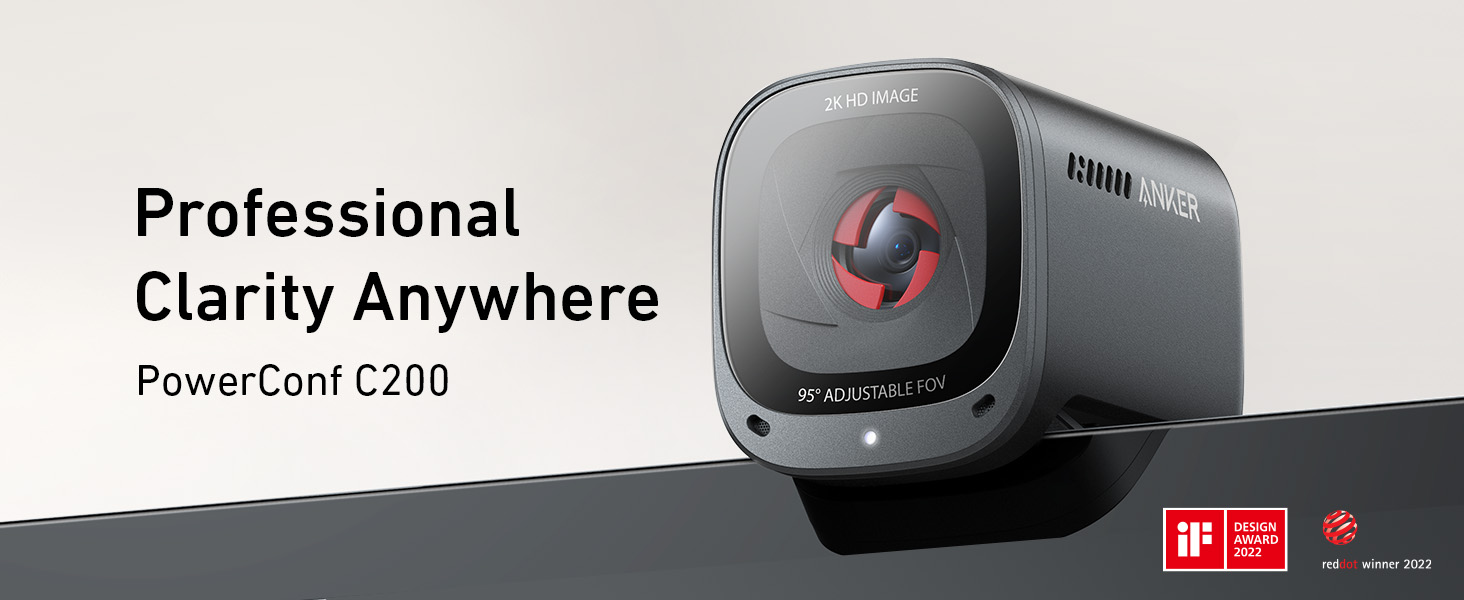
The C200 is the only camera here whose recorded specifications read as if leaving the monitor was planned. Start with check one: a tripod thread sits alongside its adjustable clip/stand, so the camera mounts on a monitor today and on a tripod the day the position changes. Then check two: its autofocus is rated from 15 cm to 3 m — a range that covers a tripod on the desk, a tripod behind it, and a shelf across a small room, where an unstated range leaves you guessing — and its field of view selects 65, 78 or 95 degrees in the AnkerWork software, so the frame can be re-set for wherever the camera lands. Then check three, the one the other threaded cameras fail at distance: its dual stereo microphones are rated for voice pickup to 3 m, three times the rated reach of the two Logitech cameras below, so the tripod can actually go where the frame wants it without your voice falling out of the picture. At 2K, 2560×1440 at 30 fps, it also carries more resolution than either 1080p camera, and its sliding privacy cover switches the camera off between calls, wherever it is mounted.
Fit check: the limits are the ones its review records. The body cannot swivel and there is no pan-tilt or tracking, so the tripod's head does all the aiming — buy the position, then aim it once, and expect to stay in the frame you set. The narrower fields of view are digital crops of the 2K image, and the frame rate is 30 fps at every resolution, so this is a meeting camera being placed well, not a motion camera. Its included cable's length is not stated in the recorded specifications, so the one measurement this pick asks of you is the run from the tripod spot to the computer. Inside those lines, nothing else we review passes all three checks at once. Our full review records the whole picture.
The desk-placement pick: Logitech Brio 4K
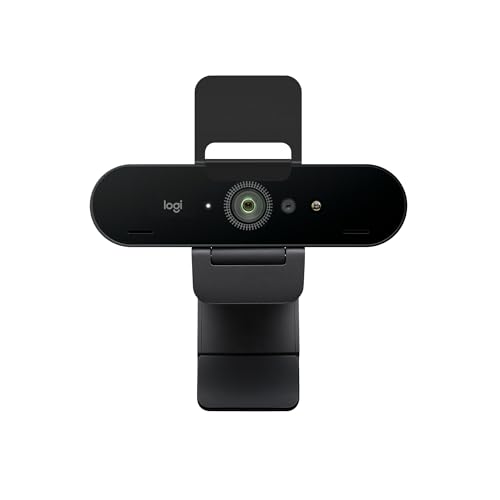
The Brio 4K is the pick for the reader whose real problem is not a tripod — it is that the monitor top is the wrong height or the wrong place, and the desk itself would do. Its detachable universal clip works two ways in the recorded specifications: it carries a standard tripod thread when a tripod is the answer, and the clip also stands the camera on a desk when it is not, which makes this the only camera here that can leave the monitor with no second purchase at all. The cable is detachable too, so the run to the computer is the easiest of the four to plan. What it places is the strongest picture we review: 4K at 30 fps, 1080p at up to 60 fps, fields of view selecting 90, 78 or 65 degrees as crops of the 4K sensor with 5x digital zoom in Full HD, autofocus, and RightLight 3 with HDR for the mixed light a desk position often sits in — the case our low-light guide ranks it first for. At 63 g without clip or cable, it also asks very little of a small desk tripod when the thread is used.
Fit check: placement freedom is not reach. Its dual microphones are rated to 1 m, so a tripod or desk position set back for a wide frame needs you within that metre, or a headset or separate microphone carrying the audio. And its review records a platform split on the autofocus: praised on Windows, with a documented Mac owner report of manual focus as the standing workaround — a cost that matters more, not less, when the camera sits somewhere you cannot nudge it mid-call. Buy it when the position is close and the picture is the point. Our full review has the rest.
Tripod-ready, on a short radius: Logitech C920s HD Pro
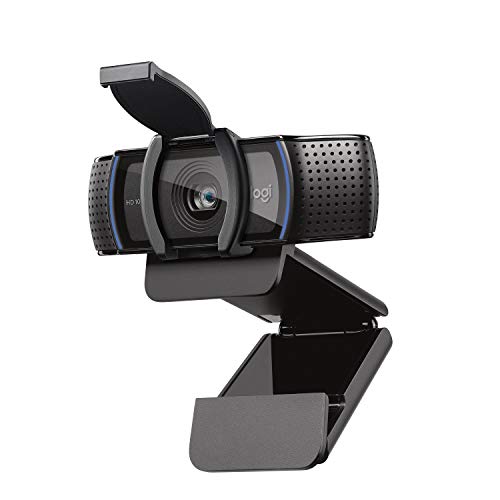
The C920s earns its place on the sentence its own review leads with: a mount that can move to a tripod when the top of the screen is the wrong place. Its universal clip is tripod-ready — and, like the Brio 4K's, the clip also stands the camera on a desk — it tilts up and down, and its autofocus glass lens keeps a face sharp as the distance changes within a desk's radius. The fixed 78-degree view is wide enough for one person with margin or two at a desk, and a tripod centred behind the keyboard is precisely how our group calls guide seats a pair on this camera instead of favouring whoever owns the monitor. For the common tripod case — a few feet of repositioning around one desk — this proven 1080p camera does the job with a decade of other people's calls behind it.
Fit check: the radius is the condition, and it is set by the cable. The USB-A cable is attached and non-detachable at 5 ft, so the tripod lives within that run of the computer, with slack for the stand's height — a shelf across the room is outside this camera's geography. The clip does not swivel, the view has no wider or narrower setting, the dual stereo microphones are rated to 1 m, and the tripod itself is not included, as its specifications say plainly. Inside the radius, it is the calm buy; outside it, the C200's thread comes with the reach this one lacks. Our full review covers what else this design does well.
The honest skip for a tripod: Logitech Brio 101

The Brio 101 is in this guide to be ruled out of it, cleanly and by its own specifications. Its mounting line records a universal clip that tilts up and down only — no swivel, and no tripod thread to attach a stand to. There is no setting, accessory in the box or second mounting point to find: the camera's placement is the top of a monitor or a laptop lid, full stop. The irony is that placement is this camera's one live question — its tight, fixed 58.9-degree view frames a face too large at laptop distance, and its review names distance as the fix — but the distance its design allows comes from the screen's position (a monitor set back on the desk, a second screen), not from a mount of its own. None of this is a defect: our general webcam guide recommends this camera for exactly the solo, still, simply-framed seat it was built for, at a set-back monitor.
Fit check: if you already own a Brio 101 and want it lower, closer or off to the side, the honest options are moving the screen it clips to, or accepting the perch — not shopping for an adapter this guide has no recorded basis to recommend. And if you are buying new with any tripod position in the picture, this is the one purchase on the page that cannot grow into the job: every other camera here can leave the monitor today or later, while the Brio 101's arrangement is a clip and a screen, permanently. Our full review makes its monitor-top case in full.
When no tripod is the right buy
Price the free option first: the perch you already have. For most seated calls the top of the monitor is genuinely the right place — the camera sits at the screen you are looking at anyway, the cable run is the short one the camera shipped for, and your voice stays at desk distance, inside every microphone rating on this page. A tripod bought for a framing problem that light or seat height is actually causing will stand in the corner holding an expensive lesson. The cases that do earn one are specific: a clip that will not sit on an unusually thick bezel (the fallback the C200's own review names), a laptop lid that must close while its screen stays in use elsewhere, a tall monitor whose top edge puts the camera above the angle you want, a camera that must sit centred between two seats, or a side angle for showing a desk, a board or a product. Name your case before you shop the stand.
The second honest exit is distance itself. A position across the room outruns every cable and most microphone ratings here, and the fix is rarely a longer shopping list — it is moving the seat, the desk or the call. These cameras serve a desk and its immediate surroundings; within that geography the thread, the cable and the microphones all hold, and outside it they all run out together, which is the specifications telling you the position is wrong, not the camera.
Before you buy: the books test
Ten minutes with what you already own tells you whether a tripod position works before a tripod is bought to hold it. Set the camera you have — or judge the spot for the one you are buying — at the height and distance you have in mind: on a shelf, on a stack of books, or stood on the desk itself where a clip allows it, as the Brio 4K's and the C920s's clips do. Then join a test call or record a minute of video and check four things in order. Framing: head and shoulders with margin to lean, at the field of view you will actually use. Focus: lean in and sit back, and watch whether the picture follows. Voice: listen to the recording back at the distance the microphones will sit — that playback is the far end of every call. Cable: the run reaches with slack, without crossing a walkway or pulling tight at full standing-desk height if your desk moves. If the position fails a check, a tripod will not fix it — a tripod is a stand, not a spec change — but if it passes, you now know the exact height and spot the stand has to hold, which is the only shopping brief a tripod purchase needs.
Tripod webcam questions, answered honestly
Which webcam is best for use on a tripod?
Of the four webcams we review, the Anker PowerConf C200. It passes the tripod checks together: its specifications record a tripod thread alongside its monitor clip, its autofocus works from 15 cm to 3 m — the widest focus range we record, and the range tripod distances actually use — and its dual stereo microphones are rated for voice pickup to 3 m, so moving the camera away from the desk does not move your voice out of range. Its field of view also selects 65, 78 or 95 degrees, so the frame can be re-set at the new distance. The conditions are in our full review: the narrower views are digital crops, there is no swivel, and the frame rate is 30 fps at every resolution.
Does any webcam we review come with a tripod in the box?
No. None of the four cameras' recorded in-the-box lists includes a tripod, and the Logitech C920s's specifications say so outright: its mount is tripod-ready, tripod not included. A tripod thread or a tripod-ready clip describes the mounting point on the camera, not the contents of the box — the tripod itself is a separate purchase for every camera on this page, which is why this guide treats the position test, not the purchase, as the first step.
Which of these webcams cannot be used on a tripod?
The Logitech Brio 101. Its specifications record a universal monitor clip that tilts up and down only, with no swivel and no tripod thread — there is no mounting point to attach it to a tripod with. Its placement is the top of a monitor or a laptop, which is the job it was built for, and the distance fix its own review records is a set-back monitor or a second screen, not a mount. If a tripod position is part of the plan, this is the one purchase on the page that cannot grow into it.
How far from the computer can a tripod-mounted webcam sit?
Two recorded figures set the radius, and both are shorter than most people expect. The cable: the Logitech C920s's USB-A cable is attached and 5 ft long, and the Logitech Brio 101's is the same; the Logitech Brio 4K's cable is detachable, and the Anker PowerConf C200's included USB-C to USB-A cable has no length stated in its recorded specifications, so measure the run before you settle a position. The microphones: the Brio 4K's and the C920s's are rated to 1 m and the C200's to 3 m, so a camera placed beyond its microphone rating has solved the picture and spent the audio.
Is a tripod always better than mounting the webcam on the monitor?
No — the monitor top is the right perch for most seated calls, and it is free. It puts the camera at the screen you are already looking at, keeps the cable run short, and keeps the microphones at desk distance, inside every rating on this page. A tripod earns its place in specific cases: a clip that will not sit on an unusually thick bezel, a laptop lid you need to close, a camera that must sit between two seats or below the top of a tall monitor, or a side angle a clip cannot give. Run the position test in this guide first — if the new position does not visibly improve the frame, the perch was never the problem.
Bottom Line
Pass the thread gate first — then let distance choose
Run the checks in order: can the camera leave the monitor at all, can it aim and focus at the new distance, and can its cable and microphones afford that distance. A tripod position with real distance in it: the Anker PowerConf C200, the only camera here whose thread comes with a 15 cm to 3 m focus range and microphones rated to match. The monitor top is wrong but the desk is right: the Logitech Brio 4K, whose clip stands on the desk itself and threads onto a tripod when asked. A few feet of repositioning around one desk: the Logitech C920s, tripod-ready inside its cable's radius. And the Logitech Brio 101 stays the simple clip-on camera it is — buy it for the top of a screen, not for a stand. For the solo ranking of the same four, see our webcams for video calls guide, for two or more people sharing one camera our webcams for group calls guide, or browse all our webcam reviews.